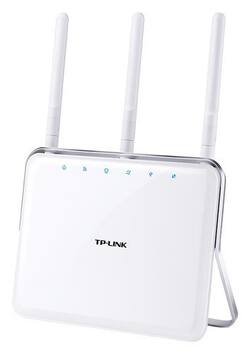
TP-Link - AC1750 Dual-Band Wi-Fi Router
Model: ARCHER C8
SKU: 2080118
This item is no longer available in new condition. See similar items below
Customers are delighted by the AC1750 Dual-Band Wi-Fi Router's ease of use, strong performance, and wide coverage throughout their homes. Many appreciate its reliable connection for multiple devices and streaming, finding it a good value for the price. While some experienced minor issues with Wi-Fi strength, the positive feedback on performance and range outweighs these concerns.
Archer C8 AC1750 Wireless Dual Band Gigabit Router *My Test Setup Desktop PC Windows 10 Pro AC1900 Wireless Dual Band PCI Express Adapter (Archer T9E) *Setting Up Setting up the router for the first time is quick and easy to do. Once everything is properly connected, you’ll be online in less than 5 minutes. And when you’re ready to dig into the router’s more advanced settings to customize to your liking, you’ll have plenty of options to dig into. You can set parental controls for certain users, as well as set up a Wi-Fi guest network for your guests, which keeps them off of your main network. Also, the router’s web management page is very nicely done, too. All the different settings are laid out perfectly and easy to navigate. *Wireless Performance After getting the Archer C8 router setup and running, I ran speed tests while connected to the router over both 2.4 GHz and 5 GHz bands. Listed below is the current Internet plan I am subscribed to, along with those speed test results. My Internet Subscription Plan: Download 100 Mbps / Upload 10 Mbps Archer C8 Wi-Fi 2.4 GHz Speed Test: Download 111.65 Mbps / Upload 12.18 Mbps Archer C8 Wi-Fi 5 GHz Speed Test: Download 120.63 Mbps / Upload 12.14 Mbps As you can see, those are great speed test results. And the router was able to easily handle multiple devices connected at once- streaming HD content and gaming without any issues. I also have a very large backyard area, and the router provides excellent coverage in and around my entire home. I can stream HD videos and music without any issues at all. And I had 3 mobile devices all doing just that, and all were able to stream perfectly. For the best wireless coverage, be sure to place the modem in an open area of your home free of obstruction. Do not place the modem in an enclosure, under a desk, or block the vent-holes. Best of luck setting your network up.
Posted by TechOnDeck
This AC1750 router does the basic dual channel setup on AC as well as b/g/n 2.4 and 5 GHz and the speeds are as advertised. Speeds do drop a bit when disabling the NAT boost feature (needed to enable advanced settings), but the advanced settings are worth it. There are a ton of options here from filters to custom times and guest networks, and so far everything has worked as intended. TP-Link may not be known by too many, but they make a lot of great products at a great value and cost well less than ASUS/NETGEAR but still pack most of the same features.
Posted by abeach297
I purchased this router after my previous router of a different brand bought the dust. I saw the good reviews and caught it on sale as a Best Buy Deal of the Day. I was not 100% confident in the router due to the low price, but the reviews were very good. So I bought and installed it. It turned out to be a great decision and I'm very happy with the router. It came with wall mounting brackets and is now mounted on the wall of the hallway just about at the midpoint of the house. Coverage is very good and it actually looks pretty good on the wall. It has been in use over 3 months and performance is very good. Very happy with the router.
Posted by TNFarmGirl
The vast majority of our reviews come from verified purchases. Reviews from customers may include My Best Buy members, employees, and Tech Insider Network members (as tagged). Select reviewers may receive discounted products, promotional considerations or entries into drawings for honest, helpful reviews.