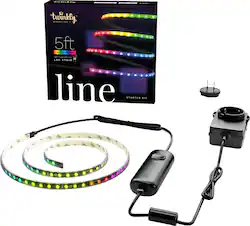
Twinkly - Smart Light Strip-Line 100 RGB LED Gen II Starter Kit - Black
Model: TWL100BBW-BUS
SKU: 6470024
This item is no longer available in new condition. See similar items below
Customers often highlight the brightness, ease of use, and customization options of the Smart Light Strip-Line 100 RGB LED Gen II Starter Kit, praising the intuitive app and the wide array of color and pattern choices. The setup process is also frequently cited as straightforward and quick. However, some customers mention the relatively high price and occasional difficulties with the app's functionality.
I am hooked on these lights. Very expensive but absolutely worth it. The app is amazing. So many options. Ill never get tired of these lights.
Posted by AliasAllison916
These Twinkly LED strip lights are easy to set up and fun to use. Right now I am using them as ambient lighting for my television, but will likely experiment with moving around the house for different applications. These lights can be controlled at the basic level with the included controller unit, but I recommend downloading and using the Twinkly App. The App unlocks a multitude of features and controls that the manual controller can not. With the controller you can basically just cycle through the preset light modes. The Twinkly App provides an amazing level of control and customization for the lights. There are several different presets to select from, as well as many different effects available in the Twinkly App Effects Store available to download. There is also an option to create a playlist of effects, and even a carousel command that cycles through them all. The App amazingly allows each individual LED (all 99 of them) to be individually programmed to any color in the RGB spectrum. This is a very impressive feature that people who appreciate tinkering will enjoy. The potential for effects is nearly infinite because each LED light can be programmed anywhere within the color wheel. The setup was very straightforward. Just plug it in to get started and use the manual controller to cycle through the lights. Once you have the Twinkly App downloaded, pairing is very simple. Creating an account is required to proceed, but I was able to use my Apple ID to do that. Facebook was also an option to create an account. It uses Bluetooth to start the pairing. Place the device in pairing mode by holding the button on the controller down until the indicator light changes color, and then use the App to find the device, pair it, and join your wireless network. The App controls the device via Wi-Fi. I did not use the adhesives on the back of the strip because I want to be able to easily move it around my home. I am very much enjoying the Twinkly LED light strip. It is purely for fun and entertainment, and for that it serves its purpose extremely well. I am looking forward to using them in the future in various places around my home. The potential applications are nearly limitless!
Posted by Kotor
I’m a tech and lighting dork. I’ve been designing lighting solutions and fixtures for quite some time. The relative inexpensiveness to fun and effectiveness of LED lighting has made it so much fun. Anyone can do some useful and creative things in their home with color-changing LED bulbs and light strips. The key thing is that is has to be simple to set-up and customize. So…Twinkly. Lovely packaging and opening experience. I really like the black plastic and rubber components because you want that to disappear in your install. The instructions need to be improved. I first went through the maddening process of connecting the system to WiFi…on 2.4 Ghz only (?!). Same process I used for a competitor nearly a decade ago. Most people would punt. I’m relentless. So I got that to work. I’ll finish my disappointment - there are many, many ways to customize the colors and patterns - but I couldn’t figure out most in the first week. Again- the average consumer will give up. Now the positives- there ARE many, many pre-programmed options for time and color (beautiful colors by the way). There are pulsing, crawling and other effects. Awesome. The ability to customize patterns by swiping over an image of the led strip, cool. I will keep working on learning the capabilities. I also like the end-to-end expansion capabilities- simple with a few integral pins on one end and receptors on the other. Just plug one strip to another. If they can improve the instruction manual, I think this would be a really fantastic product.
Posted by phoenixfta
The vast majority of our reviews come from verified purchases. Reviews from customers may include My Best Buy members, employees, and Tech Insider Network members (as tagged). Select reviewers may receive discounted products, promotional considerations or entries into drawings for honest, helpful reviews.