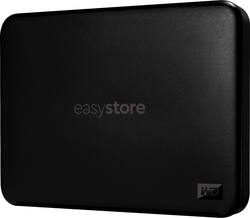
WD - Easystore 1TB External USB 3.0 Portable Drive - Black
Model: WDBCHH0010BBK-WESN
SKU: 6557911
This item is no longer available in new condition. See similar items below
Customers are impressed with the Easystore 1TB External USB 3.0 Portable Drive's ease of use, ample storage capacity, and compact size, making it convenient and portable. Many appreciate its fast USB 3.0 transfer speeds and consider it a great value for the price. While some users found the included software subpar, the drive's functionality is largely praised.
The vast majority of our reviews come from verified purchases. Reviews from customers may include My Best Buy members, employees, and Tech Insider Network members (as tagged). Select reviewers may receive discounted products, promotional considerations or entries into drawings for honest, helpful reviews.
Working fast, light weight and good design. I am satisfied with the item so far.
Posted by AyaK
My goodness I’m blessed to live long enough to get to have this technology. I bought a passport decades ago with less space and a higher price!
Posted by Johnnie
OVERALL: I consider this newly released WD Easystore 1TB USB SSD model a very fast and economical backup solution. Over the years I have used an assortment of USB 2.0 & 3.0 thumb/flash drives and/or MicroSD cards for backing up my data. Currently 82 GB of files, downloads, family pictures & videos, music, etc. (60,873 Files, 5,076 Folders) that I have accumulated over the past 20+ years. Backing up was a fairly time-consuming process until now. What used to take me a long 2.75 hours, now takes me a very short 14 minutes. Although this Easystore is larger than any of my thumb drives, it is very light, and at 1TB can hold a few rolling backups from my computer. Sweet! ALLOCATION SIZE: Out of the box this SSD was exFAT formatted with a file allocation size of 1024 kilobytes. At that allocation size, my 82.1GB of data actually used 123GB of space on this drive, and that is way too much wasted space for my intended use. So, I reformatted the SSD with an allocation size of 128kb. The same 82.1GB of data took up a more respectable 86GB vs. the original 123GB of space. I expected there would be some reduction in speed after reformatting, but there was not enough to have any concerns (about 1%). IN THE BOX: Included with the SSD is a connection cable, Mac & Windows software (apps on the drive), and a manual that is undeniably too small to read. Note that if you do not “Install the WD Software.exe” app, it caused repeated File Explorer pop ups showing the files and waiting for me to install the Windows app. Anyway, when I formatted the SSD with the reduced allocation size, and then moved the two apps back to the SSD, the irritating pop-ups have ceased. MINOR CONCERNS: I do wish this SSD had a USB-C versus the USB-A connection to the PC. But I am not overly concerned with the sort of weird USB 3.0 Micro B drive connector. Also, it would be nice to have some sort of drive use indicator like a small LED. Nevertheless, those are very minor concerns that I can easily live with and not give them another thought. FIRMWARE: A while back I had upgraded my G14 Laptop with a WD SN850X 1TB NVMe and I am running the WD Dashboard application. The WD Dashboard actually shows this Easystore drive as a SanDisk SSD Plus. Now the WD Dashboard app displays the easystore SSD current Firmware Version 6085. But the WD Dashboard (Tools) will not allow you to check to update the firmware: “Firmware update is not available for this device”. And that seems very odd to me for a Western Digital branded storage device. BOTTOM LINE: Considering the economy pricing for 1TB storage, the WD brand with 2-Year warranty, along with the speed of this drive, I believe it earned a solid 4-Star Rating for my intended backup use. .
Posted by Buddy