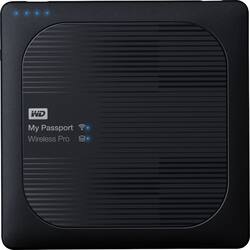
WD - My Passport Wireless Pro 3TB External USB 3.0 Portable Hard Drive - Black
Model: WDBSMT0030BBK-NESN
SKU: 5194900
This item is no longer available in new condition. See similar items below
Customers express satisfaction with the My Passport Wireless Pro's ample storage capacity, citing its usefulness for backing up various files from devices like cameras and drones. The wireless connectivity is also praised for its ease of use and ability to connect to other devices and the internet simultaneously. The device's ability to free up space on personal devices is a significant advantage for users. No significant drawbacks were reported by customers.
Several years ago I contacted WD about designing a product such as this as it would be a great accessory for photographers. When I saw the announcement of the Wireless Pro I couldn't wait to get one. However, that enthusiasm quickly diminished once I started using it. Some positive points are: * Sufficient memory for just about any use * Good battery life * Good packaging and small size * Nice carrying case Negatives: * Confusing to set up and use * After transfer of photos the screen was not updated so you didn't know if the transfer was done or not. * Navigating the menu was difficult. Terms were used that normally aren't used. I could always transfer files to/from my cell or tablet and never read the instructions. It was/is intuitive. Using the Wireless Pro to me was not intuitive at all and I found myself constantly going back to the manual (online) to learn how to do something. * Was very difficult to read the lettering on the outside of the box....which is the ON/OFF??? * Why a USB 2.0 port? USB 3.0 is backward compatible. * Confusing front panel LEDs: "My Passport" & "Wireless Pro"?? Be more descriptive. Users work with many devices and can't keep track of special meanings in one product vs another. * Special definitions for various blinking LED lights i.e. "Solid", "Fast Blinking", "Blinking for 5 Sec"?? Again, unless you carry a manual with you one should not have to remember all of these special sequences. * Computer is required for first time setup? Several setup pages to go through. Then you finally to the "Dashboard" where you can do things. There is a lot of icons on this screen but where is the "transfer photo" icon? Confusing. * Then you have to go through a similar setup on the mobile device, page after page after page. I just purchased a new camera with Wi-Fi and Bluetooth capabilities. To connect I selected two buttons to connect and I was connected. Took me about 10 seconds and I was transferring files in the next 10 seconds. * Then I was transferred to another home page which was different from the one on the PC. Won't go into all the details but at least to me it was very difficult to navigate or to do anything. Nothing was obvious. * While I willing to learn how to navigate through the menu the most disappointing thing about the Wireless Pro was the transfer speeds using either a hardwire or USB 3.0. For a few photographs it would be acceptable but for professional camera work where you have 32G or 64G (very common) memory chips this would take hours to transfer. In one of the WD videos they mentioned the transfer speeds and they were significantly below rated specs for USB 3.0 or hardwire which resulted in the unacceptable transfer times for camera XQD or SD high capacity memory cards. The last item was a show stopper. I tested these times many times and came up with the same poor transfer speeds every time. Given that I returned the device for a refund. Like I indicated above this was a great idea but the design left much to be desired. Hopefully if the specs/design change and it gets easier to navigate I will purchase this unit in the future.
Posted by BobK
It worked out of the box as a network drive connected to my Windows Surface laptop. Over the first several weeks I have seen a lot of inconsistent behavior on resuming my Surface. Sometimes it takes several tries to get the Wi-Fi to connect properly. Usually I don't have to reboot anything; just patiently try to connect for several minutes. Other times I get into the hanging state with all lights flashing in the drive. This seems to get fixed by plugging in USB and letting it do a disk repair. When unplugging USB my experience is that I have rarely seen a successful eject operation. There is almost always something keeping the drive busy which I don't have time to figure out. So I have to just unplug it and cross fingers.
Posted by NicksReview
I bought this to take on vacation. It has worked quite well. The battery holds up well. It is a little slow to acknowledge attachments, so don't be too hasty and think that it has frozen. All the data has survived. It is heavy but much cheaper than the SSD version.
Posted by ppersch
The vast majority of our reviews come from verified purchases. Reviews from customers may include My Best Buy members, employees, and Tech Insider Network members (as tagged). Select reviewers may receive discounted products, promotional considerations or entries into drawings for honest, helpful reviews.