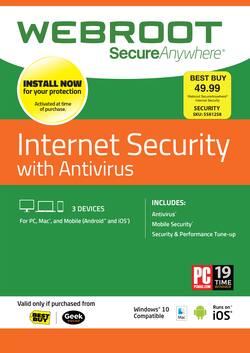
Webroot - Internet Security - 3-Device - 1-Year Subscription [Digital]
- Key Specs
- Software Format: Digital (Physical software requires a disc, cartridge, etc. be inserted into the gaming console or computer to download and/or operate the software. Digital software allows for downloading and/or playing the software on the gaming console or computer without a physical disc, cartridge, etc. Physical (Download Code Only) software is purchased in physical form with a code that allows for downloading and/or playing the software on the gaming console or computer without a physical disc, cartridge, etc.)
- Subscription Period: 1 Year
- General
- Product Name: Internet Security - 3-Device - 1-Year Subscription
- Brand: Webroot
- Publisher: Webroot
- Model Number: WEBROOT IS 3 USER 1YR DSS
- Features
- Protection Type(s): Malware, Phishing, Spyware/adware
- Real-Time Protection: true
- E-mail Security: true
- Firewall Type: Other (The method the firewall uses to filter and process data to increase network security, primarily by blocking malicious traffic requests while allowing legitimate traffic through.)
- Compatibility
- Software Format: Digital (Physical software requires a disc, cartridge, etc. be inserted into the gaming console or computer to download and/or operate the software. Digital software allows for downloading and/or playing the software on the gaming console or computer without a physical disc, cartridge, etc. Physical (Download Code Only) software is purchased in physical form with a code that allows for downloading and/or playing the software on the gaming console or computer without a physical disc, cartridge, etc.)
- Requirements
- Subscription: true
- Subscription Period: 1 Year
- Download File Size: 8 gigabytes
- Other
- UPC: 400028100377
Protect your PC, Mac, Android or iOS device with an all-in-one antivirus, firewall, antiphishing, password-encryption and identity-protection solution.
Whats Included
- Webroot Internet Security - 3-Device - 1-Year Subscription
Q: do I have to uninstall Kaspersky internet Security first before installing ( the NEW Webroot)?
A: While Webroot and Kaspersky can run alongside each other without any issues, Kaspersky will consume system resources that are better utilized for your day-to-day usage. So to answer your question, no you do not need to, but we do recommend removing it in general for the best optimization of your system.
A: If you renew, the new term will add on top of however many days you have remaining. So for example, if you have 14 days left and renewed today, you would then have 379 on your subscription. So regardless of where Webroot is installed, that is how the term will carry out.
A: Contact best buy at 1-888-237-8289, and they can renew it for you.
A: PC: https://community.webroot.com/t5/Webroot-SecureAnywhere-Complete/Installing-Webroot-SecureAnywhere-on-a-PC/ta-p/5572 Mac: https://community.webroot.com/t5/Webroot-SecureAnywhere-Antivirus/Mac-How-to-Install-SecureAnywhere/ta-p/34720 If you'd prefer, you could also submit a support ticket and our Support Team will be happy to assist you through the process.
A: Hi Anything that says '3-Device - 1-Year Subscription' mean you can install it, and receive support and updates, on 3 different devices. I have it on 2 towers and my laptop. Hope this helps!
Q: can I buy the version that will secure up to 5 devices and would that include my android
A: Yes, it has mobile security included.
Q: Can I download and install it outside USA?
A: Please visit webroot.com/safe to install it in or outside the USA.
A: Yes, you can use this with iOS devices.