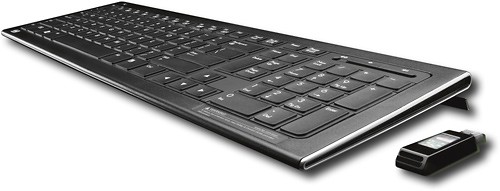
HP - Wireless Elite Keyboard - Black
This item is no longer available in new condition.
See similar items below.
Description
Features
Keyboard/Keypad Connectivity Technology: Wireless
Keyboard/Keypad Wireless Technology: RF
Hot Keys: Multimedia, Volume Control
Keyboard/Keypad Host Interface: USB
Color: Black
Limited Warranty: 1 Year
What's Included
Wireless Elite Keyboard
USB Receiver
2 x AAA Batteries
CD with Software
Documentation
Other
- Keyboard DesignWireless
- Multimedia KeysYes
- Cordless/WirelessYes
- Batteries NeededYes
- Battery TypeAAA
- Battery Quantity2
- Battery IncludedYes
- Port ConnectionUSB
- CompatibilityPC
- Mac CompatibleNo
- Mouse IncludedNo
- Programmable ButtonsYes
- System RequirementsWindows 2000, XP, Vista
- UPC884420354741
Customer reviews
Rating 4.3 out of 5 stars with 41 reviews
(41 customer reviews)Rating by feature
- Ease of Use4.4
Rating 4.4 out of 5 stars
to a friend
Rated 5 out of 5 stars
Great keyboard with 1 teeny issue (VIDEO INCLUDED)
Posted .This reviewer received promo considerations or sweepstakes entry for writing a review.Great keyboard. I don't know why i didn't get it sooner. I've had my new laptop hooked up to my tv for a few weeks and just barely getting by with the slow on screen keyboard The feel of the keyboard is what really drew me in. Feels exactly like my hp laptop's keyboard but with a 10 key keypad. For the most part it's really responsive but there is the occasional lag. I type on average 60-70 wpm and i've seen sometimes when i speed up it'll miss a letter or lag a bit. This is especially true when typing in passwords/login information for websites. Be sure to do this slowly, or you'll get an error saying it was wrong The main thing people complain about is the blue light on the usb receiver. I thought after reading the reviews people were making a big deal out of nothing. But really, it IS that bright. I made a little video to show it off. As bright as it is, i didn't knock it down a star because if it really bothers you that much, put a piece of tape on it. Not that hard
I would recommend this to a friendRated 4 out of 5 stars
Mostly satisfied with keyboard
Posted .This reviewer received promo considerations or sweepstakes entry for writing a review.I bought this today for $25, great price for a wireless keyboard. Super quick set up, effortless (at least for my system). As far as typing on it, I'm very pleased, it functions beautifully! I adapted to it in minutes. However, there are a few points that make it less than perfect, the same ones already mentioned by others. The blue light on the USB receiver which illuminates with every strike of the keyboard, oh my gosh, so bright! And yes, annoying. I tolerated it for 5 minutes, then I covered it with a piece of electrical tape. Very simple fix, and not permanent, so that's definitely not a deal breaker. My only other real complaint(s): I also wish there were LED lights for the Caps/Number/Scroll lock features and I wish there wasn't the waste with the HP-only F-keys, would like to be able to reprogram them for my own uses. That said... for the price I paid, I'd still give this 4.5 stars. Cannot comment yet on durability or battery life. I'm using this on a Windows XP netbook (MSI Wind).
I would recommend this to a friendRated 5 out of 5 stars
Excellent Keyboard--simple fix for flashing dongle
Posted .This reviewer received promo considerations or sweepstakes entry for writing a review.This is a solid keyboard that is comfortable to use, i.e., far fewer typos because of odd hand position. For those of us who are fast typists, the keyboard is perfect. I am using mine with a Sony VAIO desktop. The only function that I cannot perform with the keyboard is changing the screen's illumination. Sony has it on its keyboard and is part of the circuit board's internal circuitry. No bigee--this is something that I can live with, or without in this instance. I seldom change the screen's brightness. This is the best keyboard that I've used, even an improvement over Logitech's Illuminated keyboard for feel and speed.I use the keyboard in its flattest position, which means that my desktop serves as a wrist rest, which works far better than keyboards with built-in wrist rests. The mouse What's all the negative hoopla about the mouse? It works fine: the additional downward pressure required to activate the left/right clicks does not hinder the use of the device in any way and requires the slightest bit of additional pressure to activate the clicks. Yes, the clicks are a tad louder than my stock mouse or any others that I've used, but the sound is not loud or annoying. The infamous blue light I can see where the blue light on the 'dongle' that illuminates each time a key is depressed might be annoying to some is the dongle is anywhere in sight; but a simple method for overcoming this is to place a piece of opaque tape, black electrical tape, over the dongle's light. Mine resides in a USB port in the back of my computer--the Sony VAIO's cpu is an integral part of the monitor, much like HP's smart-touch computers--and the light is only visible from the bottom of the screen, it reflects off my desktop. Summation The keyboard and the mouse are a must buy for hardcore typists--not for the speed of use alone, but also for the comfort when typing. I've had the devices for a short time and cannot comment about battery life. However, if the battery life is as favorable as others have reported, this is a great buy from HP. I recommend to typists of all levels--this keyboard may help you to become a faster and more accurate typist.
I would recommend this to a friendRated 4 out of 5 stars
Excellent keyboard, annoying receiver
Posted .This reviewer received promo considerations or sweepstakes entry for writing a review.Not bad. Works great on Linux (tested with kernel 2.6.32-ARCH), Windows, and Mac OS X. In linux, it first was "missing" keys, but I found out that USB autosuspend was the cause of the problem; blacklist the device if it occurs to you; after changing that setting I have absolutely no problems with it. The keys have a size which I deem perfect, same for the feedback; you'll love it if you like laptop-like flat keyboards. However, it has two annoyances: * the blue LED on the receiver is extremely bright -- if you want to use this on a laptop, where you will see the receiver all the time, seriously consider getting duct tape or something * it has no indicators for num, caps and scroll lock -- not a major problem, but still would be nice to have In conclusion, I would recommend this keyboard, overally it is very good, only PLEASE, HP, remove that LED from the receiver.
I would recommend this to a friendRated 4 out of 5 stars
simple and room saving
Posted .This reviewer received promo considerations or sweepstakes entry for writing a review.Although I have a laptop, I hate the fact that it doesn't have a keypad, and sometimes it just gets in the way when I'm working with other things at the moment, or when it's just happens to be out of reach for whatever reason. It has a slim, flat, compact design without all the useless extra space near the edges. It's relatively simple and doesn't have a whole bunch of fancy "extra feature" buttons, but it gets the job done. What it does have, however, are a sleep button, a mute, and a volume up/down button. The only thing that might bother some people is the blue light on the receiver which blinks every time a button is pressed, although it can always be covered up. The only thing I don't like about it are the F9, F10, and F11 buttons which only work for an HP Touchsmart computer and cannot be reprogrammed for other functions.
I would recommend this to a friendRated 5 out of 5 stars
Great Buy
Posted .This reviewer received promo considerations or sweepstakes entry for writing a review.I usually do not regard reviews where all the stars are filled in and the cons list says nothing, but this is a special case. This keyboard is thin. Much thinner than I expected. The build quality is very solid. I have found nothing about the keyboard that feels cheap, and the wight is light but heavy enough to not feel cheap. Setup was a breeze with 64-bit Windows 7. I use this connected to a laptop-turned-desktop plugged into my tv, and right away the volume, controls, sleep button, ect worked perfectly. The price for all of this is a great bargain. I went out expecting a bulky, plasticy keyboard for this price, but stumbled upon this Great find. You will not be dissapointed.
I would recommend this to a friendRated 5 out of 5 stars
ARE YOU A GAMER?!
Posted .This reviewer received promo considerations or sweepstakes entry for writing a review.From what I've read wireless keyboards are terrible for gaming purposes, but this one does just fine when I play Battlefield 2! If there is lag its not noticeable and I'm sure I've made plenty of online players upset when I blow them away! I have not been irritated once at this keyboard and the best part is the battery will last 1year and you can replace them, no built in battery or lame-o dock charger! Chargers are ridiculous and power never lasts that long! I was looking for a nice slim, basic keyboard, maybe a back lit keys would have been cool, but I'm very happy with this wireless keyboard. Seriously if your a gamer give this keyboard a try... its only 50bucks! If you have a coupon its a steal and if you don't like it return it, but I promise you won't be disappointed.
I would recommend this to a friendRated 5 out of 5 stars
Outstanding keyboard
Posted .This reviewer received promo considerations or sweepstakes entry for writing a review.This was exactly what I had been looking for in a keyboard, sleek, basic layout with a few extra amenities like volume control, & wireless. So far it has yet to disappoint. Set up consisted of plugging in the dongle & pressing connect on the back of the keyboard. It actually feels weighty too for such diminutive dimensions. Doesn't feel cheap & flimsy. The keystrokes are nice & quiet. It seems to be very responsive even at a range of about 15' as well, even with the dongle being tucked away behind my PC. For what it is, I believe it's more than fairly priced. The only short comings that I can say it has is the size of the dongle in comparison to some newer ones & the fact it flashes with every keystroke. Which is really more of a nuisance.
I would recommend this to a friend
Q: Questiondoes the keyboard have backlit.does the keyboard have backlit.
Asked by Anonymous.
- A:Answer no it is not backlit
Answered by ripley64
Q: QuestionIs this keyboard compatible with Windows 7?
Asked by Anonymous.
- A:Answer yes I have Windows 7...works fine
Answered by ripley64
Q: QuestionThis is the touchsmart keyboard, if i have a touchsmart already will i need to use the adapter?
Asked by Anonymous.
- A:Answer The HP Wireless Elite Keyboard (FQ480AA) can be used with an HP TouchSmart PC. The wireless frequency between HP wireless devices and receivers are different for each device. You will need to use the included receiver with this keyboard.
Answered by HP Team

Q: QuestionLaser light on wireless keyboardI just bought a wireless keyboard to go with my laptop and the laser light on the usb receiver flashes everytime you press a button on the keyboard and it is very blinding. What can I do about the blinding laser light? Do all wireless keyboards usb receiver constantly flash a bright light?
Asked by Anonymous.
- A:Answer Each keyboard is different and not all will have the flashing lights. A quick fix could be to just cover it up with some black electrical tape.
Answered by krazy284
Q: QuestionIs this compatible with OSX?I know the product info says that it's compatible with certain Windows OSes, but I was just wondering if this product is also compatible with Mac OSX.
Asked by Anonymous.
- A:Answer I just bought this for my MacBook Pro. It works fine with OS X.
Answered by rebeccah02
Q: QuestionIs there a pointer / "mouse" on the board?
Asked by Anonymous.
- A:Answer The HP Wireless Elite Keyboard (FQ480AA) does not have a pointing stick. You would need to use a separate mouse or touchpad.
Answered by HP Team
Q: Questiondoes this board have num lock & caps lock?
Asked by Anonymous.
- A:Answer This keyboard has all the normal keys of any other keyoard, so yes it does have Caps Lock, Scroll Lock and Num Lock, but it does NOT have the light indicators to tell if Caps, Num or Scroll Lock are on.
Answered by krazy284
Q: Questioni want to use this keybord for my hp laptop can i use it
Asked by Anonymous.
- A:Answer I assume your laptop has a USB connection so the answer is yes, it will work. Theoretically it will work with any device that requires a keyboard and has a USB outlet.
Answered by Akey