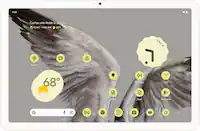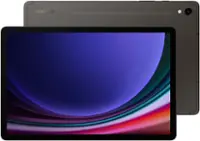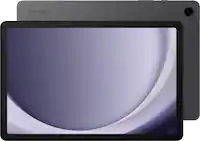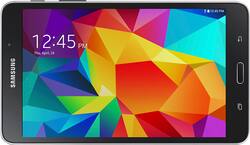
Samsung - Galaxy Tab 4 - 7" - 8GB - Black
- Key Specs
- Screen Size: 7 inches (Size of the screen, measured diagonally from corner to corner.)
- Screen Resolution: 1280 x 800 (Screens come in a range of resolutions (measured in pixels, horizontal x vertical). The higher the resolution, the greater the picture quality.)
- Processor Model: Samsung (Your computer's processor is like its brain. Working in combination with system memory, the power of the processor determines the complexity of software you can run, how many programs you can have open at the same time, and how fast those programs will run. Most computers feature an AMD, Intel or Snapdragon processor.)
- Total Storage Capacity: 8 gigabytes
- Operating System: Android 4.4 KitKat (The operating system manages all software and hardware, including files, memory and connected devices. Most importantly, it lets you interact with your device and your programs in a visual way; otherwise, you'd be typing computer code to get anything done.)
- Wireless Connectivity: Bluetooth, Wi-Fi (The manner in which a device sends data to another device over a short distance without the use of wires or cables.)
- Battery Chemistry: Lithium-polymer
- General
- Brand: Samsung
- Model Number: SM-T230NYKAXAR
- Product Name: Galaxy Tab 4 - 7" - 8GB
- Color: Black
- Model Family: Samsung Galaxy
- Year of Release: 2014
- Display
- Screen Size: 7 inches (Size of the screen, measured diagonally from corner to corner.)
- Screen Resolution: 1280 x 800 (Screens come in a range of resolutions (measured in pixels, horizontal x vertical). The higher the resolution, the greater the picture quality.)
- Processor
- Processor Brand: Samsung
- Processor Model: Samsung (Your computer's processor is like its brain. Working in combination with system memory, the power of the processor determines the complexity of software you can run, how many programs you can have open at the same time, and how fast those programs will run. Most computers feature an AMD, Intel or Snapdragon processor.)
- Storage
- Total Storage Capacity: 8 gigabytes
- Compatibility
- Operating System: Android 4.4 KitKat (The operating system manages all software and hardware, including files, memory and connected devices. Most importantly, it lets you interact with your device and your programs in a visual way; otherwise, you'd be typing computer code to get anything done.)
- Operating System Compatibility: Android
- Connectivity
- Wireless Connectivity: Bluetooth, Wi-Fi (The manner in which a device sends data to another device over a short distance without the use of wires or cables.)
- Network Connectivity: None (The manner in which a device sends data to another device over a long distance using a cellular network.)
- Power
- Charging Interface(s): Proprietary (The connection for transmitting power to charge the device.)
- Battery Chemistry: Lithium-polymer
- Camera
- Front-Facing Camera: true
- Front Facing Camera Megapixels: 1.3 megapixels (The more megapixels, the more detail that the camera facing the user can capture.)
- Rear-Facing Camera: true
- Rear Facing Camera Megapixels: 3 megapixels (The more megapixels, the more detail that the camera facing away from the user can capture.)
- Dimensions
- Product Height: 7.36 inches (The out of box height of the item. Height is measured as the vertical distance from the bottom of the item to the top as it would be primarily used or placed.)
- Product Width: 4.25 inches (The out of box width of the item. Width is measured as the horizontal distance from one side of the item to the other as it would be primarily used or placed.)
- Product Depth: 0.35 inches (The out of box depth of the item. Depth is measured as the distance from the front of the item to the back as it would be primarily used or placed.)
- Product Weight: 9.6 ounces (The out of box weight of the item.)
- Included
- Included Software: Android OS
- Warranty
- Warranty - Parts: 1 year
- Warranty - Labor: 1 year
- Other
- UPC: 887276042275
Samsung Galaxy Tab 4 - 7" - 8GB: Juggle tasks at work and enjoy movies at home with a tablet that is portable enough for your commute and powerful enough to keep up with your busy schedule. The quad-core processor provides quick performance that your entire family will enjoy. 
- Android operating system: Productivity and entertainment at your fingertips. Download apps, games, movies, music and eBooks from Google Play. Cloud integration provides a seamless experience across all Android devices.
- 7" screen with 1280 x 800 resolution: Clear, bright resolution for watching movies, surfing the Web, reading books and more.
- 8GB internal storage plus microSD slot: Stores your music, movies, photos and more. Expand storage up to 32GB with a microSD card (sold separately).
- Quad-core processor: The right combination of fast performance and power efficiency. It allows rapid multitasking, delivers smooth response and unleashes stunning graphics.
- Dual cameras for photos and face-to-face chat: 1.3MP front camera and 3MP rear camera with GPS tagging, built-in photo sharing options and panoramic shots.
- Family-friendly settings for easy sharing: Multi-User Mode and Kids Mode keep your whole family's music, games and apps organized.
- Android operating system: Productivity and entertainment at your fingertips. Download apps, games, movies, music and eBooks from Google Play. Cloud integration provides a seamless experience across all Android devices.
- 7" screen with 1280 x 800 resolution: Clear, bright resolution for watching movies, surfing the Web, reading books and more.
- 8GB internal storage plus microSD slot: Stores your music, movies, photos and more. Expand storage up to 32GB with a microSD card (sold separately).
- Quad-core processor: The right combination of fast performance and power efficiency. It allows rapid multitasking, delivers smooth response and unleashes stunning graphics.
- Dual cameras for photos and face-to-face chat: 1.3MP front camera and 3MP rear camera with GPS tagging, built-in photo sharing options and panoramic shots.
- Family-friendly settings for easy sharing: Multi-User Mode and Kids Mode keep your whole family's music, games and apps organized.
Whats Included
- Samsung Galaxy Tab 4 - 7" - 8GB
- Lithium-polymer battery
- Power cord
- Owner's manual
- Samsung Galaxy Tab 4 - 7" - 8GB
- Lithium-polymer battery
- Power cord
- Owner's manual
A: Almost all tablets, including this model, are equipped with WiFi, meaning that if you are in a location with WiFi service, you can access the Internet without needing a mobile data plan. If you would like to access the Internet on the go like you would a smart phone, then you will need to purchase a data plan. The price of data plans varies widely depending on the cellular service provider and the amount of data you choose to purchase.
Q: I want to use this as an E Reader. How good is it for this purpose?
A: I have a disability in one eye. I use this tablet as an e-reader. It is excellent. I have no trouble at all. Make sure when you use your book app, adjust the print font and style which is comfortable for you. I also change the page color to sepia. A little easier mm on the eyes than the stark black and white. I use Kindle, Nook, and Kobo apps on my Samsung tablet. Each one of these apps have a little different way of adjusting font size and styke. You can also adjust margins and line spacing. I think you will fond this tablet very easy to use. You will love it!
Q: Are there replacement batteries for samsung tablets?
A: The batteries are built in, and the person who can replace those batteries are from the Samsung service centers or any accredited Samsung service centers. It's not safe buying substandard batteries from untrusted 3rd party stores.
Q: How well does the camera work?
A: My girls use the camera all the time most of the pictures are clear and the video camera works great also. My daughters have taken so my pictures and videos I have had to purchase them a bigger memory card
Q: can I use a sylus with this?
A: Yes, but make sure it has a rubber end. The plastic stylist do not work.
Q: Can I access the kindle content from my kindle that died on this Samsung tablet?
A: Yes! you can simply download the Kindle app from the appstore and sign into your amazon account. it will automatically sync all your kindle books to your new tablet!
Q: kids mode
A: hope this helps. You have to go to your widgets and add it to the quick screen. follow this link http://www.samsung.com/us/support/supportOwnersHowToGuidePopup.do?howto_guide_seq=18237&prd_ia_cd=N0000408&map_seq=244673&preview=true
Q: can you hook this model up with Verizon?
A: I don't believe so I think you need to get one that is Verizon compatible with the 4GLTE