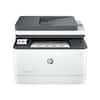
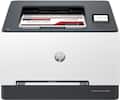
Canon - imageCLASS LBP632Cdw Wireless Color Laser Printer - White
Model: 5159C003
SKU: 11564840
Designed for small and medium-size businesses, the imageCLASS LBP632Cdw model balances speedy performance and minimal maintenance. The LBP632Cdw is easy to set up and offers media versatility to print on a variety of media types and sizes, including envelopes, banners and more. Produce crisp, colorful documents with fast print speeds of up to 22 pages per minute1, using high quality Canon Genuine Toner 067 / 067 H. Use Poster Artist Online to create professional-posters, banners and signage. Keep printing with a plain paper capacity of up to 250 sheets and a 1-sheet multipurpose tray. Easily connect and print through high-speed USB, Ethernet, or wirelessly from computers or mobile devices. Print using a variety of mobile apps, including the Canon PRINT Business app2 using your compatible mobile device. The LBP632Cdw comes with a 1-year limited warranty3 and is backed by Canon's Service and Support network.

Duplex print up to 22 pages‐per‐minute with a quick first print of approximately 10.3 seconds (black/color,letter)
Medium resolution for producing sharp text, even at 6 points or smaller, and graphics with thin lines and curves.
They handle large volumes quickly and at a low cost per page. Toner (powder) is used instead of ink, so you get smudge-free images and text.
Print on both sides of the page without turning it over manually, to minimize your printing costs and help the environment.
WiFi®Direct Connection enables easy connection to mobile devices without a router
Print on‐the‐go with Canon PRINTBusiness, Apple AirPrint, Mopria PrintService
Compatible with Toner 067 and High Yield Toner 067
Reload less often with a the 250-sheet standard cassette
Chromebook compatible
1 year warranty
1 - Print speed is based on internal testing. Print speed may vary, depending on the number of copies selected as well as the settings for size, type, and orientation of paper.
2 - Canon PRINT Business is a free app available on the App Store and Google Play Store. For more information, including compatibility, please visit usa.canon.com/mobile-app. Please see the respective websites for Apple AirPrint and Mopria Print Service for compatibility and additional information.
3 - Warranty program is subject to certain conditions and restrictions. See warranty card for details.