 See more images
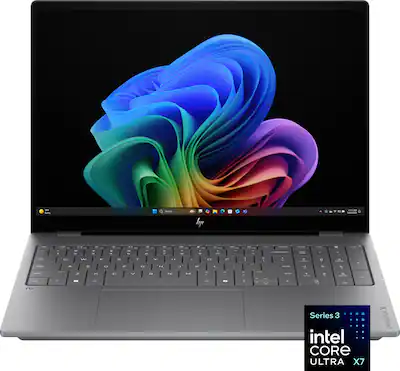
HP - OmniBook X – 16” 2K OLED Touchscreen Laptop – Intel Core Ultra X7 358H 2026 – 32GB Memory – 1TB SSD – Copilot+ PC - Meteor Silver
- Model:
- 16-BG0013DX/CL2U7UA#ABA
- SKU:
- 6665780
Highly rated by customers for:
See more imagesHighly rated by customers for:
JohnR Posted
The HP OmniBook X laptop is an impressive piece of technology that is functional, well built, and packed with useful features for everyday tasks. During my time with it, I have come to appreciate the robust build quality, and the powerful specs that allow me to tackle any project I am working on. As with most tech products these days, the first thing you will notice about this laptop is the packaging and unboxing experience. HP has done a solid job of making sure this process is enjoyable, and showcases how well the laptop has been secured for travel. Once everything was unboxed, a couple of things caught my attention. First, the power adapter is very small and compact, which is a breath of fresh air from most large laptop power supplies. It uses a USB-C connector, so it fits in well with all modern tech. Second, this 16” laptop uses an all-aluminum construction, and weighs approximately 4.5 pounds, so it doesn’t feel too heavy for a large-screen laptop. I was immediately impressed with the cool-to-the-touch aluminum, which definitely feels premium. Upon opening up the HP, you are greeted with a couple of very cool things. The first item is the 2K OLED touchscreen, which looks phenomenal with any content you throw at it. The second item is the full-size keyboard, WITH an included ten-key. While I do not do much work that required a dedicated numerical keypad, if you do accounting work, or work with numbers, this is an amazing feature to have. As for this keyboard, the keys feel great to use, with a good amount of travel, and a satisfying click when they engage. There is an LED backlight for the keyboard, which can be quickly adjusted with a dedicated button at the top of the keyboard. Powering up the OmniBook X was quick, and the Windows 11 set up process was painless. It takes a bit of time, but this seems to be the case regardless of tech specs or what computer you are using. And speaking of tech specs, this HP has some very impressive tech inside. It uses: - Intel Core Ultra X7 Series 3 Processor - Intel Arc B390 Graphics - 32 Gigabytes of RAM - 1 TB SSD of storage - 2048 x 1280 OLED screen with 120 Hz refresh rate, and 400 nits of brightness What does this mean for daily use? Well, I found this laptop to be extremely competent, and capable of handling any task I could think of. I did not notice any slow-down while doing things like browsing the web with multiple tabs open; watching videos; or running photo and video editing software. I typically use my laptop for school (graduate school) and work purposes, as well as leisure activities, where I watch content on streaming sites/YouTube, listen to music, and work on video editing software. Additionally, I have used the Microsoft suite of office programs, and they have run flawlessly, though I expected them to, considering the specs. The OmniBook does have CoPilot capabilities, although I do not spend too much time with these features. If you are into AI things like image generation, then these can be fun, but I have found them to be of limited use as of right now. One thing I have not spent much time doing with the OmniBook is gaming. I have played some of my old favorites, like Fallout 3 and Fallout New Vegas, and they ran smoothly, but these are not “modern” games. I haven’t tested anything as demanding as Cyberpunk 2077, just because I do not feel like this is a true gaming laptop. That being said, the OmniBook might do surprisingly well at running more demanding, current-generation titles, but I have not actually tested this performance. Some other things I wanted to mention about the OmniBook: - The touchscreen is awesome! It works great, with no lag, and is a nice feature to have. - This laptop uses 1 Thunderbolt 4 port, 1 DisplayPort 2.1, and 1 HDMI 2.1 for displays, and also includes 1 USB-C, and 2 USB-A ports. Overall, a nice selection of ports, and some good options for daily use scenarios. - The lithium-ion battery is rated for 19 hours, and I’d say this is pretty accurate. It definitely lasts long enough for a full day of heavy use, and charges relatively quickly with the included adapter. - The meteor-silver aluminum finish is NOT a fingerprint magnet, which may not matter to some, but is a huge plus for me. - The webcam has a built-in privacy slider, which is a feature that should be standard on all laptops, in my opinion. The OmniBook X from HP is a great choice for someone who needs a powerful laptop, that won’t be left behind by constantly improving technology. With its impressive specs, it ensures that your PC is equipped with tech that will allow it to work flawlessly well into the future. I have been thoroughly impressed with the performance, the build quality, and the inclusion of thoughtful features and high-end technology. If you are looking for your next powerhouse of a laptop, the HP OmniBook X 16” 2K OLED Touchscreen Laptop is the one to check out!
Jp223 Posted
This is a nice all-around workstation/computer. Its great for daily tasks, running AI models locally, and even some gaming. In my experience HP has made some solid laptops, and this Omnibook is no exception. Its hardware is well built and performs strongly. Getting 32GB of RAM, 1TB hard drive, and the latest mobile CPU from Intel coming in with 16 cores sets you up with a strong device to work with, which is part of the reason I chose this one. Starting off, I will say the laptop is heavier than I expected. Its not bad heavy, but I’m guessing the large battery is probably where the extra weight comes in. With all the specs I already mentioned, this thing runs smooth. I’ve been using it daily for the past week, including setup, and it can handle multitasking easily. My goals were to take advantage of the unified memory with AI, be able to handle light to medium gaming, and of course handle my day to day tasks which including managing projects, day trading, and my side business. This is officially the first computer that takes advantage of my Wifi 7 network in my home, making the speed and range quite nice. Ran a speed test on my network and got 573 Mbps down and 386 Mbps up. The ports on the device are typically enough for your average user, 4 USB (2-A and 2-C), however I do wish there was an ethernet port, otherwise its plentiful. The keyboard gives me mixed emotions, I am happy they have a num pad on it, but I think because of this the keyboard layout is a bit tight and takes some getting used to type on. There is also missing the right CTRL button, which I’m used to using on my desktop. There are several backlit options to choose from including how bright and how long you want the lights turned on. The keyboard is sturdy and like I said the hardware is well-built, so pressing down on the keyboard doesn’t push it down/inward like you see on some laptops. I like the option to run some local LLM’s (AI models) on here because of the privacy and wanting to save a monthly fee, so the 32GB was a big draw for me. I’ve ran 3 different models on here, and had some good success. I get around 20 tokens per second response time, using some of the better models like Qwen 3.6 and Gemma 4. I also decided to try out some gaming even though I didn’t buy this computer for that, normally I would use a gaming specific laptop. I installed No Rest for the Wicked, and it worked just fine getting me around 60 FPS. Which leads me to my next thing, the graphics/screen...boy did it look great! The OLED screen is fantastic and you get those rich colors popping out. The game typically has a lot of dark scenes or areas, which OLED’s perform very well on, and it amazed me. I love the OLED glossy screens, makes everything look so much better IMO. I personally would have traded in the touch screen for a higher resolution display, but thats just because I don’t use a touchscreen. Speakers sound good too, they are unique as the sound comes more from the bottom, rather than on the top or sides. I haven’t noticed any air flow coming out or around me either, which is nice not having hot air blown towards me. Even when doing heavy work, the fans don’t get that loud. Some thoughtful design went into this device. I’ve been using the Face Unlock feature through Windows Hello and it works quickly and accurately, even in darker areas. System boots up or wakes up from sleep speedily. Battery seems to have some good life while using the backlit keyboard and having my screen brightness the same level as plugged in. Charges quick too, I went from 16% battery to 50% in 25 min. Overall this is a pretty solid computer that runs exceptionally well. The only 2 small downsides I discussed for me would be the weight and getting used to the keyboard. Otherwise it performs like a performance workstation should, and can handle a variety of tasks and applications simultaneously. The icing on it is the beautiful display, which somehow makes my desktop OLED monitor look dull! I’ve heard good things about this Intel CPU and it has not disappointed yet. I have attached a screenshot of the game with the resource overlay at the top along with my network speed test for reference.
UweZ Posted
This HP OmniBook X - 16" 2048x1280 (2K) OLED Touchscreen Laptop offers lots of power thanks to its Intel Core Ultra X7 high-end mobile processor and the integrated Intel Panther Lake graphics card (iGPU), Intel Arc B390. With 32GB RAM and a 1 TB SSD, it is ideal for creatives, photo hobbyists, developers, AI users, multitaskers, and the "casual gamer". This one is incredibly fast at tasks that can use many CPU cores (up to 16!) at once (i.e., not just one), which is ideal for heavy productivity workloads such as video rendering, simulation, prototype building, software compilation, and gaming. It is pre-installed with Windows 11 Home, which Setup will take you around 2 hours, including download & install of >50 updates. The good news is that I did not encounter any failures during the many installs. Once you have completed the initial setup, check for additional updates in [Settings - Windows Updates - Check for Updates] and run the pre-installed HP Support app to install two more updates. Many 1-month trials are pre-installed or installable, such as McAfee Antivirus, Office 365, Xbox Game Pass, and various Adobe software (see screen capture). Tip: If you try to uninstall McAfee Antivirus, you'll be prompted to provide a reason and offered a $9.99 upgrade offer that extends virus protection for an entire year. [ PROS - Things I liked and appreciated ] - A gorgeous, bright (400 nits) and high screen resolution (2048x1280) 16" OLED display at 120 Hz and excellent touchscreen responsiveness; delivers flicker-free and maximum sharpness and accuracy of colors and contrast, as well as deep blacks - Solid, sturdy aluminum chassis with a premium feel - Excellent CPU and iGPU performance - Front-Facing Speakers - Battery life of up to 19 hours per charge (typical use is good for at least 9 hours) - Comes with a foldable and small footprint 100W Charger (UBS-C); use the included one or any other that delivers at least 65W but not more than 100W (charged fine with a 65W Adapter, though not as fast, of course) - Thunderbolt 4 support, which port you can use to connect to an external docking station if you need more high-speed ports and monitor ports (comes with 1 x HDMI, 1 x (USB-C) Thunderbolt 4, 2 x USB-A, and an additional USB-C port) - Backlit full-size keyboard (feels good to the soft touch) - Quiet cooling (when needed) [ CONS - Only a few ] - The display viewing angle is centered; it is not anti-reflective (see provided picture) - Better sound; it's rather flat; no particular bass - Windows 11 setup is time-intensive; no permanent productivity software is provided; however, there are one-month free trials for Office 365, McAfee antivirus, and various Adobe software [ Verdict ] I would highly recommend this laptop to productivity users and students alike. 5 stars.
Farns Posted
I’ve reviewed plenty of “productivity’ laptops in my day, and most of them are great for work or school, but pretty forgettable once you try to do anything more demanding. The HP OmniBook X 16 is the first one I’ve used that actually felt practical for gaming too, and that caught me off guard in a good way. Most of my time with it has been for work, with some gaming and streaming mixed in. For everyday use it’s been a great experience. With mostly presentations and spreadsheets it’s barely broken a sweat. The bigger surprise was gaming. I was able to play Call of Duty online with fantastic performance. It looked great, ran smoothly, and I did not notice any stuttering. I’m not saying this replaces a full gaming laptop, but for a productivity machine, it is seriously impressive. In real-world use, it felt like it could hang with an entry-level RTX 4050 laptop, at least for the kind of gaming I do. Even better, I really did not notice much fan noise, which is rare when a thin laptop starts getting pushed. The OLED screen is both a highlight and a slight letdown. Colors are incredible, and streaming movies and TV looks really vibrant. I like to test with dark action movies like Deadpool, and the blacks looked deep without getting crushed. For gaming, the 2K resolution makes sense not not have anything more pixel dense for performance, but for productivity, though, I could notice pixels around text in spreadsheets and while browsing. That is a big turnoff for me since I usually prefer something closer to a Retina-level or 4K display for work. It is not bad, but it is noticeable. The keyboard is comfortable once you get used to it. The keys are wide, which I liked because I have bigger hands, but they also feel a little close together at first. I would suggest trying it in store if you are picky about keyboards, but I would not overthink it because muscle memory kicks in after a few days. The trackpad is great — large, smooth, and easy to use. Build quality feels OK but this is not what I would call a very portable laptop. HP did a nice job making it look thinner than it really is with the tapered bottom, but it is still chunky, heavy, and has some sharper corners than I would like. For me, a 16-inch laptop is something I’ll move around the house, office, or use in my hotel for longer sessions, but not something I want to use in a cramped airplane seat or pull in and out of my backpack for 5 different classes in a day. I did not spend much time with Copilot because I do not really need it, and I find the dedicated Copilot key unnecessary. The webcam and mic are fine and get the job done, but if I’m traveling, I’m using a headset anyway. Overall, the HP OmniBook X 16 gets 4.5 stars from me. It is not perfect, especially with the text sharpness and portability, but the performance is excellent. This is the first productivity laptop I’ve reviewed that I would honestly call useful for real gaming, and that’s a winner in my book.
AZEqualizer Posted
HP - OmniBook X – 16” 2K OLED Touchscreen Laptop – Intel Core Ultra X7 358H 2026 – 32GB Memory – 1TB SSD – Copilot+ PC The HP Omnibook X 16” has a sturdy design and exhibits minimal flex with a strong display hinge that supports the touchscreen without wobbling. Build quality is respectable, being all aluminum, but it comes off as a fairly plain design with some noticeable quirks. It has a hefty chassis of 4.6 lbs, but somehow it seems heavier, and the unit is better suited as a mobile workstation than an easy-to-tote laptop. The small power brick is always a nice feature, but the 6.8 ft USB-C to USB-C cord for it is a little short for my taste. Though there is plenty of real estate on the Omnibook the ports are all crammed in a small area of the right side near the top and a couple on the left side near the top. The left side has a USB-2 port and a headset connector while the right side has a USB-2, a full-size HDMI 2.1 port, and two USB-C ports (1 x Thunderbolt 4, 1 x DisplayPort 2.1). It would have been nice to have a USB-C port on the left side. It has Bluetooth 6.0 built-in. And WiFi 7. The speakers are typical for a laptop and decent, and I chose to use some high-end headsets when I wanted real quality sound They narrowed the keys on the keyboard and bumped them slightly to the left to fit in a full keypad. It may take a little practice to get comfortable with the key spacing. The keys are backlit, but when the lighting is off, the contrast between the keys and their low-contrast letters is difficult to read. The keys are comfortable, with a decent feel and adequate travel. There is a nice, responsive touchpad with reliable clicks across most of the pad. The built-in mic is fine for when you are in a pinch for a video meeting. The 16-inch display panel features a 2K, 2048×1280 OLED with a 120Hz refresh rate. While the refresh rate is satisfactory, the 2K resolution limits sharpness. For improved clarity, QHD+ (3.2K) or 4K UHD would be preferable. Text and fine details may appear soft, especially during programming or spreadsheet tasks. The OLED provides deep blacks and vibrant colors, with over 400 nits of brightness, 500 nits on HDR. However, when on battery in Best Power Efficiency mode, which dims the edges, it can be quite distracting. Additionally, the panel shows a noticeable screen-door effect where pixel structure is visible on light backgrounds. Coupled with the glossy finish and reflections in bright settings, this detracts from the nicety of an OLED display. There isn’t a stylus with the machine, and the hinge doesn’t allow for the machine to be a two-in-one or to lay the display flat. The HP 5MP IR Camera with High Dynamic Range Switch capabilities and 16:10 aspect ratio is a nice feature. The camera has a manual shutter for privacy and is of sufficient quality to work as a facial recognition for biometric access. There is no fingerprint reader. The video conferencing quality is quite good. The machine has 32GB of memory and a 1TB solid-state drive. It has an Intel Core Ultra X7 358H 1.9GHz processor with Intel AI Boost (50 NPU TOPS), enabling it to run Windows 11 Copilot Plus. Integrated Intel Arc B390 graphics is used instead of a dedicated graphics setup, which is sufficient for some mid-level games and adequate for video editing. Cooling is adequate, with only some downthrottling under heavy graphics and CPU usage during intensive gaming. When it does get hot you notice the heat is concentrated near the number pad on the right. Normal operation is generally a cool and quit experience. Battery life is approximately 10 to 19Hours worth of video playback and the fast charge allows for charging to go from 0 to 50% in approximately 30 minutes when the computer is in shutdown mode with the included 100W GaN charger. I would consider this a mid-level laptop (mobile workstation) with a pretty high performance level. With a RAM shortage, this will likely remain at a higher price as long as the shortage persists.
insomniak1 Posted
This laptop features a classic, understated design. The matte gray finish and subtle branding give it a professional look, and the rounded edges make it comfortable to handle. Build quality is solid overall: the keyboard deck shows minimal flex, and the lid stays in place with very little wobble. At over 4.5 lbs., however, it’s on the heavier side, which hurts portability. The rubber feet are also a bit slick, causing the laptop to slide on smooth surfaces. Port selection is fair: 2 USB‑A ports, 2 USB‑C ports (one with Thunderbolt), HDMI 2.1, and a 3.5mm audio jack. The USB‑C ports are located only on the right side, and having one on the left would have made charging more convenient. There’s no card reader, but you do get Bluetooth 6.0 and Wi‑Fi 7 for future‑proof connectivity. I appreciate the inclusion of a full-size keyboard with a number pad on a laptop this size. It does take some adjustment, though—the no‑gap layout, left‑leaning main deck, and oversized number pad shift the typing feel. Still, key travel is responsive, and the three‑stage backlighting is a nice touch. The springboard-style trackpad isn’t glass, but it’s generously sized and handles gestures well. The OLED touchscreen is a highlight. Colors are vibrant, HDR content looks fantastic, and the 120Hz refresh rate makes scrolling and app switching feel incredibly smooth. I do wish the resolution were higher for a 16‑inch display, as it’s limited to 2048×1280 (16:10). Brightness is also just average at around 400–500 nits. Performance is surprisingly strong. The Pantherlake Ultra X7 358H CPU paired with the ARC B390 integrated GPU delivers more power than expected. With 32GB of shared memory, multitasking, heavy web use, and video consumption are effortless. Even modern games run at medium settings with decent frame rates at 1080p, and older or indie titles can hit the full 120fps. The 1TB SSD is fast, and the built‑in 50‑TOPS NPU enables on‑device AI features. Battery life is acceptable. I averaged about 8 hours during my typical workflow at 70% brightness in balanced mode, with more possible in energy‑saving settings. The 5MP webcam is perfectly adequate for video calls, and the AI enhancements—background effects, HDR adjustments—add value. Microphone pickup is clear with effective noise suppression. The speakers sound clean but, like most laptops, lack low‑end depth. Overall, the HP OmniBook X is an impressive machine. I would wholeheartedly recommend it at its original price. Given current industry shortages and pricing fluctuations, it may still be worth considering depending on your needs and budget.
Shaun Posted
The HP Omnibook X 16 is a great professional workstation that packs a lot of punch. It features a solid aluminum chassis, front facing speakers, a great display and the latest Panther Lake CPU from intel that is significantly faster than previous generations. If you're looking for a laptop that will fit right in at meetings or work, while also having a great display and enough performance, this laptop is for you. Pros - Great OLED display - Solid aluminum chassis - Good performance - Front Facing Speakers Cons - Rattle in trackpad - Speakers aren't very loud - Software When it comes to build quality this thing is almost perfect. The aluminum chassis makes this feel really solid (while significantly contributing to weight). The keyboard is a nice flush design with low key travel. It took me a little bit to get used to typing on it, but once I did I was able to crank out my usual 90wpm. I like that the speakers are placed near the monitor hinges giving room for a full number pad. The hinges for the monitor are very sturdy, keeping the monitor steady while you're typing on it. This laptop intrigued me because it is using the latest Panthlaker CPU from Intel, specifically the 358H. It has 16 cores (4 performance, 8 efficiency and 4 LPE). This makes it so this laptop has good performance as needed, but sips power when not plugged in. It also doesn't loose much performance when unplugged with the default settings which could be important to some. The integrated graphics card, the B390 really impressed me. This laptop isn't really made for gaming, but the built in graphics accelerator really punches above its weight class. I tested out a few games just to see what it could do and it was able to get 60fps in Cyberpunk at high settings and using XeSS quality settings. It was also able to play Diablo 4 at high settings and no upscaling while getting 60fps. My only real complaint comes from the software suite that manages the laptop. The Omen gaming suite lacks any real performance tuning capabilities for this laptop. It has an overlay you can use and stat monitoring but thats the end of its usefulness. In addition to that, its loaded with ads and popup ads while using it. There is no way to manage your power levels for the CPU that I saw which was a big letdown to me. I wanted to test the laptop at different power levels to find whats right as opposed to letting it use 55w (peaks up to 65) at all times. Software issues aside, this is a very good laptop that I have no issues using as my daily work laptop. The screen is beautiful, the performance is there and I didn't have to get a gamer laptop to do it.
stirfry Posted
To say that the previous generation HP OmniBook was a disappointment would be a gross understatement--but not this one. This OmniBook lives up to the hype with a beautiful OLED screen, scorching processing speed, great storage and memory, and decent portability. You can skip this paragraph if you're not interested in the issues with the last generation OmniBook. I really place responsibility for the disappointment in that generation with Intel. The previous OmniBook had Intel's 2nd generation of Ultra processors, which had production split between two facilities--Intel and TSMC. The problem was that the 2nd generation Ultra chips used two different architectures--and if your laptop had a chip from the older architecture, the processing speeds were really no different than the 1st generation Ultra chips. The tables and advertising from Intel was nothing short of confusing. This OmniBook features the latest Intel architecture--Panther Lake. While not as confusing of a release as the previous generation, this generation of Ultra processors does still require some understanding of the chip naming nomenclature. One of the big advantages of Panther Lake is the integration of Intel's new ARC graphics. However, in order to get the best ARC graphics (B390), you need to have a processor with the X before the number; otherwise you are getting the much slower ARC graphics. This OmniBook comes with the Ultra X7, meaning it has the best ARC graphics, which arguably is as fast as the nVidia RTX 4050 dedicated video card. This means playing a good number of games at decent resolutions and frame rates is not out of the question. I have not played any games on this laptop, but I have read a number of very reputable articles where the authors have--and they were nothing short of impressed. OK, enough Geek Speak. The HP OmniBook is a very solidly built laptop. Removing it from the packaging, it has a good amount of heft, despite its thin profile. The laptop and power supply weigh in at 5 lb, 3.8 oz, making it heavier than most portables, but for a 16" laptop, still reasonably easy to fit into a backpack and carry around. The power supply is 100W and measures about 2" X 2.5" X 1". What I really appreciate about the power supply is that is has a retractable plug. A really nice touch for portability and storage. With normal computing, I had the battery last well over eight hours, and that was with a good amount of large data set processing. Powering on the OmniBook, the OLED screen (at 2K resolution) is bright and crisp, with vibrant colors and a deep contrast between blacks and whites. Updating the system required several reboots and about an hour, so be patient. The BIOS firmware updates take the longest and result in a completely black screen lasting a few minutes--so don't get concerned. Just let it do its thing. After getting rid of some bloatware (HP has gotten better with this), I immediately ran GeekBench to measure system performance. I kept my numbers from the last generation OmniBook, and it came in at 2369 for single core, 10443 for multi-core, and graphics at 27130. Get ready. This OmniBook clocked in at 2897 / 16668 / 56666. I mean, wowsers! What a jump in performance! While "lab" numbers are one thing, I can attest that this OmniBook felt fast. Scrolling through graphics-heavy Chrome tabs was flawless, and processing of large data files in Minitab Statistical Software and Excel was blazingly fast. For connection ports, the OmniBook has a USB-A and headphone jack port on the left side, and then another USB-A, 2 USB-C (one being Thunderbolt), and HDMI on the right side. With the USB-A ports, I saw data transfer rates around 40 MBPS, which was as expected. The keyboard features a lattice design, meaning there are no spaces between the keys. If you've not had a keyboard like this before, it does taking some getting used to at first. But pretty soon it is old hat and it adds to the modern look of the design. I do a bit of data entry, so I appreciate the full number pad on the right side of the keyboard. The speakers are up-facing, which allows better sound transmission than some smaller laptops with down-facing speakers. While the audio was not mind-blowing, it was still very, very good--with ample bass and loudness without any tinniness. The camera is also very good--again, not the best I've ever had, but way far from the worst. Images were crisp with good color saturation and contrast. I do think the OmniBook is priced slightly too high compared to its competitors. At $1599, this laptop would be a great deal. At $1999, it makes me think twice about shopping other brands. For the goods the laptop boasts, the price is OK. Overall, this is a very nice laptop. Solid build quality, a great OLED screen, Panther Lake Ultra X7 performance (still saying wow to this one), a large 1TB of storage and 32GB of RAM make the OmniBook X a really great laptop for a vast number of users.
DrWMJ Posted
This is a great laptop that can do almost anything. That said, I would like to point out a few compromises that may not bother many people but could bother others. This is one of the first machines available with the Panther Lake CPU with the Arc B390 integrated graphics. This chip is a real leap forward in terms of raw computing and graphics performance. Moderate gaming, 3-D imaging, and other advanced functions are possible on this HP, all with less power consumption and heat generation. This laptop truly combines features of a personal laptop, portable workstation, and gaming computer all in a sturdy, well-built package. It is a delight to use. However, we get to the compromises. First to mention is the display. Barely more than FHD but technically 2K resolution, this display does not have the truly crisp edges and clarity that would be seen on a 3K or 4K resolution display. The OLED is a plus, so that one does get beautiful colors and deep blacks. Adding a touchscreen here is a bit puzzling; the clamshell design does not lend itself to all the utility that a touchscreen can provide. As far as I can tell, there is no active digitizer, so that no stylus would be compatible. Also, the addition of the touchscreen layer on the display is likely to be accounting for the “screen-door effect”, which once seen, is difficult to overlook. I would have liked to see a higher resolution display with an active digitizer. I do recognize that such inclusions would have led to much higher power consumption, and shorter battery life. The keyboard is another feature that is controversial. I personally like the lattice-free design of the keyboard, as typing is comfortable and fluent. However, keyboards are very subjective things, and some people report having to practice getting used to this one. I like the solid feel, good key travel, and solid détente. You might want to try a demonstration unit prior to purchasing. On a device for this price, it would also have been nice to get a haptic trackpad. The trackpad provided works well but feels a bit flimsy. If you don’t mind the appearance of the display and are comfortable with the keyboard, and you don’t mind toting around a 4 and ½ pound machine, this Omnibook will provide you with exceptional computer performance. I can recommend this machine, but with those caveats.
RA1210 Posted
I think it's a great laptop for what I paid for $1500, I don't think the new price of $1900 is worth it. Panther Lake is a excellent performer, Idisagree with the other reviews saying you can do light gaming on this. I think you can do more than light gaming which is great. My biggest drawback for this laptop which isn't really HP's fault, is that it's a little too bulky for me to travel with regularly and I'm not a fan of having only usb-c on the right side only. Also I'm not a fan of the keyboard, it takes a while to get used too. Other than that it's a great laptop. I purchased this laptop because it's our only X7/X9 option as of February 2026.
TJB426 Posted
After spending several days using the HP OmniBook X, it feels like a laptop that was clearly designed with real‑world work and creative use in mind. Everything about it comes across as thoughtful, solid, and dependable rather than flashy for the sake of specs. The overall build feels sturdy and well put together. For a larger laptop, it strikes a good balance between feeling durable and still being easy enough to move around when needed. One of the first things I noticed was how comfortable it is to use for extended periods. The keyboard has a great feel, and the backlighting is clean and even, making it easy to work late or in low‑light settings without strain. The screen is a standout. Colors look rich and accurate, and the extra space is incredibly helpful when multitasking or working on detailed projects. I’ve been using this laptop to sketch design ideas for 3D printing, and the touchscreen makes that process feel intuitive and natural. Whether roughing out shapes, annotating ideas, or reviewing designs, the display feels responsive and comfortable to work on. It’s also been excellent for creative tasks like photo editing, where accurate color and clarity really matter. Day‑to‑day performance has been smooth and reliable. Everything feels quick and responsive, from normal productivity tasks to juggling multiple apps at once. Built‑in Copilot features feel well integrated and easy to access when I want quick assistance or ideas, rather than something I have to go looking for. I also tested some light gaming through Steam, and while this isn’t a gaming‑focused system, it handles casual play just fine as long as expectations are reasonable. Initial setup did take a bit longer than expected due to system updates, but once everything was finished, the overall experience has been stable and enjoyable. This is a laptop that feels especially well suited for creators, makers, and anyone who values a great screen, comfortable input, and tools that support creative thinking.
MatthewG Posted
This laptop has an amazing battery life! with the screen brightness turned down to 30-40% and display refresh rate lowered to 60hz hdr off eco mode on you can expect 11-14+ hours of light use. and display further lowered to 20% 17-18+ hrs on a youtube playlist loop. also the 1200p oled looks fantastic.. and although it's only 2k, I believe it actually pairs better than the higher 2.5k and 4k resolution panels in that it adds to the battery life as well as being a better pairing for the iGPU because games render at 1200p much easier than 2.5k providing a more fluid experience in games and making it easier and more likely to take advantage of the 120hz refresh rate of the monitor by meeting a 120fps minimum in more games. Overall, this is a fantastic do-anything no-compromise laptop. now if only Intel could start making more panther lake models available then maybe the price would come back down to earth. A++ otherwise however.
RickG Posted
Amazing boot up speed. Good performance once you remove all of the HP & Intel bloatware. Camera video quality was better on my HP Envy 17”. I wish this OmniBook also came in 17” but the screen resolution & quality is great. Keyboard is more compact compared to HP Envy but I am getting used to that. Buttons have a better tactile feel though. Touchpad is excellent. Very quiet fan and never feel any “hot zones” like I do with the HP Envy.
NickM Posted
I'm glad I bought this before the price increase. Solid laptop for $1.5k, all the features I was looking for (oled, 120hz, power efficient, powerful enough for light gaming). Display res could be higher but it works well.
ElleH Posted
This is a very nice laptop. It has a nice wide screen and plenty of RAM and stirage. The only thing I don't like is the new style keyboard with zero space between keys, and the price is a little higher than it should be due to the issue with chips.
Sharonk Posted
The 16" screen is so easy on my eyes. I'm tired of squinting at the smaller screens. The graphics are bright and sharp and having a huge hard drive gives me peace of mind! Set up was a breeze. The only challenge I've had is purchasing another power cord, but I found one at HP.com which should be arriving any day now.
lebsoor Posted
Good laptop, the x7 chip is amazing on battery life, almost as good as my MacBook Air. For the price a haptic touchpad would be nice
stangapds Posted
Finding a 16 inch laptop that can handle real work, run a game after hours, and last through a full day unplugged without dying has been a tall order for a long time. HP's OmniBook X 16 makes a strong case that Intel's Panther Lake generation might have finally closed that gap, so I spent some time putting it through the paces. Here's where it landed. Let's get right to the processor because it's the headliner. Intel's Panther Lake Ultra X7 358H is a serious step up from previous generations. Sixteen cores split across performance, efficiency, and low power tiers, plus an integrated Arc B390 GPU with 12 Xe3 cores. In day to day work the thing is fast in a way that's hard to describe without sounding like marketing copy, so I'll just say this: nothing I threw at it caused any hesitation. Heavy browser sessions alongside spreadsheets and some data processing, all running at once with zero lag. And the Arc B390 surprised me. Fired up a couple games expecting to be disappointed and instead got playable frame rates at decent settings. It won't replace a dedicated gaming rig, but for integrated graphics this is a different animal than what Intel was shipping two years ago. Fans stayed quiet through most of it too, which was a pleasant shock. Build quality is solid. Aluminum chassis, good weight to it when you pick it up. Sturdy hinge that doesn't wobble even with the touchscreen. Feels like a laptop that'll last. But at 4.6 pounds before you add the power brick, it's not the lightest thing you'll carry around. Not heavy by any means for a 16 inch machine, but worth knowing if you're comparing it to a 13 or 14 inch ultrabook. That 100W GaN charger is a small block with a USB-C cord, compact enough to toss in a bag without thinking about it. Fast charging works as advertised too. I went from about 15% to half in under 30 minutes. Battery life on a normal work day got me through 8 to 9 hours with the screen at a comfortable brightness, which is respectable for a 16 inch machine with this much horsepower. Keyboard took some adjustment. HP squeezed in a full number pad, which I appreciate for data entry, but it means the letter keys are shifted left and spaced tighter than I'd like. No right CTRL key either. After a few days my fingers figured it out, but if you're particular about keyboard feel I'd suggest trying one in a store before committing. Keys themselves have decent travel and the backlit options are nice, though with the backlight off the key labels are almost impossible to read against the silver finish. Trackpad is large and responsive. One thing the speakers deserve a mention for: they're fine. Not great, not terrible. Adequate for a video call or background music, but I grabbed my headphones any time I actually cared about audio quality. One thing worth being transparent about: the display. Colors are gorgeous, blacks are deep, contrast is excellent. All the stuff OLED does well, it does really well here. For movies, gaming, photo editing, anything with rich visuals, this screen is a pleasure. But HP went with a 2048x1280 resolution on a 16 inch panel, and depending on what you use it for and how sensitive you are to pixel density, that could matter to you. Text in spreadsheets and code can look a bit soft compared to higher resolution panels, and on light backgrounds you can pick out the pixel structure if you're the type who notices that kind of thing. There's also a vignette effect in the power efficiency battery mode where the edges of the screen dim, which I found distracting enough to keep it on balanced mode instead. None of this ruined the experience for me, but if you're coming from a 4K or Retina display and you spend most of your day staring at text, it's worth seeing one in person first. A 3K panel at this price point would have been the cherry on top. Port selection is decent. Two USB-A, two USB-C with one being Thunderbolt 4, HDMI 2.1, and a headphone jack. No ethernet, which I expected but still wish was there. Ports are clustered toward the back of each side, which keeps cable clutter minimal but can make things awkward if you need to plug in something short. Software-wise it came pretty clean out of the box. Trend Micro was pre-installed and got uninstalled immediately, but beyond that nothing to complain about. So where does that leave it? Performance is seriously impressive and the build feels like it'll hold up. If you need a laptop that can handle heavy multitasking, some light gaming, and a full work day on battery without carrying around a dedicated GPU, the Panther Lake chip and Arc B390 combo deliver in a way that previous Intel generations just didn't. Would a higher resolution screen make it perfect? Yeah. But for the kind of person who wants one machine that does a little bit of everything well, this is a very easy recommendation. Just know what you're getting with the display going in.
Nicole Posted
No complaints, beast for productivity and light gaming. Only complaint is the keyboard layout but you will get used to it after a few days of use.
camdenk Posted
SUMMARY: If you are a creative or heavy user that doesn’t mind the weight or the keyboard, the HP OMNIBOOK X is a capable powerhouse worth a strong consideration. When I unboxed the Omnibook X is became immediately apparent that this thing is a beast. One of the first machines featuring Intel’s new Panther Lake architecture, this laptop features 32G of RAM which is shared between the CPU and on-board ARC GPU, which is a play that we have seen from other competitors in this space. The chassis is solid aluminum and it is quite heavy at roughly 4.5 lbs. That being said, it feels premium, solid, and ready to take some abuse for the creator or professional that demands power and screen real estate in a package that is portable in a sort of non-apologetic way. It doesn’t slouch on ports either with 2 USB A, 2 USB C, HDMI, and yes a headphone jack! The screen is OLED and gorgeous, with (in my opinion) the ideal 16:10 aspect ratio for productivity which allows for split windows that are usable for multitasking. Presumably battery life does take a hit with an OLED screen, but especially if you are a creative professional this is a compromise worth accepting. It is worth mentioning that I did experience what is effectively all-day battery life with constant usage and a mix of both multitasking “office” tasks as well as things like photo editing and 3d modeling. The keyboard, while it did take me a little bit to get used to due to the lack of gaps between the keys, is great and responsive. If you are going to type a lot, I would try it out in person to see how your hands respond. There is a num pad here which is great and necessary on a productivity machine. The trackpad is large and responsive – really no complaints there. The webcam supports Windows Hello for authentication and is nice and sharp for those who will be taking conference calls on video and does have a privacy shutter. The built-in microphone and speakers are good too capturing my voice clearly with background noise in the vicinity, though the speakers did get a little tinny at really high frequencies/notes, but overall, I felt like they were well balanced. Also worth mentioning that there are grills on the top and bottom of the laptop and the sound seems to radiate from the entire chassis, which did have a cool room filling effect, at least compared to other laptops. Overall, this is a solid proposition by HP that feels and performs in a premium manner with the latest and most consequential updates to Intel processors that we have seen in recent years. Definitely worth consideration if you need the performance and are willing to trade-off a slightly more portable package.