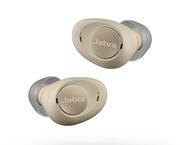
Customers are enthusiastic about the Enhance Plus Self-fitting OTC Hearing Aids, highlighting their ease of use, comfortable fit, and long battery life. The Bluetooth connectivity and phone call capabilities are also appreciated. However, some customers have expressed concerns regarding the sound quality and charging issues.
Pretty bad product. Faild after couple of months use, bought for my dad living overseas he hardly used it but said left ear was stop charging went dead. Sent back to US to calm warranty. Calming warranty was easy they send me a replacement, but the replacement also arrived faulty right ear was not responding at all. Contact them again and they send me a another one but unfortunately this also failed after week of use. Same charging issues!. Filled a credit dispute Best buy should stop selling this product.
This review is from Jabra - Enhance Plus Self-fitting OTC Hearing Aids With iPhone Streaming For Music & Calls - Dark Gray
Posted by AmilaW
Comfortable. Mild to medium hearing loss correction. Road noise and chewing very loud and annoying. Have to take hearing aids out.
Posted by DonaldB
--- SETUP --- It is recommended that you charge the Enhanced hearing aids from Jabra before first use. While you wait, download the Enhanced Jabra app to run the hearing aid test. --- FEATURES --- The hearing aids with rechargeable battery that lasts up to 12 hours on a single charge, charging case that can extend the hearing aid use to 35 hours, app with personalized hearing aid, bluetooth connectivity for use as headphones. --- PERFORMANCE AND EXPECTATIONS --- I was born deaf on my right ear (15% hearing capability) and my left ear has about 87% hearing. I opened the Jabra Enhance App and it gave me a tutorial on how to pair the hearing aids to my phone. After that, it guided me through a hearing test to calibrate the hearing aid to my needs. In order for this to work properly, you need to find a completely (or close to it) quiet place. Since I live in an apartment complex, the app would detect noise from my neighbors and it would ask me to restart the test. I was finally able to run a successful test and it was a very easy process. It is very similar to when you take tests at a hearing doctor’s office. When you hear a beep, you touch the screen on the phone. The process repeats over and over as it calibrates. By default, the app starts you with the right ear and then proceeds to the left. I would have preferred to choose what ear to start with. The reason for this is that, by forcing me to start with my deaf ear, I didn’t know what the beep might have sounded like. I work as a school teacher. I discovered that from my deaf ear, using the hearing aids, it was much easier to identify where sound was coming from, which is a big help when trying to find students who are talking or tapping and I need to ask them to stop. From my good ear, the ambient sound that the microphone was picking up was too much for me. The iPhone has its own hearing aid settings and allowed me to individually adjust the microphone volume for each hearing aid, but the app insisted that I keep the volume level synced, so I did that. I reserved the hearing aid on my good ear for when the room was absolutely quiet, which during my work week, that looks like during testing days. This was very helpful because students have to whisper when they talk to a teacher. The hearing aids allowed me to listen to their needs much better. After a little over a week’s use, I really enjoy that I don’t have to keep buying batteries, that the rechargeable battery lasts more than a full workday, and that the case can charge your hearing aids while you don’t need them. For me, that was during my planning period, which is when I’m alone for about an hour and a half and don’t need to listen to anyone. The one thing that I noticed after a week is that, though the hearing aids recharge through the magnetic case, the magnet didn’t secure my earbuds correctly. This caused the following problems: When I wanted to hear audio from my phone and not my hearing aids, the hearing aids remained connected via bluetooth even when inside the charging case because they wouldn’t turn off automatically due to the case not detecting the hearing aids. Occasionally, the hearing aids would be put into the case and, due to the charging nodes not aligning properly, they would remain on and nonstop audio feedback would occur. Being partially deaf, sometimes I wouldn’t hear the feedback and it had to be pointed out to me. Other than the case issue, I did enjoy my experience with the hearing aids. After the initial hearing aid test setup, the app nor the phone are necessary for you to use the hearing aids unless you need to make further customization. --- APPROVAL --- Overall, if you already use hearing aids but are tired of switching batteries constantly, this will be a great investment. If you feel like you might need hearing aids but haven’t had a hearing aid test, this is a great way to find out if you need some. You can take the test and decide if you need future advice from a doctor.
Posted by Trobadour
The vast majority of our reviews come from verified purchases. Reviews from customers may include My Best Buy members, employees, and Tech Insider Network members (as tagged). Select reviewers may receive discounted products, promotional considerations or entries into drawings for honest, helpful reviews.