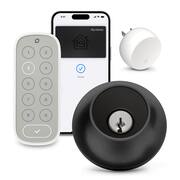
Customers often highlight the ease of use and straightforward installation of the Lock+ Connect smart lock, praising its sleek design and convenient keypad access. Positive feedback also mentions the user-friendly app and the overall quality of the product. However, some users express concerns regarding battery life and the security of the lock's cylinder.
The vast majority of our reviews come from verified purchases. Reviews from customers may include My Best Buy members, employees, and Tech Insider Network members (as tagged). Select reviewers may receive discounted products, promotional considerations or entries into drawings for honest, helpful reviews.
So many ways to unlock your door. The inconvenience is understated. I haven’t had to carry my keys in a while. I love being able to get into my house using my watch/phone
Posted by MSibai
So, my first impressions were not great with this lock. I couldn’t get the cards for work and the battery kept on saying low in the iPhone(so I was thinking the battery life was absolutely horrendous), and lastly the touch to unlock didn’t seem to be working that well. I got different battery first, that didn’t do squat, still gave me a low battery alarm every time I opened the app on the iPhone, however, on my android I didn’t get the alarm, so I dug into the settings a little more and it says the battery is healthy. At this point I realized the iPhone app is the problem not the battery. The touch to unlock works perfectly for me and my android phone, but for my wife’s iPhone it was hit or miss but has started working consistently. I think this is the first time a product has worked better with android integration than iPhone integration especially when it has apple home integration but as a Google and Alexa user I’m completely happy with this turn of events. The paperwork says the battery will last a year and that it isn’t compatible with rechargeable batteries, now just to be clear as long as the voltage matches a rechargeable battery works just fine… However, a rechargeable battery will have a third of the capacity very often so you will not be happy with how long the battery lasts, Also, rechargeable batteries have a different capacity calculation so it will think your battery is full all the way till it is dead in all likelihood, which could cause you a problem. With the fact that a battery should last at least 6 months (if they promise a year) I’m not going to worry with rechargeable batteries and trying to use them to save a few pennies over the course of a several years. Granted I can only judge the battery life over the week I’ve had it, and it still shows as quite healthy (as it should if it should last a year). The physical install was interesting, this is the first lock that I had an issue with, it would lock but say it failed to lock, I ended up making the hole 1/16th of an inch bigger just in the back as I noticed it got tiny bit smaller and then it worked perfectly. I wouldn’t say it’s the locks’ fault, but it definitely wants a clear pathway more so than other locks. The other thing that took me a bit was figuring out what position the lock need to be in the properly lock and close, it took me a couple of tries and fiddling but I got it, and I would say that is my inexperience more so than the lock being difficult. Lastly the cards that unlock the door, are not like your work cards (I mean they use the same tech but they aren’t the same) I can get the cards to work every time, put your thumb on the blue square and put that directly over the key hole at a 45 degree angle and hold it for a few seconds, it will unlock. These are annoying and not worth the trouble in my mind. If it was like work and I tapped it and I was in that would be really cool, as is, it’s a gimmick that maybe they’ll master in a few generations. Now, all that semi negativity would make you think I’m not a fan, I love this lock set, I love that it looks absolutely normal (though I’m going to have to fill some holes from my last smart lock) and that the keypad is separate allowing it to be to out of site and out of mind. I love that when I walk up to the house, I can just twist on the outside of the lock area and it unlocks, no code no nothing. Basically, once you work out all the kinks, it just works. It works with both Alexa and Google, which somehow, I’ve ended up with both assistants at different areas of the house and car, so it is working with both which is awesome. This is by far my favorite lock; my wife loves the lock because it just unlocks for her and the few times it didn’t, she could easily use the number panel (when she takes longer than 3 min to go to the door). The kids love it as I was able to mount the number panel where they can easily reach it. I love that it has so many different ways of unlocking and locking the door, I don’t necessarily understand the auto unlock and why you’d want that, but to each their own and it’s cool that it is there. I love that when I touch it, it unlocks. Overall, setup and installation is decently simple and there are a few things to get used to, but once you’re used to them (how to use the card and time limit on touch to unlock to preserve the battery) it is by far the best lock for just looking normal and being extremely smart at the same time.
Posted by Benb
The Level Lock+ seamlessly replaced our Nest Yale lock on our iron entry front door, addressing our primary concern of maintaining the aesthetic beauty of our rugged iron door. Unlike many smart locks that are easily recognizable, the Level Lock+ resembles a standard deadbolt, discreetly concealing its smart features within the door without any bulky components inside or out. Opting for the matt black variation to match our oil-rubbed bronze door, the Level Lock+ exudes a sleek and unassuming appearance, seamlessly blending with the door's design. The straightforward installation process, detailed in the Level website's video, made the setup hassle-free. While the Level Lock+ impressed with its functionality, the non-matching silver components posed a minor aesthetic inconvenience. A quick fix with matte finish spray paint addressed this issue, highlighting the need for Level to include color-matching options in the future. Powered by a CR2 battery, the Level Lock+ offers convenience with a physical key as a backup for scenarios where the battery might die. Integration with the Level app and HomeKit was seamless after setup, with the added convenience of Home Keys for unlocking via iPhone using NFC. Despite initial hiccups with Home Keys, resolving the issue through reinstallation and Apple Home app setup proved effective. The Express Mode feature in Wallet app, along with various unlocking methods, including Siri, Home app, and key cards, showcased the Level Lock+'s versatility. The Level Lock+ demonstrated reliability and convenience, providing notifications, access logs, and automation options through the Home app. Sharing Home Keys within the Family setup was straightforward, offering easy access for family members. The combo pack, including the Keypad and Connect, enhanced the overall experience. Installation of keypad and connect was a breeze, and the illuminated keypads added a nice touch. While the 4 to 6 digit password for the keypad was functional, an option for an 8-digit password would enhance security. Overall, the Level Lock+ exceeded expectations with its sleek design and multifaceted functionality. The convenience of unlocking with a tap on the iPhone and the ability to manage access in various ways make it a valuable addition to our home security. Despite minor improvements needed, such as color-matching options and longer keypad passwords, we are thoroughly satisfied with the product's overall design and performance.
Posted by TechGuru