Skip to contentGo to Product Search
Main Content

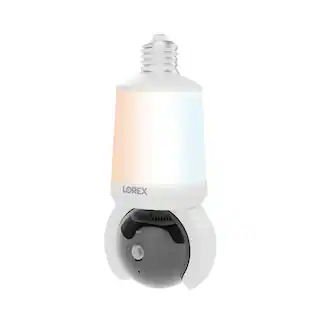
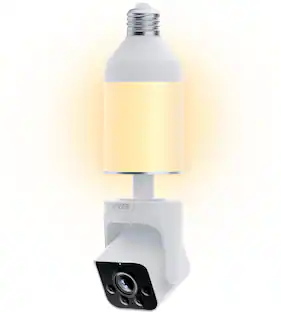
Lorex - 2K Wi-Fi Smart Lightbulb Camera - White

Model: SL300-AA
SKU: 6614839
Sold byBest Buy

Customers are saying

Customers are satisfied with the product's excellent camera quality, effective motion detection, and night vision capabilities. They also appreciate its ease of use, 360-degree field of view, and useful features like privacy mode and two-way communication. However, some customers found the bulb's size to be larger than anticipated.

Generated by AI based on customer reviews.

Highlights

Features
  • Illuminate your peace of mind

    Light up your space while keeping a watchful eye on every corner, day and night with the Lorex Lightbulb security camera.

  • Set up in an instant

    Enjoy a quick and easy installation, thanks to light bulb design. Simply screw into a light bulb socket and pair to the Lorex app, no wiring required!

  • Flip the switch for continuous power

    Enjoy reliable, 24/7 security with a constant power supply for both lighting and security, thanks to the electrical socket connection.

  • Don't be left in the dark

    Shine light on your property with the multi-directional 400 Lumen LED lightbulb or use the dimmable feature to customize the brightness to suit any mood or setting.

  • Light on demand

    Use the Lorex app to personalize when your light shines with 4 unique light modes.

  • Group, control, customize

    Have all of your lightbulb cameras ignite at the same time. With the Grouping feature, synchronize the setting to apply the same detection settings, light modes, brightness levels and schedules.

  • Cover every angle

    Expand your view with the ability to move the camera lens vertically and horizontally to get a 360° view.

  • See clear, day and night

    Experience around the clock coverage and impressive image quality day and night.

  • Get alerts that matter

    Get smart notifications in real-time when motion is detected, reducing unwanted alerts.

  • Smart home ready

    Easily integrate your Lightbulb Camera with Google Home and Amazon Alexa smart home devices for effortless control. Use simple voice commands to turn the light on or off, adjust the brightness, view the live camera feed and more!

  • Communication is key

    Easily hear and speak using the built-in microphone and speaker.

  • When you want to shut off

    For those moments you want to keep to yourself, set the camera to privacy mode and the camera turns inwards to stop recording.

  • No matter the weather

    The weather-resistant camera housing is IP65 and protects again harsh weather conditions like snow, rain, dust, and extreme heat.

Specifications
  • Video Camera Resolution
    2K (1440p)
    Field Of View
    360 degrees
    Night Vision
    Yes
    Number Of Cameras Included
    1
    Camera Power Source
    Light socket
Sponsored

Reviews

Rating 4.4 out of 5 stars with 39 reviews

85% would recommend to a friend
Customers are sayingCustomers are satisfied with the product's excellent camera quality, effective motion detection, and night vision capabilities. They also appreciate its ease of use, 360-degree field of view, and useful features like privacy mode and two-way communication. However, some customers found the bulb's size to be larger than anticipated.
This summary was generated by AI based on customer reviews.
  • Camera Quality (25)
  • Motion Detection (8)
  • Night Vision (8)
  • Ease of use (7)
  • Storage (4)
  • Size (5)

Customer Images

The vast majority of our reviews come from verified purchases. Reviews from customers may include My Best Buy members, employees, and Tech Insider Network members (as tagged). Select reviewers may receive discounted products, promotional considerations or entries into drawings for honest, helpful reviews.

  • Rated 4 out of 5 stars

    Great 2k picture, night mode, 360 degree & bright!

    If your in the market for a smart bulb that has a camera built-in this is probably your ticket unless you're an avid Apple home user as this does not support that but does support everything else including it's excellent OEM Lorex app. Upon installation into the light socket I intended to use it went through a self test and then it speaks with a voice out loud in order to tell you what it's doing and which mode it's in so that you may connect it to the app. You can do so with a simple QR code that is located on the bulb itself as well as the packaging making it very easy. The set up process takes no more than a minute including creating an account if you don't have one with them yet, all very easy. After you're up and running it brings you through a very nice tutorial to make things easy and show you where everything is inside of the app. I found that using the remote control to move the camera is quite responsive more so than I expected it to be. It also reached quite far on Wi-Fi and kept the same 2K camera signal which I was very happy about. I am currently using this to monitor my puppy Jax while I leave the house. It does a great job of detection and I can even tell when the dog is barking signifying to me to check the app to see what’s going on. The main functionality in the app you can take snapshots, record video, talk back-and-forth through the loudspeaker on it and microphone I have Built in, you can set up an alarm like siren, adjust how bright the light is which is actually fairly bright (400 lumens and cool white kelvin temp), you can also turn on privacy mode where it flips the camera upwards to ensure that it’s not monitoring something that you don’t want to be monitored. Of course you can get the on screen joystick up to control where the camera is looking at any time and the app makes great use of this. There is a cloud service for storing your files or if you wish there is a micro SD card slot right on the bulb itself to make local storage a thing which is super convenient and that is what I use as the storage media is very cheap to purchase and stores a fair bit even in 2k resolution. Speaking of resolution the built-in night vision works very well up to around 20 to 25 feet though it’s rated for more you really can’t make out anything after that point but that’s very usable anyway. The bulb itself is on the large side so make sure you take measurements wherever you wanna put it that it will fit in your fixture. The motors are not very loud which keeps it nice and discreet. One thing I really like is that they provide a timeline Where you can view events and track things that you choose like seeing a human etc. throughout the day and go back on your cloud storage or memory card to view them and at what time they happened. I think overall this is a very good jump into a motorized camera, the fact this is a lightbulb and you can just screw it in is a very nice bonus not dealing with wires making it easy to plan out exactly where you want to put this. As long as your not waist deep in the apple home eco system already this provides integration with all the other major players like google and Alexa etc making for a very easy setup of any way you choose.

    Posted by Manny

  • Rated 5 out of 5 stars

    Good design and great value

    This is a pretty unique design for a camera, and the convenience of not having to mount a camera in one set spot is a nice option to have. The camera size is not bad, not small, but decent for a camera and light combo. I tested it out with a regular lamp to get comfortable with it for a few days. The app design and hardware is pretty well laid out. Starting off the instructions are a bit bare, but that’s typical since most devices point you to an app to walk you through. There are some audible voice prompts from the bulb that let you know how the setup is going. Overall the setup was pretty easy, I got everything going in about 10 minutes and it did the firmware update for me. I very much like the PTZ option of being able to move the camera around. The light itself is decent and you can turn it on and off through the app, it puts an equivalent of 40W of an incandescent lightbulb of light out, so don’t expect it to light up a large room by itself. You can adjust the brightness of the light from the app as well which I think is a great option. You will be prompted to subscribe to Lorex for cloud storage and other features, but you don’t have to do this. I would highly recommend installing a microsd card though (not included), otherwise it won’t hold any videos recordings unless you do the subscription. I couldn’t find any instructions or app for installing the microsd card, but their website explained it with a quick search, which is below the camera lens under the rubber cover. You also have the option of the camera delivering preset recordings to guest or you have the option to speak to go guest through the bulb speaker, but the volume on that isn’t as loud as the preset responses. Attached is a screenshot of the app and some of the options you have. I also really like the motion tracking and ability to turn the light on when motion is detected, you can select Human or Vehicle activity to trigger recording so it does have some nice AI integrated. The settings for the camera specifically are a bit hidden, took me a couple of days to realize they were there. There is an app option called Home & Away which I was excited to try out, since it is supposed to only notify you of motion activity when you are outside of your home (or selected zone). None of my other cameras have been able to do this successfully, and unfortunately this does not appear to have worked either. I initially was getting some alerts while at home, and when I left the neighborhood, had my wife walk in the camera area a couple of times and I never got alerts, but I could manually go look through the recordings and see the video of her was taken, so its at least picking up the recordings, but if I’m not getting alerted it doesn’t do me much good. I also don’t see a way to select the size of recordings, but you do have the option of selecting the video quality. Downloading the videos is an option, but not the easiest, especially since I wasn’t able to pull up thumbnails to see which video I want to download. I would like to be able to download directly from the Events List. You also have the option to share app access with them, which shares the recordings and camera. Overall, there are lots of options for this camera and the hardware on the camera seems pretty good, but the app could use some updates which really is an easy fix. I would like to see better notifications in general and that work based if I’m home or not. This is my first Lorex camera to own, and I think the value is definitely there. Video quality is pretty good, so good I actually turned it down to 1080p to save room on my SD card. I was originally going to give this camera 4 stars, but the more I played with it and explored different settings the better it got. I definitely think it’s a quality camera for the money and I hope to see app updates with enhanced features down the road for an even better experience.

    Posted by Jp223

  • Rated 5 out of 5 stars

    Convenient and easy to setup and use

    This is such a quick and easy way to add a camera to a room where it may not otherwise be so easy to put one. Utilizing the lightbulb socket is such a smart idea. Having the camera mounted this way also allows for something that other security cameras may not be able to do, and that is rotate positions. - Setup Setting up the Lorex light was very easy. Download the app, screw in the camera to the socket, turn on the light switch, and add the camera to the app. Very easy. The app does a great job of walking you through the process and being clear about each step. - Software Once the camera is added to the app, there are many options and features that make this camera truly shine. Pun intended, I suppose. Since the camera doubles as a light, you can have it automatically turn the light on when the camera detects movement. Even more impressive still, you can have it only turn on if it detects a person, but not turn on if it detects a vehicle. On top of that, you also can set that to a schedule. So, if you only want the light to turn on during the night, when it detects a person, you can do that too. The software is very well designed. Since the camera can be rotated, not only horizontally, but also vertically, you can view a very wide area using a single camera. Since the camera can't see all these positions at once, the app lets you move the camera using a virtual joystick. Better still, you can set presets of positions that you can quickly jump to from within the app as well. You can even have the camera follow a subject once it detects it. - Hardware The camera and unit itself feel very well made. The one thing to be aware of, is the entire unit is maybe taller than you would imagine. Which, of course, makes sense, since the camera needs to be lower than any fixture you may have it in, so its view isn't blocked. But, that is something to keep in mind for when you're going to install it. The camera quality is also very good. It has several resolution options to choose from, and the quality is very good. It also supports night vision, allowing you to check on a room without having to activate the light. There is also the ability to use the camera as a two-way communication, which can be very handy as well. Overall, this is an excellent option to add a camera in any number of places that you either may not have the option to run a wire, or don't want to worry about charging a battery. There are a couple of things to be aware of. First, like I mentioned previously, the camera does hang down a bit further than a typical bulb would. Second, the color temperature of the light is more of a blue color. So, if you prefer a warmer color that is something else to keep in mind. Pros: Excellent features and camera quality, useful app with great control, easy install, nice hardware Cons: A bit larger than you may expect, color temperature of light doesn't seem to be adjustable and is a bit more blue.

    Posted by dustinw

  • Rated 5 out of 5 stars

    Powerful Smart Camera and Light Bulb

    The device is a powerful and versatile smart camera and light bulb combination. It does a great job at both of these jobs. It can be installed anywhere (indoors or outdoors) where a powered light socket is present. Installation and setup are straightforward and easy, First download the Loex App. Then create an account. Then screw the camera into a light socket. Then pair the bulb to your App. It is that simple. The App walks you through the process. Just make sure the light switch is set to on for whatever light socket you are using. One thing that I did not like, is that each Lorex device needs an individual password. This feature provides more security, but also complicates the process. Essentially I had to create 2 passwords, one for the App and one for the device. The Lorex App is easy to use and allows a considerable amount of control and customization.Everything is logically labeled and is straightforward to figure out. The camera video quality is up to 2K but can be set to below 2K. Thai could be useful if you are using local storage and want to maximize video recording times. The image and sound quality of the camera is excellent. Colors are rich and lifelike. Night vision quality is also excellent. The camera has a pan and tilt function that can be set to automatically follow movement. The motion detection is accurate and easily able to track movement and identify people. I like that there is a privacy mode that physically covers the camera lens so there is no possibility of recording. Since this is a light bulb I should cover the illumination function. This is a capable LED bulb. It gets very bright and the illumination can be adjusted using a slider in the App. Cloud storage is available as part of a paid subscription. Local storage is also available using an SD card. A SD card is not included. I am very happy with this Lorex smart camera light bulb. It is an innovative device that makes adding a camera to many areas very easy. The video and audio quality is excellent. Finally, It is outdoor rated so can be used in a variety of areas.

    Posted by Kotor

  • Rated 3 out of 5 stars

    Not Bad, But Could Use Some Improvement

    📦 UNBOXING: Inside the box, you’ll find the basics—the light bulb camera, a quick start guide, and some stickers to put on your window that tell others you have a security camera. 💪 BUILD: The light bulb camera itself feels solid, has good weight to it, and seems reasonably durable for something that will remain stationary in a light fixture. The lighting portion appears above the camera bulb, which means the camera will be admittedly better quality than the light itself. It should also be noted that since this is a fully integrated solution, there really isn’t a way to easily repair the LED should it ever stop working, but that’s honestly probably the least of your worries. The LED is rated for 6500 Kelvin and 400 lumens, which isn’t particularly bright, but if you are using it outdoors, then you’ll be glad to know that it also has night vision. Indoor lights typically have a much higher lumen rating, so I think this would stand out like a sore thumb among indoor lights given its significantly lower brightness. I also don’t love the hue and prefer more halogen bulbs—I do think that if they could increase the brightness and also configure the hue to be warmer, it would be a welcome addition. The camera portion rotates a full 360 degrees, and it can also be tilted a full 90 degrees to face either straight forward (parallel to the ground), or at the ground (perpendicular to the ground). You can also install a microSD card on the rear of the camera. If you opt to use continuous always-on recording, you’ll absolutely want a high quality endurance microSD card. While it’ll eventually burn out your SD card, it should last a lot longer than a standard SD card designed for minimal writes. Personally, I’d recommend using an endurance-rated microSD card with only motion-detected capture to get the most out of the camera. 🛠️ SETUP: Setup is pretty straight forward. Install into any E27 or E26 light bulb socket, download the app, and begin the setup process by scanning the camera’s QR code which is printed on the back of the camera and also on a piece of cardboard inside of the box. One thing to note is that you’ll need a 2.4GHz Wi-Fi connection for this camera to work, as it doesn’t support 5GHz. The setup process was quite easy, and after a firmware update, I was in action. 📱 APP: The app provides options to control the camera, control the lightbulb brightness, configure sound and motion detection, notifications, and both cloud and local storage settings. I appreciated that I could create presets of different locations I wanted to point the camera to (e.g. Front Door, Sidewalk, Floor, Street), but I did find that selecting my presets often yielded wildly inaccurate results. The camera would often be rotated or tilted too far and things I wanted to be in frame would be out of frame. One thing that also took me some time to understand was the “Home” preset which would automatically engage after about 30 seconds. This meant that if you wanted to observe a different preset, the camera would interrupt you after 30 seconds to return to your “Home” preset. I can understand if it would return to the “Home” preset if I no longer had the app open, but the fact that it does it while I’m trying to observe a different camera angle is quite frustrating. Some other notable features include lightbulb schedules, muting notifications, setting motion detection zones, alarming a siren, and a privacy mode to hide the lens. Another strange anomaly I observed was that the motion detection zones remain the same, no matter which preset you navigate to. So if you happen to change your “Home” preset, you may need to re-configure the motion detection zones. This perhaps isn’t a big deal given most people probably won’t change their “Home” preset very frequently. But if you are like me and you select a preset to view another angle, you may find that your motion detection zones are off because the camera doesn’t consistently return to the same angle. Also, if you do a live snapshot or live recording through the app, the only way I have found that you can look at them again is by clicking the thumbnail preview after the image/video has finished capturing. These are saved directly to your phone’s app storage, yet their app doesn’t seem to provide a way to review them unless you tap on the thumbnail right after capturing. 📺 IMAGE: The image quality is about what I would expect at this price with a peak resolution of 2560 x 1440, but there are also options to stream at 1080p, 720p, and SD (480p). During daylight, the image is pretty crisp, and capturing faces will be dependent on where you place your bulb. If you’re able to place the fixture near the door, it’s certainly more likely that you’ll capture good quality footage of any visitors to your door. But if your camera is high up like mine, then it may be a bit more challenging. There also doesn’t appear to be a native zoom for this camera, so you won’t be able to capture high resolution footage from a distance, either. This isn’t really a concern for me, but I can imagine some folks may have lighting arrangements that could find a zoom lens to be useful. During the night, the footage is also sharp without introducing a ton of noise. And because it’s also a light bulb, it’s able to provide some additional light that you might not otherwise have towards producing a better quality image. During a live stream, I generally found that footage was decent, but when rotating, it was obvious that it was using a low bitrate encoding as artifacts would appear on the stream. The footage is captured at 15fps, which is a decent balance to capture good image quality without also requiring a ton of storage. 🧐 CONCLUSION: Overall, I think that Lorex is off to a fair start with this lightbulb camera. However, if you’re the kind of person who wants to switch between multiple angles quickly, you might be annoyed that it doesn’t consistently return to the correct angles. And the app has a few strange user experience issues that I think should be addressed. But if you’re the kind of person who wants to set it once and not move it, then you may find that it suits your needs. For me, I think it will get the job done being my package camera so I can see what packages have arrived on my porch. But when you look at the landscape of competitors that can do these basic things, it seems hard to justify this higher price point.

    Posted by Xephyroth

Compare similar products

Lorex - 2K Wi-Fi Smart Lightbulb Camera - White
4.4(39)

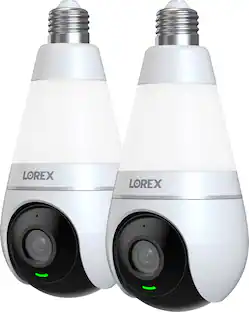
Illuminate your peace of mind. Light up your space while keeping a watchful eye, day and night with the Lorex 2K Lightbulb security camera. With 2K Resolution, bright LED lightbulb, 360-Degree Pan-Tilt capabilities and Person and Vehicle AI Detection, you will have complete coverage of every corner.
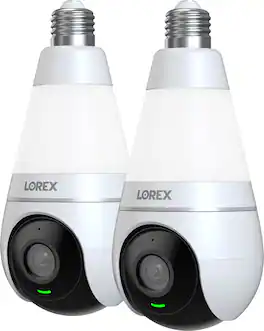
Lorex - 2K Wi-Fi Smart Lightbulb Camera (2-Pack) - White
4.4(37)

Illuminate your peace of mind. Light up your space while keeping a watchful eye, day and night with the Lorex 2K Lightbulb security camera. With 2K Resolution, bright LED lightbulb, 360-Degree Pan-Tilt capabilities and Person and Vehicle AI Detection, you will have complete coverage of every corner.
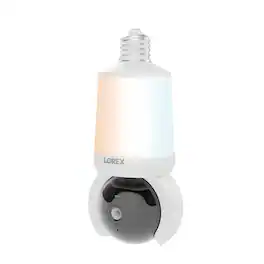
Lorex - Connect 2K Wi-Fi Smart Lightbulb Pan-Tilt Security Camera - White
3.9(51)

Enjoy quick, easy home security—just screw the camera into a standard light socket and connect via the Lorex Connect app. Brighter smart lighting, adjustable color temperature, and Wi-Fi 6 provide faster setup and smarter protection with no clutter or complicated wiring.
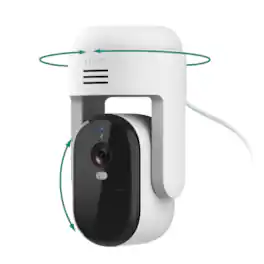
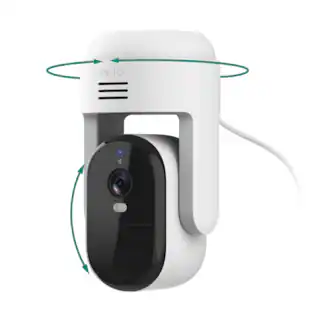
Arlo - Essential Pan Tilt Outdoor Security Camera 2K (2025 Release) - Wired Plug-In Powered, 1-Cam - White

Protect what matters most with the Arlo Essential Pan Tilt Outdoor Security Camera, an advanced outdoor security camera featuring crystal-clear 2K HD resolution, intelligent motion detection, and reliable Dual-Band WiFi connectivity. Weather-resistant and built for year-round outdoor performance, this wired PTZ camera is designed for homeowners seeking dependable cameras for home security in any condition. With 360° pan and 180° tilt capabilities, it delivers a complete view of your property, eliminating blind spots and providing comprehensive surveillance coverage. Automatic Motion Tracking follows people, vehicles, and activity within the camera's field of view, ensuring you never miss important events. A 1-month trial of Arlo Secure Early Warning System is included, adding 60-day cloud storage and advanced smart detection including person and vehicle recognition, package and animal detection. No subscription is required, and without a plan, you have access to live streaming, motion alerts, and two-way communication right out of the box. The Arlo Essential Pan Tilt Outdoor Security Camera delivers vivid Color Night Vision, letting you capture details like facial features, clothing colors, and vehicle colors in both day and night conditions. An integrated siren helps deter unwanted guests and potential threats, adding an active layer of protection to your outdoor security setup. Easy to install with a 16-foot power cable, this wired outdoor security camera eliminates battery charging while delivering dependable, always-on performance. Compatible with Amazon Alexa, Google Home, Samsung SmartThings, and IFTTT, it integrates effortlessly into your smart home ecosystem. Whether you're upgrading existing home security cameras or adding a new layer of protection, the Arlo Essential Pan Tilt Outdoor Security Camera offers powerful monitoring, intelligent detection, and peace of mind for your home and family.

Pros for Lorex - 2K Wi-Fi Smart Lightbulb Camera - White
Motion Detection, Night Vision, Camera Quality, Ease of use, StorageImage QualityImage Quality, Motion Detection, Setup Ease, Pan and Tilt, CoverageMotion Detection, Night Vision, Video Quality, Overall Performance, Size
Cons for Lorex - 2K Wi-Fi Smart Lightbulb Camera - White
SizeConnectivityConnectivityConnectivity, Battery Life

Specs

Questions & Answers
  • What is the maximum operating temperature for this camera?

    The maximum operating temperature is 122 degrees fahrenheit.

    This question and answer was generated by AI based on customer and product data.
  • Does this camera have night vision?

    Yes, this camera is equipped with night vision.

    This question and answer was generated by AI based on customer and product data.
  • Can I control the brightness of the lightbulb?

    Yes, you can use the Lorex app to dim the lightbulb to your liking.

    This question and answer was generated by AI based on customer and product data.
  • What is the field of view for this camera?

    This camera has a 107.9 degree field of view.

    This question and answer was generated by AI based on customer and product data.
  • Does this camera work with smart home devices?

    Yes, this camera can be integrated with Google Home and Amazon Alexa.

    This question and answer was generated by AI based on customer and product data.
Ask a question
No content

Customers often buy these together

Sponsored

Finance Options

My Best Buy® Credit Card
Buy Now, Pay Later