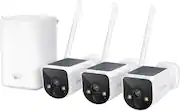
Customers appreciate the MaxRanger4K system's excellent video quality, ease of setup, and reliable wireless range. Positive feedback also highlights the long battery life, thanks in part to the solar charging capabilities, and effective night vision. While some users found the mobile application needed improvement and motion detection could be more responsive, the overall experience is largely positive.
The vast majority of our reviews come from verified purchases. Reviews from customers may include My Best Buy members, employees, and Tech Insider Network members (as tagged). Select reviewers may receive discounted products, promotional considerations or entries into drawings for honest, helpful reviews.
Great camera system pretty much plug and Play would definitely recommend
Posted by StephenS
The clarity is awesome. But the cameras load very slowly and are not reliable in catching action. Sometimes they never load or if you are looking at them they go to a black screen. Also they never fully charge.
Posted by Cass4eb
This is a great camera 3 pack security camera package. Its essentially a NVR, where the cameras just send the stream and a central HUB records and manages it all. It includes all you will need to monitor around your property. Everything comes very well packed and with 3 distinct separated boxes inside the major box. They also include a quick start guide and more detailed manuals (1 for the NVR Hub, 1 for the cameras, and 1 for the Android/iOS apps). This is a whole NVR system. They include a central hub, which creates its own wireless network, it does not use your home's Wi-fi at all. This is great, and it has further reach and penetration than your common household Wi-fi. The hub has also a backup battery, so in case power goes out, it will still continue to record until power comes back. It also has a HDMI port to connect the hub to any TV or monitor, an ethernet port, if you wish to give it internet access and two USB ports (one used for the mouse they include) and also if you wish to add an external USB drive for larger storage. They do include a 64GB Micro SD card (has also an Micro SD card slot) to get you started. Following the instructions, you start with the HUB. I plugged everything I needed first before powering it on (HDMI cable, mouse ethernet, an external USB drive), then powered it on and it came up on my TV monitor screen. Its like its own operating system. Once it, you go through a simple setup (like language, time zone etc.) and create an admin password (so no one else can access it and view your recordings or change your settings). Once in, you can see your camera channels and change any settings. At this point there was no camera, as had not added any yet. Onto the cameras, I had charged them for around a day before (you should fully charge them first, because the solar panels are to keep them charged, but you have to give them a full charge first). All the cams have a flap you open (this is to protect them from weather elements) and that exposes a type C USB charge port, a power on/of button. They include everything you need to wall mount them, either on wood or concrete. They also include easy rain gutter mounts, no drilling necessary. Once I mounted mine with its own large wireless antenna and turned it on, it paired automatically with the central hub and showed there. Once you have all your cameras showing up, you can download and pair your hub with the Swann mobile app for remote viewing, management and alerts. This is my biggest CON though. The app on Android (and I have a last gen phone) is super slow, unstable (crashes a lot) and makes my whole android phone crash. Videos take forever to load. AND THEY DO NOT EXPOSE ALL THE SETTINGS ON IT. I will highly recommend you go through all the settings in the CENTRAL HUB, because many important settings are not exposed in the app. I.E. the app does not have options to change the cooldown time of detections, change the AI detection strength (app will only let you change the regular motion sensitivity, but there are far more options regarding these on the HUB). Luckily they also have an app for windows, so I can also manage and keep an eye from any Windows PC/laptop I have. The whole kit's hardware is great and of quality, very well constructed, the cameras feel great too. It's their software, more the mobile app that needs more work. The camera solar panel will keep your camera charged, as long as you follow their instructions well (the manual recommends where to mount it if you live on the northern or southern hemisphere). Of the 3 included cameras, I had to mount one where only gets sunlight half of the day. On this one I had to tweak some settings in the HUB (like length of recordings, cooldown time and also the recording zones: Yes you have a grid were you can chose what area only to monitor). This allowed this one to keep its charge around 45-50% all the time no problem. The other too do get sunlight all the time, because I mounted them higher on the gutter with the included gutter mounts (this is great) and the solar panel does a great job keeping them charged. You should still fine tune your motion sensitive, cooldowns etc. IN THE HUB for better optimization. Video and audio quality is great, you can choose to record either in SD or HD mode and the app lets you see it in many screen ratios (1.1, 4:3, 16:9 etc.). The motion light is bright and strong, and cameras also have some blue and red lights called "Swann force" its kind of a little cop siren light. You can program the cameras to light, play a loud siren, or those blue/red cop lights. The cameras also have two way audio so you can speak through them. Video quality at night is also great and they have night vision, although if you make the cameras turn on their lights they will record in color. The central HUB offers lots of customizations (you can even setup an email server and make it send alert emails etc.). I highly recommend to explore and get familiar with the central NVR hub as it makes this kit powerful. The mobile app, I just recommend for regular alerts. It still needs a lot of work from Swann. The central HUB will record and store all your video clips on the included SD card or your own provided USB storage. There is no need for cloud subscriptions. However, they do offer an OPTIONAL cloud subscription for cloud upload and backup and some more rich alerts. They do give you a 3 month trial if you wish to test this. I will highly recommend this kit if you want to monitor your property around. It is great for a large property, backyard, barn etc. It offers great quality compared to other ones out there. This is really an upper level of camera kit and I have had lots in the past from the other more known and mainstream brands and were not as well constructed as this one. @@@@@@@@@@@@@@@@@@@@@@@@@@@@@@@@@@@@@@@@@@@@ Some PROS AND CONS as a TLDR +++PROS+++ +Central NVR hub. +Creates its own wireless network. +Records locally in the hub. +64 GB Micro SD card included. +You can add your own USB storage solution. +Can also backup to the cloud, this is optional and not required, they give you a 3 month trial of their service. +Cameras are sturdy. +Solar charging. +Large wireless antennas. +Easy to wall mount. All you need included. +Rain gutter mounts also included, no drilling necessary. +Hub also has a back up battery, in case power goes out, you still record. +Large wireless range. +There is also a Windows app. +Great video and audio quality. ---CONS--- -Mobile app (only tried the Android one) needs LOTS of work. Crashes a lot and its very slow to load any videos or alerts. -Not all the settings are exposed on the mobile app. Need to manage the HUB NVR directly for better customization.
Posted by JamexRZ