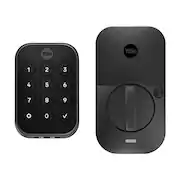
Rating 4.2 out of 5 stars with 47 reviews
4.2- Installation Ease (25)
- Build Quality (13)
- Connectivity (6)
- App Usability (4)
- Battery Life (4)
Customer Images
The vast majority of our reviews come from verified purchases. Reviews from customers may include My Best Buy members, employees, and Tech Insider Network members (as tagged). Select reviewers may receive discounted products, promotional considerations or entries into drawings for honest, helpful reviews.
- Rated 4 out of 5 stars
Good Wifi Lock
The Assure Lock 2 Wifi enabled lock is a pretty good alternative to a key lock. The lock attaches to your deadbolt and operates by keypunch code or through the app by way of wifi or bluetooth. It takes a bit of mechanical know how to install, but if you follow the instructions you will get it installed properly. The app is necessary to install the lock and it helps you through the process. Once installed the app is very good to open and close the door. The keypad is smude resistent and the door lock is attractive from inside the house. The responsiveness to the keypunch is very good. The calibration on setup went very well.The response to wifi is good. I did have a problem once during testing with wifi, but I think it was just an odd occurence because it hasn't happened again. There is an item called door sense that you attach to the door and it tells you if the door is open or closed. Screwing this into the door might give you pause so I am sure some don't use this feature. I wish they could make that feature functional in another way that doesnt result in screwing into the door and boring a hole through the side of the door. Rest assured you can use the lock without that feature. There are many functions once the lock is installed. You can set up entry codes for different people in your family. What a great feature. You can auto lock at a set time after opening. You can set auto open feature so when you are on the property the lock unlocks. You can use these locks with Alexa, Google, and Apple. I use it with Alexa and overall it works fine with Alexa. It is too early to tell how things will go with the batteries, because these sort of devices can drain batteries fast. I am hopeful. The quality build, the excellent features, the very good app and stylish look make this a lock I would recommend. I am glad I own it. I expect years of use.
This review is from Yale - Assure Lock 2 - Smart Lock Keyless Wi-Fi Deadbolt with Push Button Keypad Access - Satin Nickel
Posted by AFASOX
- Rated 5 out of 5 stars
A Key-Free Revolution in Home Security
I recently installed this cutting edge smart lock and it has completely changed the way I feel about home security. The sleek, contemporary form of the Yale Assure Lock 2 makes an initial impression. It doesn't draw attention to itself, yet it gives every door it graces a touch of refinement. Because of the lock's sturdy construction, you can be sure that it will resist years of use and the elements. This locks key free operation is its most notable feature. You can stop searching for your keys and fretting that you could lose them. If you have a smart home assistant like Amazon Alexa or Google Assistant, you may use your voice to open the Yale Assure Lock 2 or enter your home using a PIN code, the Yale Access app, or even the Yale Assure Lock 2. You can easily disable any PIN codes you have created for family, friends, or service providers once they are no longer needed. It offers a great degree of convenience and control that conventional locks simply cannot equal. The Yale Assure Lock 2 was surprisingly simple to install. It can be set up in less than an hour if you're confident with simple DIY operations. The lock has detailed instructions and fits the majority of regular doors. The Yale Access app's step by step video tutorial was extremely useful. This smart lock raises the bar for home security with Wi-Fi bridge you can insert it in the lock after installation. Utilizing the Yale Access app on your smartphone, you can remotely lock or open your door from anywhere. Concerned that you left it unlocked while you were away? You quickly check your phone to calm yourself down. Another level of convenience is the capability to provide visitors temporary access while you are away from your house. Battery life is a problem with smart locks, however the Yale Assure Lock 2 has shown to be remarkably effective. It runs for months on four AA batteries, and the lock alerts you when the batteries are getting low so you're never caught off guard. The Assure Lock 2 stands up to Yale's reputation for being dedicated to security. Your information is protected by a most reliable encryption system, and the lock itself is impervious to tampering. The Yale Assure Lock 2 is a great advancement in home security, It is a standout option for anyone looking to replace their front door lock due to its key free simplicity, Wi-Fi connectivity and durable build, with the security, ease, and control it provides make the cost worthwhile. Its a convincing example of how intelligent technology can improve our daily lives and keep our houses secure. The Yale Assure Lock 2 ought to be at the top of your list if you're thinking about getting a smart lock.
This review is from Yale - Assure Lock 2 - Smart Lock Keyless Wi-Fi Deadbolt with Push Button Keypad Access - Satin Nickel
Posted by pb22
- Rated 5 out of 5 stars
A trustworthy keypad lock with tons of smarts
This Yale Assure Lock 2 is essentially a Yale keypad deadbolt using August Lock app “smarts.” It’s the best of both worlds giving you all the security you need from Yale with all of the connectivity and automation features of an August Lock. It’s compact and easy to operate as well as being very solidly built. Pros: * Easy to set up and install. * Solidly built. * A backlit keypad with actual buttons to press. * App access and control. * Useful “passage” button to temporarily disable auto-locking. Cons: * DoorSense feature was tricky to set up. * As with all replacement door locks, installation requires a screwdriver and some know-how. * Not compatible with Apple HomeKey. Installation and Setup: The packaging is quite nice with everything clearly laid out and nicely labeled. The physical portion of the installation is typical for this type of product but it all starts in the app. First you get the app up to the point where it expects the lock to be ready. Then, for the actual lock installation, uninstall the old lock and then start installation with the deadbolt, the inside portion and the outside portion of the new lock. Finally, return to the app to get everything online, connected and set up the way you like. A few parts of the setup didn’t go 100% smoothly, but you can’t expect something like this to be perfect for everyone and a quick remediation fixed it all. The lock comes with an optional DoorSense magnet that is used to tell the lock when the door is open, ajar or closed. Calibration of this feature kept ending with success, but then the app would claim this feature wasn’t set up and it would show the door as open and locked when it clearly was closed and locked. I tinkered a bit more with it and finally got it working. The reset of the setup was super-easy. Usage: For those who have installed or used an August Lock before, this lock can be controlled by either the Yale Assure app or the August app, and seems to have the exact same functionality in both apps. You can set up keypad codes per person as well as guest codes. You can limit the use of anyone’s codes by date and time including a Vacation mode that disables keypad use but allows app use. My favorite feature that I have not seen on even the August locks was the “Passage” mode. With other locks that have an auto-lock feature, sometimes you are going in and out of the door often and the door keeps locking after 5 minutes so you have to unlock it again and again. There is a button on the inside portion of the lock that when pressed, deactivates the Auto-Lock feature until the next time you intentionally lock the door. No more annoying auto-lock when you’re walking in and out a bunch, but you do need to remember to lock it when you’re done to reset the feature. The keypad is nicely backlit and gives you the ability to press one button to lock the door behind you rather than waiting for an automatic lock or using the app. The inside lever that rotates to lock the deadbolt is smooth and easy to tell from a distance when the door is locked. Plus, there is a light on the inside of the door that you can optionally enable to show the door’s status from a distance. Of course, the app gives you full control of the lock remotely including access to all settings and the status of the door and lock. Through the app, you can set up and revoke guest access as well. You can even access the lock’s status and lock/unlock the door from an Apple Watch app. I haven’t been using the lock long enough to comment on battery life, but the lock takes 4 AA batteries and came with the long-life lithium variety. This is a welcome change to other brands of locks that use more specialized, expensive and harder to find batteries. I’m hoping to get at least the expected 3 months out of a set which would be a LOT more than I ever got out of competitor’s locks. Integration of the lock to various home systems is great! This model has built-in Bluetooth (for local connections) and WiFi (for remote access) without the need for a separate WiFi gateway box. It is compatible with Apple HomeKit, Google Home and Alexa. Just be aware that this lock is not compatible with Apple’s new HomeKey feature. Overall: Very easy to set up, nicely designed, solidly built and flexible. This lock has most everything you could want. The only thing missing, as an Apple user, is HomeKey support.
This review is from Yale - Assure Lock 2 - Smart Lock Keyless Wi-Fi Deadbolt with Push Button Keypad Access - Satin Nickel
Posted by gadgeTT
- Rated 5 out of 5 stars
SECURE AND CONVENIENT!!!
The Yale Assure Lock 2 is a Wi-Fi enabled smart lock that offers a variety of features to make your life easier and more secure. It can be locked or unlocked with a keypad, your phone or your voice using Google Home, Alexa, Apple Home, Samsung SmartThings, Philips Hue and even your Apple Watch. This is the only smart lock that I have seen that is compatible with majority of the smart home eco systems out there. It can also be unlocked automatically once you get close enough to the door. You can also use the Yale Access app to lock and unlock your door remotely, create and manage access codes, and receive notifications about your door's status. The lock can also be set up to be locked automatically once you close the door using Yales Door sense. Features: • Easy to install and use • Variety of features, including Wi-Fi connectivity, Backlit keypad, and voice control, Yale App • Secure, with Grade 2 certification • Compatible with Multiple Smart Home Ecosystem • Can be unlocked upon approach without touching your phone or lock • Can be locked automatically • Can setup multiple access codes • Real time notification of activity at the door • Backed by a one-year warranty The installation process for the Yale Assure Lock is very simple and all the accessories needed are included. For my installation, I simply needed to remove my old lock and start installing the Yale Assure Lock. The whole process took me about 30 minutes which included removing the old lock. In terms of security, Assure Lock 2 is Grade 2 certified, which means it meets the industry standard for residential security. It also features a few security features, including a keypad lockout and a tamper alarm. Overall, the Yale Assure Lock 2 is a great option for anyone looking for a secure and convenient smart lock. It's easy to install and use, offers a variety of features. I have been using the Yale Assure lock in my home for a few days now and so far its been working out great.
This review is from Yale - Assure Lock 2 - Smart Lock Keyless Wi-Fi Deadbolt with Push Button Keypad Access - Satin Nickel
Posted by Hmirza
- Rated 5 out of 5 stars
You'll Never Want to Use a Key Again!
After spending time with the Yale Assure Lock 2, I don’t think I can ever go back to using an old, “dumb” lock. I’m not sure if one can call a door lock a game changer, but I certainly think this counts! Inside the box you’ll find nearly everything you need apart from a screwdriver and, potentially, a drill and associated bits. The lock itself looks very pretty. The exterior is small, but not tiny – it is exactly the size it needs to be. I do appreciate the physical buttons, rather than membrane buttons or touchscreens. It’s worth noting that this version does NOT contain any keyways. In other words, you cannot use or add on any physical keys here. If you are concerned about what to do should the batteries run out you should know that it would likely involved you ignoring battery warnings for a quite a while but also that there is an emergency option to hold a 9v battery to the exterior lock to power it enough to input your code. The interior part of the lock is a bit larger, but still smaller than a trade paperback novel. This houses the main mechanisms, so it must be larger. The turn for the deadbolt feels smooth and solid. The battery compartment also houses the WiFi module, which is a small plastic cartridge you insert during installation to add the WiFi capability. The box also contains several sized screws and everything else you need. The physical installation wasn’t any different from installing a standard “dumb” lock. While there is a small cable to thread from the exterior part of the lock to the interior part of the lock through a mounting plate, it was easy enough to do as a one-person job with just a Phillips head screwdriver. The caveat to this is that my door and the associated holes were all perfectly situated and sized already. Your milage will greatly vary depending on the size of your door, size of the holes on your door and on your frame for the strike plate. Please do your research ahead of time, as you may have to start doing some drilling or the lock may not even fit at all. The app guided me through all the installation steps, and I was also able to follow along with the included printed instructions. I’m a fan of printed instructions, so I’m glad I had them to refer to at several points. After the installation was completed, I was asked about setting up the WiFi, which was seamless, and then it did a firmware update that lasted roughly 8-10 minutes. From there I was all set! It was here that I wished there was a bit of a tutorial to the app, as I was just left dropped off on the main screen of the app not really knowing what to do next or what settings I should then look at. However, it was all very intuitive and after about fifteen minutes, I felt confident in using the app. I even went a step further connecting it to my Google Home and my Philips Hue setup (so some lights turn on when you come home!). Unlocking can be via app or PIN code. Either works seamlessly and easily. PIN codes are assigned to individuals via the app. This gives you the ability to see who has unlocked your door. You can make PIN codes work at all times, limit to certain days and time frames, or temporarily, after which the code is disabled. That’s a plethora of options for any situation, from caregivers and workers to short term property renters. PIN codes can be 4 or more numbers long. From the app, you must wait for it to connect to Wi-Fi or to Bluetooth first, then click a giant red button to unlock or lock it. I’ve never had to wait longer than about 20 seconds to connect, and I think a large part is that from my driveway my phone typically is barely connecting / losing its connection to my home network. If I’m next to the door, Bluetooth connects faster. My partner, using the app on their Apple Watch, says they’ve never waited at all for a connection. You can invite others to use the app on their own phones instead or in addition to PIN codes. In either case, the door is opened (or locked) in seconds. You can configure the app with whatever notifications you’d like, from specific people to only unlocks or even if your lock loses its WiFi connection. The lock comes with a host of extra features, too. You can set the device to Auto-Unlock with geofencing so as you approach your home it automatically unlocks. Using the door sense add on, which is included, but does require drilling into your door frame, you can have the door auto-lock as well as notify you if your door has been left ajar for too long. Both of those times are configurable. Usually at this point in the review I go over my negative thoughts, but I honestly do not have many here. I’ve mentioned that I wished the app would walk you through its features and options more, but that’s all. I think it’s rare with technology such as this to have such a great experience from unboxing to installation and setup, and usage without encountering any frustrations, but Yale seems to have pulled it off. If you’re in the market for a WiFi connected smart deadbolt for your home, I think you’d be hard pressed to find an option that is better than this one. This not only works but offers a bevy of options that is really more than necessary – all while looking stylish and being easy to install, too! I’ve already recommended it to friends and family, so consider this a recommendation for you as well!
This review is from Yale - Assure Lock 2 - Smart Lock Keyless Wi-Fi Deadbolt with Push Button Keypad Access - Satin Nickel
Posted by Eric