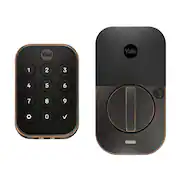
Customers express satisfaction with the Assure Lock 2's easy installation and user-friendly design, praising its convenient features like auto-lock and Wi-Fi connectivity. Positive feedback also highlights the secure keypad and helpful app. However, some users reported concerns regarding battery life and the need for timely low-battery notifications.
The vast majority of our reviews come from verified purchases. Reviews from customers may include My Best Buy members, employees, and Tech Insider Network members (as tagged). Select reviewers may receive discounted products, promotional considerations or entries into drawings for honest, helpful reviews.
The Yale Assure Lock 2 is a well built/easy to install door lock that will look good anywhere. I installed it within 20 minutes, you receive everything you need including batteries the wifi/doorsense module and multiple size of screws to fit just about all doors. All of the instructions are clearly laid out which makes the installation a breeze. Everything about the Assure Lock 2 screams premium product from the look, feel, installation and the app. This lock is beautifully designed and the buttons have a great tactile feel to them that makes me think they will hold up really well overtime. Besides the buttons having a great click to them they are way better than touch screen since you don’t have to wait for the lock to “wake” and unlike a touch screen there wont be a input that is missed because of weather. Now I can’t speak on the battery life since I have only used the lock for a few days however this will depend on how strong your wifi signal is how many features you’re using. In case your batteries ever do die there are two terminals underneath the lock where you can place a 9 volt battery if you get locked out. The app is very nicely designed and provides great information for giving access to family/friends and allows you to adjust the type of access you give people such as days/hours. There is a ton of features in the app (auto locking, voice assistance features, remote access, notification of who came/went etc) and the yale app works with both of the primary mobile operating systems. Two of things I enjoyed the most was locking the door with the push of the Yale button and “Passage mode” which is used when you want to come in and out multiple times and not have the door auto lock on you, which only works if you install doorsense module that is included. I only really had 2 issues with the Yale Assure Lock 2 and they are the thumbturn which just falls out and its something that is easy to lose and the second thing is that the latch is not adaptable/adjustable for the depth in the strike pocket (hole where the lock goes into). With this being a smart lock I think the calibration should be able to adjust it self if the strike pocket area is not deep enough. Now don’t get me wrong Yale lays out what the requirements are and even provides you with rulers for measurement so you can pre-measure everything, but being a smart lock this is something that should be adjustable. Overall the Yale Assure Smart Lock 2 in a great looking smart lock that is packed with functions that I would recommend to anyone in the market for a smart lock. Pros: • Easy instructions • Premium product • Great smart features Cons: • Thumbturn issue • Un-adjustable calibration
This review is from Yale - Assure Lock 2 - Smart Lock Keyless Wi-Fi Deadbolt with Push Button Keypad Access - Satin Nickel
Posted by JayS
After spending time with the Yale Assure Lock 2, I don’t think I can ever go back to using an old, “dumb” lock. I’m not sure if one can call a door lock a game changer, but I certainly think this counts! Inside the box you’ll find nearly everything you need apart from a screwdriver and, potentially, a drill and associated bits. The lock itself looks very pretty. The exterior is small, but not tiny – it is exactly the size it needs to be. I do appreciate the physical buttons, rather than membrane buttons or touchscreens. It’s worth noting that this version does NOT contain any keyways. In other words, you cannot use or add on any physical keys here. If you are concerned about what to do should the batteries run out you should know that it would likely involved you ignoring battery warnings for a quite a while but also that there is an emergency option to hold a 9v battery to the exterior lock to power it enough to input your code. The interior part of the lock is a bit larger, but still smaller than a trade paperback novel. This houses the main mechanisms, so it must be larger. The turn for the deadbolt feels smooth and solid. The battery compartment also houses the WiFi module, which is a small plastic cartridge you insert during installation to add the WiFi capability. The box also contains several sized screws and everything else you need. The physical installation wasn’t any different from installing a standard “dumb” lock. While there is a small cable to thread from the exterior part of the lock to the interior part of the lock through a mounting plate, it was easy enough to do as a one-person job with just a Phillips head screwdriver. The caveat to this is that my door and the associated holes were all perfectly situated and sized already. Your milage will greatly vary depending on the size of your door, size of the holes on your door and on your frame for the strike plate. Please do your research ahead of time, as you may have to start doing some drilling or the lock may not even fit at all. The app guided me through all the installation steps, and I was also able to follow along with the included printed instructions. I’m a fan of printed instructions, so I’m glad I had them to refer to at several points. After the installation was completed, I was asked about setting up the WiFi, which was seamless, and then it did a firmware update that lasted roughly 8-10 minutes. From there I was all set! It was here that I wished there was a bit of a tutorial to the app, as I was just left dropped off on the main screen of the app not really knowing what to do next or what settings I should then look at. However, it was all very intuitive and after about fifteen minutes, I felt confident in using the app. I even went a step further connecting it to my Google Home and my Philips Hue setup (so some lights turn on when you come home!). Unlocking can be via app or PIN code. Either works seamlessly and easily. PIN codes are assigned to individuals via the app. This gives you the ability to see who has unlocked your door. You can make PIN codes work at all times, limit to certain days and time frames, or temporarily, after which the code is disabled. That’s a plethora of options for any situation, from caregivers and workers to short term property renters. PIN codes can be 4 or more numbers long. From the app, you must wait for it to connect to Wi-Fi or to Bluetooth first, then click a giant red button to unlock or lock it. I’ve never had to wait longer than about 20 seconds to connect, and I think a large part is that from my driveway my phone typically is barely connecting / losing its connection to my home network. If I’m next to the door, Bluetooth connects faster. My partner, using the app on their Apple Watch, says they’ve never waited at all for a connection. You can invite others to use the app on their own phones instead or in addition to PIN codes. In either case, the door is opened (or locked) in seconds. You can configure the app with whatever notifications you’d like, from specific people to only unlocks or even if your lock loses its WiFi connection. The lock comes with a host of extra features, too. You can set the device to Auto-Unlock with geofencing so as you approach your home it automatically unlocks. Using the door sense add on, which is included, but does require drilling into your door frame, you can have the door auto-lock as well as notify you if your door has been left ajar for too long. Both of those times are configurable. Usually at this point in the review I go over my negative thoughts, but I honestly do not have many here. I’ve mentioned that I wished the app would walk you through its features and options more, but that’s all. I think it’s rare with technology such as this to have such a great experience from unboxing to installation and setup, and usage without encountering any frustrations, but Yale seems to have pulled it off. If you’re in the market for a WiFi connected smart deadbolt for your home, I think you’d be hard pressed to find an option that is better than this one. This not only works but offers a bevy of options that is really more than necessary – all while looking stylish and being easy to install, too! I’ve already recommended it to friends and family, so consider this a recommendation for you as well!
This review is from Yale - Assure Lock 2 - Smart Lock Keyless Wi-Fi Deadbolt with Push Button Keypad Access - Satin Nickel
Posted by Eric
The Yale Assure Lock 2 is a Wi-Fi enabled smart lock that offers a variety of features to make your life easier and more secure. It can be locked or unlocked with a keypad, your phone or your voice using Google Home, Alexa, Apple Home, Samsung SmartThings, Philips Hue and even your Apple Watch. This is the only smart lock that I have seen that is compatible with majority of the smart home eco systems out there. It can also be unlocked automatically once you get close enough to the door. You can also use the Yale Access app to lock and unlock your door remotely, create and manage access codes, and receive notifications about your door's status. The lock can also be set up to be locked automatically once you close the door using Yales Door sense. Features: • Easy to install and use • Variety of features, including Wi-Fi connectivity, Backlit keypad, and voice control, Yale App • Secure, with Grade 2 certification • Compatible with Multiple Smart Home Ecosystem • Can be unlocked upon approach without touching your phone or lock • Can be locked automatically • Can setup multiple access codes • Real time notification of activity at the door • Backed by a one-year warranty The installation process for the Yale Assure Lock is very simple and all the accessories needed are included. For my installation, I simply needed to remove my old lock and start installing the Yale Assure Lock. The whole process took me about 30 minutes which included removing the old lock. In terms of security, Assure Lock 2 is Grade 2 certified, which means it meets the industry standard for residential security. It also features a few security features, including a keypad lockout and a tamper alarm. Overall, the Yale Assure Lock 2 is a great option for anyone looking for a secure and convenient smart lock. It's easy to install and use, offers a variety of features. I have been using the Yale Assure lock in my home for a few days now and so far its been working out great.
This review is from Yale - Assure Lock 2 - Smart Lock Keyless Wi-Fi Deadbolt with Push Button Keypad Access - Satin Nickel
Posted by Hmirza