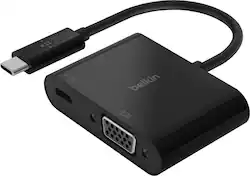
Belkin - USB Type C-to-HD D-Sub/USB Type C Cable - Black
Model: AVC001BTBK
SKU: 6409319
This item is no longer available in new condition. See similar items below
Customers value the compatibility and ease of use of the USB Type C-to-HD D-Sub/USB Type C Cable, frequently praising its seamless setup and functionality with various devices and monitors. They also appreciate the clear and crisp video quality produced, along with the ability to extend their screen to larger displays. The reasonable price point is another frequently cited positive aspect.
The vast majority of our reviews come from verified purchases. Reviews from customers may include My Best Buy members, employees, and Tech Insider Network members (as tagged). Select reviewers may receive discounted products, promotional considerations or entries into drawings for honest, helpful reviews.
Serves it's purpose. Took it back to get a dock hub.
Posted by JasonBarnot
--- SETUP --- The Belkin USB-C to VGA adapter is easy to set up. No download was required, just plug and play into a USB-C type port. --- FEATURES --- This device helps connect your older tech (items with no HDMI or USB-C) to modern tech. Additionally, there’s a USB-C slot so that you don’t lose the availability of the existing one. --- PERFORMANCE --- Whenever I connect a new device to my computers, I always make sure I have the most updated version available. After my computer update (optional), I plugged in the Belkin USB-C to VGA adapter to my Windows laptop and then a VGA cable (pictured) to the adapter. The other end of the adapter ended at my projector. My projector recognized the connection and it showed a mirrored version of my laptop. I was able to change the display settings to extend the projector image to use it as a second screen. No noticeable lag detected. --- EXPECTATIONS --- This adapter was easy to use and worked flawlessly the first time I plugged it in. It won’t take up much space and securely connects without being loose if it needs to dangle. --- VALUE --- Belkin products have become a household name in my family and I have grown to trust their reliability. Thus, I feel this product is aptly priced. --- APPROVAL --- I recommend this USB-C to VGA adapter for people who have working legacy devices that need to be brought up to modern standards. Teachers often work with outdated projectors, so this is ideal for that.
Posted by Trobadour
This Belkin adapter let you connect to a VGA display or projector from a USB-C or Thunderbolt 3 port on your PC. Using it is intuitive, plug the VGA cable into the adapter, then plug the short USB-C cable into your computer. There are NO drivers or software to install, and NO switches to set. The Belkin also has a USB-C port for POWER pass-through to your laptop if needed. Plug your AC Adapter into the Belkin to run off AC power. Be warned the adapter only supports up to 60 Watts as noted on the packaging. Enough for a Chromebooks and low power laptops. But not powerful PC’s. For example a 15” Surface Book 3 with i7 AC Adapter is 127 watts. As Belkin notes on the packaging, this USB-C port on the Belkin adapter supports up to 60 Watts of power. Pictures of the box are included with my review. Why 60? The USB-C port supports either 3 or 5 amps. Check with your laptop vendor’s specs to see which one your model supports. The maximum voltage permitted by the current USB Specification is 20 Volts. Converted to watts and you get 60W over a 3A cable or 100W over a 5A cable. So Belkin is going with 3 Amps, which may save a 3 Amp USB-C port on a laptop from being damaged. I’m not sure what would happen if you plugged a power adapter in that supplies more than 60 watts and if the laptop drew more than 60. Would the adapter limit it to 60 watts, would something be damaged? I don’t have a high power adapter to test that, nor would I with my gear. I found nothing on this on their web site. I would not use a power adapter larger than 60 watts until I found out for sure. There are no directions or documentation to explain this with the adapter. Judging from other reviews, there should be as many seem to miss this. There are no directions or documentation to explain this with the adapter. Judging from other reviews, there should be as many seem to miss this. You CAN NOT use this port for any other peripherals such as a memory stick, drive, wired Ethernet cable, or other adapters. Nowhere does Belkin state these are supported. But just to verify that peripherals wouldn’t work via some undocumented or unsupported feature, I tried plugging an Anker USB C to Ethernet Adapter and a SanDisk - Ultra 128GB USB 3.1, USB Type-C Flash Drive into the Belkin USB-C port on my Chromebook and Surface. Nothing happened at all on my PC, they did not show up as even an unknown device. If you need to plug a USB-C peripheral in and you have no other ports on your laptop, such as on a Surface Book 3, then look for a USB-C hub that will support all the adapters and memory sticks you will need to plug in. Make sure the hub on your PC will also support the power requirements of all your peripherals. I tested the Belin adapter with my HP Chromebook model 14-ca061dx and by default it added the external monitor as a second display. This can be changed in the Chromebook System Settings to mirror your laptop display if you wish. I plugged my Chromebooks 45 W AC power adapter into the Belkin adapter and my Chromebook showed as charging. It works as advertised. I also tested with my Surface Book 3. The Belkin adapter worked perfectly here as well. I plugged my 45 watt Chromebook USB-C power adapter in the Belkin and it supplied power to my laptop. Maybe not as fast as it was using it, but it would help extend the run time. The 102 Watt Surface power supply does not use a USB-C connector, it’s a proprietary connector. Belkin provides a solid plug and play solution with this adapter. It has the excellent build quality you expect from Belkin and comes with a 2 year warranty. My only suggested improvement for Belkin is to emboss or label the adapter with a note that that the USB-C port is for power ONLY and limited to 60 Watts. I’m not going to carry the box in my laptop bag and I may not remember this a year or two from now. A very minor gripe and my only one. I’d ding this .1 point for a score of 4.9 stars, which rounds to 5. Being as guy, I of course have a label maker and put a label on it with this. Now it’s perfect. I received this PC due to my affiliation with the Tech Insider Network Program. Reviewers in this invitation-only program are provided products for the purpose of writing honest, unbiased reviews.
Posted by MrBill250