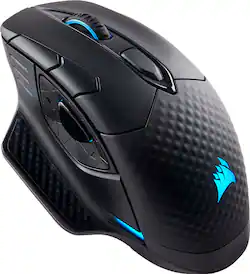
CORSAIR - DARK CORE SE Wireless Gaming 9 Button Optical Mouse with RGB Lighting and Qi Wireless Charging
Model: CH-9315311-NA
SKU: 6167607
This item is no longer available in new condition. See similar items below
Customers frequently mention the wireless charging, RGB lighting, and ease of use as significant advantages. Many appreciate the quality and responsiveness, while some users find the battery life and button placement less satisfactory. Concerns were also raised regarding the software and the size of the mouse. A few users experienced connection issues.
Wireless gaming mice are the next "big" accessory being pushed at PC gamers. With the Dark Core SE, Corsair aims to rid wireless gaming mice of their reputation for perceived latency increases and wireless connection issues. In my experience, Corsair has largely succeeded, but there is still a lot of room for improvement. Here's my take: PROS: - Excellent, ergonomic design. The mouse is rather long and should comfortably fit the contours of your palm. The thumb rest is perfectly sized with a nice soft-touch plastic. The textured surface on the rear portion of the mouse provides nice grip during long gaming sessions. - Weight. The Dark Core SE feels very substantial. I prefer a heavier mouse since it tends to offer more control and precision. - Lightning fast performance. With a max DPI of 16,000, the mouse is extremely responsive. Buttons on the top of the mouse let you reduce mouse sensitivity for even more accuracy. Taking shots in Rise of the Tomb Raider has never been more precise. The mouse easily keeps up with rapid movements and I have yet to notice any lag whatsoever. - Multiple connection options, including wired, 2.4 GHz, and Bluetooth. You'll want to use 2.4 GHz for optimal wireless performance, but it's nice that Bluetooth is included as a back-up. - Nice placement of RGB lights. Not too many, not too few. The lights turn off after about 15 or 20 minutes of inactivity to save battery. Using the Utility Engine software, there are an almost limitless amount of color configurations to choose from. - Great battery life. Corsair claims up to 24 hours of use on a full charge, and that seems accurate to me. - Qi wireless charging. You can recharge the mouse on the companion MM1000 pad (sold separately) or on any Qi-enabled wireless charger. It works well, but like most wireless charging solutions, it seems to charge rather slowly. CONS: - Questionable button layout, especially the side buttons near your thumb. The backward and forward buttons seem to be too spread out, and I have to really stretch my thumb to reach for the forward button. Since the buttons are on a rocker, you can't press forward and backward at the same time. - Clunky customization software. In the quick-start guide, Corsair doesn't even mention that you have to go to its website to download and install the Utility Engine customization software. Regardless, the software is a confusing mess. Simply remapping a button takes about 50 clicks through menus, sub-menus, and sub-sub-menus. The mouse supports up to three "profiles" of different settings, but every time I edit and save an existing profile, I seem to accidentally delete or overwrite another profile. Furthermore, the software only seems to recognize the mouse via wired connection. So if you're using the mouse wirelessly, you'll have to plug it in every time you want to change a setting. Corsair really needs to rethink this entire process. - Slow to wake up. After the mouse goes to sleep after 15-20 minutes of inactivity, it takes at least a few seconds of movement to finally wake it up. OVERALL: Aside from a few awkward button placements and weak customization software, this is an excellent wireless gaming mouse. It's comfortable, sturdy, and extremely fast. The addition of Qi wireless charging helps it stand out in an increasingly crowded market. If you really want to get the most out of this mouse, just be prepared to spend several frustrating hours with Corsair's software.
Posted by ryanmcv
This mouse has everything you can want in a mouse, Wifi Wireless, 1ms response time, ergonomically designed to fit your hand
Posted by Robert
Had no issues at all with it being wireless and found it to be great! The only issue I noticed was the mouse 4/5 buttons and sniper button could be placed a little future back. Found a hard time being able to hit the M5 button during a game.
Posted by FullySemiAuto1
The vast majority of our reviews come from verified purchases. Reviews from customers may include My Best Buy members, employees, and Tech Insider Network members (as tagged). Select reviewers may receive discounted products, promotional considerations or entries into drawings for honest, helpful reviews.