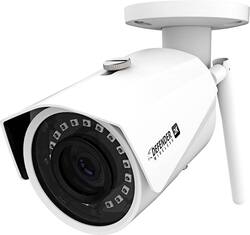
Defender - Indoor/Outdoor 2K Wi-Fi Wireless Security Camera
Model: IP2KCB1
SKU: 6353469
This item is no longer available in new condition. See similar items below
Customers have good things to say about the camera's picture quality, night vision, and ease of use, with many praising its clear visuals and straightforward setup. However, the app's functionality and initial setup process received criticism for being less user-friendly and somewhat cumbersome. Some users also noted concerns about the power cable being exposed and the lack of a battery option. Overall, the camera's strong visual performance is frequently highlighted, but improvements to the app and setup experience are suggested.
I own a couple of indoor/outdoor cameras and have enjoyed using them for various purposes such as identifying what nightly visitor is digging a hole in my backyard beneath the fence (it was a raccoon) or simply catching my cats doing bizarre cat behaviors. Unfortunately, most indoor/outdoor cameras rely on an internal battery that needs to be replaced eventually. The batteries aren’t cheap. I needed a camera to place on the outside of my home where there’s been a blind spot when it came to having proper camera surveillance. I had high expectations with the Defender 2K Wireless camera. The camera is wireless to an extent. The camera doesn’t rely on optical/coaxial cables but it does run on a required power cable. So, if you’re looking for a completely wireless camera then this security camera isn’t what you are looking for. The power cord that comes with the camera is 10 feet long which pretty much allows initial freedom of placement. Once secured, you can position the camera in almost any direction without worrying about the camera “shifting” under its own weight over time. The camera also appears to be weather ready, meaning that it will endure rain, snow or heat. Connecting the Defender camera to your internet is frustrating. REALLY frustrating. You download the SmartSignal app and have to connect the camera to the app. It took SEVERAL tries to make it connect via ethernet cord. However, once the app and the camera are connected, you are free to set up the camera wherever you want for as long as it’s within your Wi-Fi range (or if you have a long enough Ethernet cable). I placed my camera high enough with the power cable out of reach of anyone that may attempt to cut it. The SmartSignal app feels outdated and is cumbersome to navigate through compared to other surveillance camera apps. There are several gigs of memory allotted for recordings to be stored in the cloud. The app would sometimes not show me recorded history right away and would take a couple of minutes to show me the recording. Sometimes, I would have to close out the app entirely and reopen it in order to access the recorded history. But there is a peace of mind in knowing that there is a 16GB removable memory card installed within the camera in case you have to have a hard copy of footage that might not save to your phone/device when prompted. The visual quality is fantastically clear, whether you're watching it from your phone or tablet. The night vision is just as clear as daytime footage which is nice since other cameras seem to have a muddled night vision playback. Another nice feature is the Motion Alert/Activity Zone options. You can tap and drag on the display grid to specify a zone that you want focused on in the recordings. You can also turn on Human Detection or just general motion movement that alerts the app that there’s camera activity. Overall, the Defender - Indoor/Outdoor 2K Wi-Fi Wireless Security Camera is a high def surveillance camera but it’s accessing and navigating through the companion app is what makes it a frustrating experience.
Posted by Acadius
I got the opportunity to review this new Defender 2K (4MP) model IB2KCB1. Let start at the beginning now, I’ve had a 4 camera IP Security system tied into a DVR recorder years ago, as in 15 years ago. I installed it myself, 4 cameras, all had its own power supply and feeding into my Security DVR which was cat line plugged into my router, quite a job. Seeing this new stand alone with the ability to connect via Wi-Fi was interesting. My old cameras all had a DC power feed and a coaxial BNC connectors, so the Wi-Fi as well as using a cat line was interesting, not to mention in Hi-Def. Here’s what I found, Camera is well build and sturdy no doubt in its aluminum body. For those that may know or not now, night vision is rated in LUX and how far it can see. This Camera has a 1 Lux rating which is good for 100 ft. night vision. A .5 is better and .0 is best. The Camera came with a pre-installed generic 16 GB micro SD memory card. Now take note, you have to unscrew a small cover to get the Micro SD card out, so if the camera is mounted high, grab a ladder, then unscrew the cover, remove card, copy files and reinsert or swap with another MicroSD card. There is a small preformed rubber gasket O ring that is pre-fitted on the cover to weatherize it and it tends to fall out! Yes, not something you want to do continuously. It came with a screw on Wi-Fi antenna and a small bag with covers for cables as well as an O ring for the screw on antenna. Nowhere in the paperwork was there any mention of this O ring or what it was for! The instructions that came with it were only a quick reference start up guide pamphlet, has to be easy? It wasn’t, and frustrating at times. Let’s start with the App, which is required. The app has shortcomings. Installation of the App gives you a log in screen where you have the option to sign up? Easy huh? So I skipped pressing the Login button and pressed Sign up. Then Country United States, and Next. Next screen asks for you to enter an Email and a password and select the Verification code which does nothing. There is a “I have read and agreed” circle with a check mark, it shows a check mark but it’s not agreed until you tap it and high lighten it, simple yes but initially I tapped it and what popped up was the Smart Privacy Policy which I scrolled down and closed and tried the Verification button again. It was not until I zoomed it that I could select the “I have read and agree” button and could move to the next stage. Defender then sends a Verification code email, not minutes later you’ll receive it and the email states, this code is for registration ONLY, valid in 15 minutes not FOR 15 minutes. Now I take it that it will be valid in 15 minutes so I wait 15 minutes, enter the code and its invalid! Evidently it’s valid for only 15 minutes once sent so I go thru it a second time with success. These 2 hiccup’s, seems simple but it threw me off for a few minutes and Defender should have caught this, after all we are working thru a phone’s screen to sign up. Some screen images on the app are not fitted to the screen size as one would expect, so you may see a screen and be at a loss only to then slide it up a hair and see the next step button. I did try signing up on line and it directed me to use the app. I am now getting the feeling that this quick start manual has issues with say when it’s written by someone who’s native language isn’t English and we have these small language barriers that come into play. Forward I move and finally the app is installed. Scan the code on the camera, the serial number is locked into the app and give your wifi access password. Within a few minutes the camera is logged in and it loads it into memory. My cell is also connected to the same network as the camera and I can see what the Camera see’s so I’m thinking I’m good. The camera records and you get alerts and can see the recordings on the memory card and can download them. So I’m finally thinking ok, a rough start but its working. Night vision was good as well. But here is where it comes short, the moment I leave home and leave my home Wi-Fi network, I can’t log in live. You will see messages such as percentage loading only to fail and get “Play error, click to refresh” “Cloud Storage not available at this time” You’ll still get the alerts after it happens you can download them, or wait till you get home and back on your network to download them or climb up and remove the SD card. BUT it’s not as what one would expect with today’s commercial of live video cams and one using their cell to view and speak with someone on the other end. So I went on line looking for answers and how to. After a bit I was chatting live with tech support. I clearly explained what I have gone thru and what I was trying to accomplish. They clearly understood what my objective was. I was then told I needed to have a Dual Band Router and have the camera hard wired in with a cat line, hmmm. Then I was told I could accomplish it via Wi-Fi. After 15 minutes they advised they would email me instructions on how to accomplish what I wanted, live video stream. A short while later I received the email, puzzled as what they sent me were the exact same pamphlet instructions that came with the unit in PDF format! At this point I was done. Searching more on line I learned this same camera is sold in a generic form and is used with an add on security router as well as a DVR router box which is the best ideal solution. The add on security router allows you to hard wire the camera or cameras to it and plug it into your router so you can see live feed or you can go via the DVR box does the same but adds much more features, Defender has the upgraded DVR. Take into consideration that this is a Hi-Def camera and if you do get it going to stream live, you will need a fast internet connection as well as fast Wi-Fi router IF it even can connect live via the Wi-Fi method. So results are while this camera is a good value in price and quality, it falls short in features and easy of set up. The lack of a detailed manual explaining all the features, how to use the app as well as lack of customer support and knowledge I feel will make it somewhat frustrating for most individuals. After all it is advertised as a quick set up and use, which it fails on. This is more of a standard security camera with Wi-Fi option and is definitely not a RING type or I should say camera like on the insurance commercial where the mayhem guy breaks into a guy’s car while he is away from home and chatting with him. Where you save in money, you will pay in frustration.
Posted by iampete
First off, please note regarding this wireless security camera, it does indeed connect to wifi and you can view it remotely from your cell phone, however it does require a power cable to be connected at all times to use, there isn't a battery option. The camera itself is pretty standard. Seems durable with a strong shell and antenna. It comes with the connections you need, however, if you do not have an outlet near where you will use it, or would like to run the cable safely/hidden, you will have to run some extensions to wire it yourself or call a professional. The picture quality is decent as well as response time and images are fluid. It works well in the dark with limited light. Night Mode is decent, and it switches back to being able to a clear picture fairly quickly when drastic light change occurs. Notifications of movement seem to work well and the recommended phone app is simple enough for viewing the feed and recordings stored from activity observed. Sadly, zone setup seems very lacking in the app and the FAQ is very limited. Be ready to mess around or watch a YouTube video on your own for discovering other features. Note: the uploaded photos were just taken off the app while I was tinkering around with the camera in my living room. Mostly just to showcase the difference between day/night mode as well as image quality. Overall, physical construction is solid, image quality is good, and visibility in various lighting conditions is clear. Set up is easy as well. The biggest negatives are zone setups, no audio as far as I could tell, and the requirement to be plugged in for power. It’s a solid buy but is basically security 101, just the basics that work well, no special bells and whistles.
Posted by underdog217
The vast majority of our reviews come from verified purchases. Reviews from customers may include My Best Buy members, employees, and Tech Insider Network members (as tagged). Select reviewers may receive discounted products, promotional considerations or entries into drawings for honest, helpful reviews.