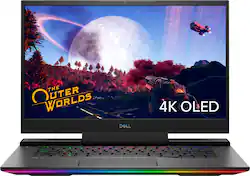
Dell - G7 15.6" 4K Gaming Laptop - OLED - Intel Core i7 - 16GB Memory - NVIDIA GEFORCE RTX 2070MQ - 1TB SSD - 4-Zone RGB - Black
Model: G7500-7194BLK-PUS
SKU: 6419696
This item is no longer available in new condition. See similar items below
Customers praise the G7 15.6" 4K Gaming Laptop's OLED display and its impressive performance, noting the excellent graphics capabilities. However, many users report issues with overheating, and some express concerns about battery life, fan noise, and frame rates in games. The laptop's weight is also mentioned as a potential drawback by some customers.
It's a gorgeous screen and the machine is a fast little thing, the machine is nice and heavy and feels like a quality machin. also, the OLED screen is sweet. Even with all that being true, I have some serious quality issues here. The Fan on the CPU stopped working on it randomly. I tried to replace the fan, but it seems it is an issue with the board. thats pretty terrible, but also, the machine has started randomly shutting down. when I restart it says I ran out f power, this is even if I have 100% power or my machine is plugged in. The Alienware software is pretty when it works, but rather than it automatically updating with the dell suites, the keyboard just randomly stops making lights work and then I know I need to update the alien ware software. One of my keys (#2) popped off and was impossible to repair. I need to have a cooling system to run it, which is just as bulky a s the computer, an I can't really consider it portable anymore. Also, the cute LED on the power chord is just another thing to fail in the system, so I had to reinforce it with some duct tape. (see attached picture.) Really shouldn't have such a hard time with a machine. it was pretty expensive, and I'm sad. I was looking to buy a new monitor and some VR accessories, but looks like Im saving up and buying a new PC instead.
Posted by Joshua
I bought this laptop on a Wednesday and didnt get it working optimally until Friday. When I got home with it, I plugged it in, and ran all the Windows, Dell and BIOS updates, along with chipset and drivers. After running the updates, I booted up COD Warzone and no matter what settings I ran it on, the FPS would drop to 4 for one whole second, like a stutter, then back up to smooth 60. I also tried Fortnite, it would run a beautiful buttery smooth 60FPS on the 4K oled screen for a good few minutes, but would always have that stutter which would drop it to 4FPS for one second and then back up 60fps costing me a couple solo Royales. - The issue with this laptop (if you have one) will most likely be an issue with throttling on the CPU. That's because Dell tuned this laptop with too much power to the CPU for the turbo boost. - I didn't want to give up on this laptop because the most comparable laptop to this in size and power is the $2600 Razer and because I enjoy fixing things, I spent two days of troubleshooting and digging through forums on google, to narrow down what the issue is with this laptop from the factory. - Unfortunately, it may require a little bit of extra work on your part, the work DELL should have done before mass producing this thing, but in doing so, I have complete control over this very powerful machine and am running 1080p Fortnite on epic settings with 100% texture resolution at 62° C on the CPU and GPU! - The RGB lighting is very bright and pleasing. The front RGB bar has 10 customizable sections and the keyboard is 4 sections, not per key, but still, the Alienware command center software that comes with this laptop provides customizeable fan profiles and 6 different color modes for the RGB settings. The chassis is aluminum and the 4k OLED screen is seriously one if the most gorgeous screens I've seen on any laptop on the market, at least in the two thousand dollar budget range. - Overall, I think it was a little sloppy of Dell to release this product to the public with this issue and they claim that version 1.3 Bios fixed it, but I pulled this thing right out of the box and updated it to version 1.7 with all the other updates, went straight to Warzone and had this issue, so it's really just an overvoltage issue. Unfortunately nowadays, a lot of these slim laptops with powerful hardware have thermal throttling issues. From my experience, unlocking the undervolting and power limiting the Turbo boost to 44W has completely stopped the problem. The websites provided below offer all the knowledge from people who love the hardware and look of this laptop, but needed to get control on the CPU and GPU clock speeds and undervolting in order to stop the overheating and throttling from happening. https://www.ozbargain.com.au/node/559551 https://brendangreenley.com/undervolting-2020-dell-laptops-like-the-vostro-7500-and-more-tips-to-improve-thermals-battery-life-and-speed/
Posted by Ksubclass
Dell G5 7500 4K OLED In short: Pros: Excellent productivity laptop with the best display IF you can get it in a deal/sale around 1100 (Open-box) - 1300 (New). Cons: Not So Much of a Gaming laptop for playing extreme graphic intensive games, due to insufficient thermal design. It runs hot! Long Story: I would not recommend this if you plan to do intensive gaming: - Bad thermal design and insufficient cooling will keep throttling the CPU and bring your frame rates down for intensive graphic games. - If you do intend to do gaming on this, be sure to install Quick cpu (or ThrottleStop) and set the SpeedShift to a max performance of around 3.5GHz. You may need to play around with it to get optimal performance but enough cooling. You can no longer undervolt these CPUs. - In any case be sure to update the bios. - This should be good enough to play many games, but definitely not in your lap. Now the Good: - This is a superb sturdy metal casing laptop with one of the best display you can get. I first talk about the OLED display because that is "THE" reason you want to buy this laptop when available in a deal. It is simply awesome. Contrast and color is unbelievable, especially if you come from a regular LCD display. It is not different from other OLED display laptops as all laptops in this form factor basically have the same Samsung OLED panel. Don't let the 60Hz refresh rate undermine it unless you need split second gaming performance in which case this machine is not for you anyway. OLEDs have extremely good response times. OLED displays can switch frames almost instantaneously compared to LCD and the real world refresh is far smoother than majority of LCD. What is lacking here in this gaming laptop with the oled display is color calibration. If exact color reproduction is important for photography, video-editing etc you are going to need to use some color calibration instruments which you probably have anyway. For the rest of us, I think it is pretty good out of the box. - The rest of the configuration is pretty standard. A Gen old Intel processor (10 gen, 6 core, 12 threads) and RTX 2070 MaxQ (8GB dedicated video mem) which is more than enough for productivity and most games but not at 4K because of lack of heat issues as already stated. It would have been a good gaming laptop if the thermal design was better but this laptop gets hot if you push it to play graphic intensive games, the thermal throttling kicks in which degrades performance considerably. - I don't play as much games and my use is mainly software development. What I really wanted to buy and was waiting for was the Zen3 Ryzen 7/9 with RTX 30xx but when I saw this OLED laptop for a little over 1100 + tax (Open box Excellent), I bought it since it would be nearly impossible to get a laptop with an OLED panel (with upgradability) for this price. - It has 2x 8GB Samsung memory modules and although they are rated at 3200 speed, work only at 2933 - 10th Gen Intel CPU limitation unless overclocked. Neither is soldered and both modules can be upgraded. Although specs say only 32GB max is supported, you can replace one or both with 32GB sticks for a max of 64GB if needed. I replaced one with 32GB TeamGroup 3200 (Cheapest at the moment 119@amazon) and thankfully it works at 2933, same as the other 8 GB. Many laptops especially HP and Dell are finicky in working at max rated speeds the CPU support and many times work at lower speeds if the manufacturer is different than the one it originally comes with. At 40GB I am able to easily run a handful of VMs along with doing other tasks. I noticed the power connector (of the battery) was a bit chipped/broken at the left side. Probably the previous owner might not have been careful or maybe it was the BestBuy folks who might have opened and disconnected the battery to ensure all was good. But it's small enough to be ignored since it's not something that you need to do frequently. So didn't really feel like returning/replacing this piece. -1x m.2 ssd slot only which has a 1TB m.2 nvme Micron 2280 (80mm) ssd that is fast enough and should be enough storage for most use cases. - It has plenty of connectivity 1x mini-DP, 1x USB-C Thunderbolt-3, 1x HDMI, 1x RJ-45 ethernet and 3x USB-3 A ports. - The keyboard has decent keys and layout with 4 zone lighting although I wish the 15" also had the numpad as the 17". I really like that the power button is apart from the keyboard, unlike many new ones which have it in the keyboard area, some even next to the delete button! There is also a "boost" button on the left side similar to the power button but I will advise against using it due to heating and throttling. There is a 12-zone light bar at the front. The lights for the keyboard and bar can be customized only using the "FX" in Alienware Command Center although I had trouble getting it installed initially! The Alienware command center that was already installed did not have FX functionality, maybe because I got the open-box :-S There are a few predefined effects but the not so good part is you cannot download or share the lighting effects and will need to create your own. - Lastly, with 4K display and high performance components, it's a power hog, so don't expect to have much battery life especially if you are gaming, but if you adjust your power plan well and don't do intensive work/games, you can squeeze out around 4-5 hours unplugged. - All in all, I am very happy and find this to be a great laptop @$1100 + tax (open-box excellent) with a superb screen for productivity, watching movies and regular gaming provided you limit the CPU to prevent over heating and throttling.
Posted by HonestReviewer
The vast majority of our reviews come from verified purchases. Reviews from customers may include My Best Buy members, employees, and Tech Insider Network members (as tagged). Select reviewers may receive discounted products, promotional considerations or entries into drawings for honest, helpful reviews.