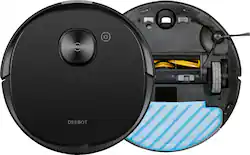
ECOVACS Robotics - DEEBOT T8 AIVI Vacuum & Mop Robot with Advanced Laser Mapping and AI Object Recognition & Avoidance - Black
Model: OZT8AIVI
SKU: 6407315
This item is no longer available in new condition. See similar items below
Customers are pleased with the DEEBOT T8 AIVI's mapping, vacuuming, and mopping capabilities, frequently praising its navigation and obstacle avoidance features. However, some users experienced issues with battery life and object recognition, while others found the dustbin size to be insufficient. The app's usability also received some negative feedback.
The vast majority of our reviews come from verified purchases. Reviews from customers may include My Best Buy members, employees, and Tech Insider Network members (as tagged). Select reviewers may receive discounted products, promotional considerations or entries into drawings for honest, helpful reviews.
I like the job this robot vacuum does. I have it scheduled to clean every day and it has helped keep my place clean as I want to make sure the area is open for cleaning. It does a decent job of switching between the carpet and non carpet areas. Also, it has a mopping plate that sucks up dirt on one end and mops the floor on the other end. Also, it automatically avoids any carpet if the mopping plate is installed. I did purchase an upgraded mopping plate pro and that does a super job of mopping up and removing stubborn stains. Not sure why they don't make that standard because the mopping plate that comes with the unit works best on a floor with very light stains. Overall I am glad I got this unit as I have mostly hardwood floors and a few area rugs. I am really enjoying having a cleaning servant available at all times!
Posted by Calvin
Our family has had two other brands of robot vacuums, but none with all of the features offered by the Deebot OZMO T8 AIVI. One’s first impression upon opening the box is that this robot vacuum is the nicest looking of any we have had. The matte black color and smooth, metallic finish make this vacuum blend with other finishes in one’s home as opposed to those that offer less appealing materials or colors. Ecovacs includes an easy to follow “cheat sheet” for setting up the T8. One basically has to remove the protectors, install the side brushes, set up the docking station and place the Deebot on the docking station and power on. A QR code is provided to download the Ecovacs Home app to complete set up. Simply use the in-app scanner to scan the QR code on the vacuum itself or the one provided on the instructions. Be sure to enable one’s location to complete the instructions within the app to complete set up. The Deebot vacuum will provide voice instructions when it is connected or when one needs to proceed to the app to complete further steps. The T8 can be set up with Amazon Alexa or Google Assistant. In the Alexa app enable the Ecovacs Deebot skill, then sign in to your Ecovacs account and finally select the robot vacuum to use voice control. This is a nice feature for those that like the quick voice command ability to ask the Deebot to start and stop cleaning and to ask the Deebot to go back to its charging dock. The Ecovacs app has some great features beyond the obvious capabilities to start, stop and pause cleaning. Once the T8 has mapped out one’s home it will show a diagram of the mapping within the Start Cleaning option. Details can be seen of the square footage, time to clean and other data such as a cleaning log of all vacuum sessions. The T8 will send messages when cleaning is complete (with the option to move obstacles and re-clean those areas), tips on improving cleaning efficiency and if it gets stuck a request to free it. In our use thus far it has rarely gotten stuck. The performance of the T8 is improved by its use of AIVI or artificial intelligence and visual interpretation technology. It does an excellent job of identifying obstacles such as shoes, cables and other household obstacles. We have one room with a step down and the robot vacuum easily senses the drop off and adjusts its direction accordingly. In vacuum only mode the T8 will increase the suction power automatically when it is operating on carpeted floors. We had excellent performance by the T8 on bare floors, carpeting and area rugs. The T8 operates with a fairly low noise level compared to other vacuums we have had, but one will notice the increase in sound when in use in carpeted areas. There is also an interesting Video Butler feature that utilizes the front camera to allow one via the app to see live video, use remote photo capture, use voice message or remote control. A password is set up to control access to this feature and no data is uploaded to the cloud. An optional lens cover comes with the OZMO T8 should you not want to use this feature. Some of the customization features available in the Ecovacs Home app that really make the T8 an exceptional vacuum to use are the ability to utilize the mapping of your home to define “no go” areas for the T8. No more worrying about which doors are closed to limit a vacuums access. Also, set virtual boundaries to define specific areas and rooms for the T8 to clean. Some other additional settings available within the app are to adjust the vacuum power, water flow level and to set up cleaning schedules. To utilize the mopping feature simply remove the water reservoir and fill with purified water or softened water. Click the microfiber cleaning cloth into place on the underside of the reservoir and the T8 will now know it is ready for simultaneous vacuum and mopping mode. The mopping function is a great option for convenient cleaning for spills, dust control and everyday dirt. This doesn’t replace the need for a more thorough mopping on a less infrequent basis, but it does an excellent job of keeping floors spiffy in a quick and convenient fashion. Note that Ecovacs advises not to use any cleaners in the reservoir. Recognition of carpeted floors by the T8 enable it to avoid these areas while in mopping mode. With the modular design of the OZMO T8 it will be interesting to see some of the accessory items that are available to use with the T8. One is an Auto-Empty Station (automatically empties the Deebot’s dustbin) and the other is the OZMO Pro Electric Oscillating Mopping (up to 480 times per minute). The one feature I did not see on the Deebot was any notification via the app that the dustbin is full. It will give an alarm sound when the filters in the dustbin are dirty. There are less expensive options for robot vacuums, but the Deebot OZMO T8 AIVI stands out with the excellent performance it will provide in both vacuuming and mopping as it utilizes more accurate mapping and AIVI technology. The app is very user friendly and offers great features for customizing cleaning schedules, areas and vacuum settings.
Posted by allib
Wow! I never thought I would own any kind of inanimate object that could do all this without my help! DeeDee Deebot came to live with us on Tuesday the 21st of April, exactly ten days ago. The friendship and assistance that she has given to me, especially after seven weeks of quarantine, has been welcomed with amusement and a degree of excitement. I have owned ‘high end’ robotic vacuums before so I expected her to be loaded with technological advancements, but I had no idea that the Deebot Ozmo T8 Aivi Robot Vacuum and Mop would become such a helpful friend that was capable of truly relieving me of the onerous cleaning chores of vacuuming and mopping, and be able to do so in such an independent manner while giving me stress-free relief from having to do it myself. The extend of this robotic vacuum and mop are major. Its capabilities seem to be tremendous and more extensive than this review will cover. To start with, the Deebot Ozmo T8 Aivi Robot Vacuum and Mop is designed to be durable, functional, and aesthetic. Only quality materials appear to be used. The product more than adequately covers the basic needs of both - a vacuum and hard surface floor cleaner and it does a very thorough to exceptional job with cleaning all floor surfaces. She comes off her charging base with a mission to clean and deep cleans she does. She can even vacuum and mop at the same time. Her capabilities let her know when to quit mopping when she reaches a carpeted service and she continues with vacuuming only. Unlike other robotic vacuums that I have owned, she has a tremendous capability to maneuver around numerous obstacles, almost as if she is dancing around them. This is due in large part to her high-powered camera that enables her to see objects exactly as they exist in the space. (Not that I particularly like her having to do so, but I am living and working in the same space.) She will even go back and cover the area where something was in her way if it has been moved while she is still working and off her charging station. The camera is significant in helping her visually see objects and comfortably create her mapping pattern as she moves throughout the space. With the use of D to F Laser Detection DeeDee maps out her work pattern to aerospace-standards at 2 mm precision. The precise nature of this perfectionism contrasts with my former robotic vacuums that had to slightly bump furniture and objects in order to establish a mapping pattern for cleaning. Ofcourse, with each new model that bumping of furniture became less, but it still had to happen for the robot to establish its parameters and workspace to clean. As if this precise mapping of the cleaning area by DeeDee is not great enough, her ability to designate specific areas for cleaning is not limited to just one cleaning routine. Instead, she can create dozens of work patterns that include virtual boundaries that inhibit her from venturing into certain areas, i.e. pet and child spaces. She can even take her command for cleaning each of these planned routines through both Google Assist and Amazon Alexa. The vacuum collects dirt and dust into a dust bin that is easily emptied. There is also a replaceable filter. The mopping is designed to be simple by using distilled water and easy snap on removable mopping pads that can be cleaned and/or replaced. DeeDee is extremely quiet. I must stop working and listen to be sure that she is working. If she does run into a problem, the app on my phone immediately tells me of the attention that she might need. Her run time is around 3 hours although the manufacturer’s specifications indicate that it could be up to 3 hours and over. When her dust bin is full, she returns to the charging station. If you need to have her return before she is ready, just push on her top button for 3 seconds and she will take off toward the charging station. Remarkably she can find her way through rooms, a maze of things out of place across the house and just as smoothly as the Starship Enterprise docks, she docks herself back at the charging station With the high-powered camera, DeeDee offers an additional capability of a video on board. She can stream live video and allow you, the human, to talk through the phone app to pets, etc. at home. I haven’t done this yet; I have just been very intrigues with her exceptional housekeeping skills. I recommend this product and promise that you won’t be sorry for the purchase.
Posted by SwigglesMilam