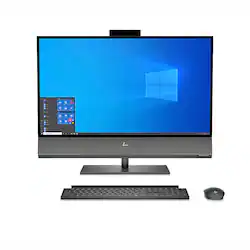
HP - 31.5" All-In-One - Intel Core i7-9700 - 16GB Memory - NVIDIA GeForce GTX 1650 - 1TB Hard Drive
Model: 32-A0010
SKU: 6419717
This item is no longer available in new condition. See similar items below
Customers recognize the 31.5" All-In-One's impressive screen size, frequently praising its clarity, color accuracy, and suitability for various tasks such as design work and split-screen usage. The high-quality speakers also receive significant positive feedback, with many users describing the audio as outstanding and fantastic. There were no reported negative comments.
The vast majority of our reviews come from verified purchases. Reviews from customers may include My Best Buy members, employees, and Tech Insider Network members (as tagged). Select reviewers may receive discounted products, promotional considerations or entries into drawings for honest, helpful reviews.
$2000 computer arrived with box torn and smashed to the point the computer could be seen through the torn hand hold hole in the side. I should have refused delivery. I know the computer was dropped when that hand hold gave way and tore. There was also no metallic security tape at plastic box tab to indicate the item had not been previously opened (ie to prove the item was not a return.) Upon start up, system had to run repairs on itself. Computer makes an annoying quiet little tickety tickety sound non-stop which is driving me crazy. Also Win10 updates don't play nice with huge 4K screen, making dropdown menu fonts, right click, tabs and other items microscopic. I didn't pay the $$$ for the exceptional screen to have to decrease the resolution so Win10 doesn't freak out. The computer is great except for the ticking (it's NOT the speakers); I sure hope it is not the hard drive getting ready to fail or internal damage from the careless shipping. The Win10 font glitches need to be fixed. Due to lousy shipping, I will not order a large expensive item from Best Buy again. AZ deliveries are never mangled to the degree this HP - 31.5"- All -In-One - Intel Core i7-9700 - 16GB Memory - 1TB Hard Drive - Black was.
Posted by PM3720
Great screen, fast processor, speakers are fantastic. The On Screen Display (OSD) button was hard to find as it is hidden on the bottom right side. It is also a very clunky joystick type of button. Of course, like all companies today the manual (online only) was written for various like models (I suppose because it is cheaper that way) and written very vague. The reason I needed to figure out the OSD button was in an attempt to connect my security cameras dvr just like I did with my previous HP All-In-One. When I wanted to view the cameras, I would click the OSD button to switch from PC mode to “game mode”. It worked very similar on this new HP, but when the computer was asleep, if my cameras detected motion and started to record to the dvr, it would automatically switch the computer to game mode which would leave the monitor on constantly with the camera view. I contact HP and after being transferred in circles to different techs, they either didn’t understand my issue, or couldn’t figure out if this was normal for the newer version computer. The only way to get any further help was to pay for support on my brand new computer that doesn’t seem to be working the way I believe it should. Additionally, the Q quick charge doesn’t seem to work. It won’t activate and charge my Samsung S20 which is the only device I own to test the system. The phone charges in my Toyota Tacoma, so I know it works. I am a fan of HP and have used their devices for years, but I think they are going the way of many other tech companies and trying to stuff so many ancillary systems in their products that they can’t support then when they don’t work. Overall, I still like the computer for my uses, but I wouldn’t recommend it to anyone!
Posted by Mike
I’ve only had this computer for about a month now, but so far I am loving it! I’m full time med student and with school being online right now due to Covid, a fast and fully functional computer was highly needed. Speaker is amazing. Screen is phenomenal. I like that the camera can disappear into the monitor for ease of privacy. All parts are heavy, showing they are very well made, I’m not concerned over dainty parts that will likely break. Only a couple of small glitches when watching my lectures, but likely because of video quality and less about computer quality. The only thing I’m missing is a touch screen.
Posted by Heather