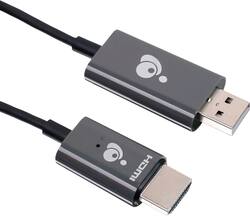
IOGEAR - Mini Wireless Screen Sharing - Black
Model: GWAVRD
SKU: 6474770
This item is no longer available in new condition. See similar items below
Customers express satisfaction with the Mini Wireless Screen Sharing device, particularly for its easy setup and screen mirroring capabilities. Many users find it simple to use and appreciate the ability to wirelessly share content from their Apple devices to their TVs. However, some customers have concerns about its video streaming capabilities, suggesting that it may not be suitable for heavy streaming. Additionally, a few users have mentioned compatibility issues, particularly with PCs and smaller iPhones.
The vast majority of our reviews come from verified purchases. Reviews from customers may include My Best Buy members, employees, and Tech Insider Network members (as tagged). Select reviewers may receive discounted products, promotional considerations or entries into drawings for honest, helpful reviews.
I was looking on the internet for a device that would mirror my mobile to my smart TV. Many HDMI sticks, (roku, fire, and cromecast) needed WIFI to operate, I needed something that would work without a network. The iogear mini was just what I needed to work wherever I was on any TV, motels, or friends houses to show all my mobile phone information on a small screen to a big screen. Thanks to it's built in WIFI it'll cast anything that is on laptop, or mobile. Videos, pictures, cast in 1080 HD quality. I have a unlimited data plan, so no worries of data overage, and don't need to rely on using my hotspot data. It's a cleaver helpful device, and I'm very pleased of its proformance.
Posted by Tommy
The IOGear mini wireless screen sharing device works acceptably when I use it with my Windows 10 laptop. After plugging in the device to my tv and going through the set up process using the quick start guide, I was able to wirelessly mirror content and extend my computer display on the tv. Keep in mind though, there is a slight lag in the mirrored display. I was able to wirelessly stream video and audio to my television and projector. When using it with a Windows 10 laptop, there is really no limitation on what can be displayed. It acts as a second display to the laptop just like having an hdmi connection, but in this case without the physical wire from the laptop to the second display. I opened up my chrome web browser on my laptop, dragged the browser tab to the wireless display (my television set), and streamed movies from Vudu, Movies Anywhere, and Netflix. The quality of the video from the wireless device leaves much to be desired, though. The video stream was occasionally pixelated when viewed wirelessly using the device. Also, video streaming isn’t smooth. It appears a few frames are skipped as the wireless device struggles to keep up with the frame rate. It was not a satisfying experience, and I couldn’t watch more than a few minutes of the movie using the wireless device. Other than video, the wireless device is great for showing static content such as spreadsheets, documents, power point. This device works well for business presentations. If you’re planning to use the IOGear Wireless Screen Sharing for your Android smartphone, you will be disappointed. I’m using a Google Pixel 6 phone, and it was such a frustrating experience trying to get the wireless device to connect with the phone. More than half the time, my phone couldn’t find the IOGear wireless device. It was hit and miss. Sometimes, it found the device quickly, and at other times, it kept searching and searching and could not locate the IOGear device. I tried using other phones, and it was the same experience, leading me to conclude that the problem was with the device and not the phones. When you do successfully connect, you will quickly find out that the content you can mirror is limited. If you’re planning to only use it to view pictures and home video on a television or projector, then you will be fine. However, the moment you want to wirelessly stream digitally protected content from providers that I listed above, you will not be able to do so. I am certain that a number of customers are interested in purchasing this device to wirelessly send movies from their smartphones onto a television or projector. If that is the case, then this is not the device you should purchase. It won’t work. Do I recommend the IOGear mini wireless screen sharing device? For business purposes where you will be making presentations featuring static content, this wireless device is a great convenience. However, for use for anything else, such as displaying video content for entertainment, then I would say this is a hard pass as there are other devices out there that can do better.
Posted by lambda100
I had high hopes for this mini wireless streaming device, especially since it's exactly what I've been needing for use in my travel trailer. I'm always wanting to stream downloaded videos on the main tv when trapped inside my RV during bad weather and no wi-fi, which happens a lot. Other streaming devices I've tried requires a wi-fi network, or a special app or has some other issue that doesn't work for our situation. Then we learned about this device that creates its' own network and works without wi-fi. We were excited. As soon as we got it we tested it out in our home. Install is easy enough, just plug one side into an open hdmi port and the other into a usb port. The usb port is used to power the device, so if you have an older tv without one, you'll need a charging type block to plug the usb side into an outlet. Unfortunately this doesn't come with one so be prepared for that if you need it. With it plugged in just switch your tv's input to the appropriate hdmi port and you'll see the welcome screen with all the info needed to get connected. Although some of the instructions are a bit ambiguous and not the easiest to understand. Basically just find the streaming device in your list of available networks from your phone/laptop and connect to it using the password on the screen. Once connected all you have to do is open up a screen sharing app (smart view on android and air play on iPhone), and you should see the device as an available option to stream to. Select it and voila! You'll see your devices screen mirrored on the big screen. Now to try out some video and see how it does, and this is where the disappointment sets in. First up I had my wife try to stream from her iPhone (12 pro) since she's the one that would use it the most. She opened Amazon Prime Video and started a show, so far so good, then the video started playing and immediately froze while the audio kept going, while the video was still playing on the iPhone just fine. This was being streamed using cell data though so next she tried it with a downloaded video, exactly how we would use it in our rv, and the exact same thing happened. Next she opened up HBO Max. This time the video on the TV just went black. Now 0 for 2 she pulls up YouTube and then Netflix. Video did work with those apps, but more on that in a bit. Next I tried using my Android (Galaxy Note 20 Ultra) and didn't have those issues with Prime Video and HBO Max. All the apps I used streamed the video. There's a big problem though. In all the video streams, the ones that worked from the iPhone and all the ones from my Android, the quality was horrible. The video was extremely laggy and choppy and most of the time the audio was out of sync. No matter what video source we tried we experienced the same issue, whether the video was downloaded or not. Even video captured by the phone's cameras played back choppy on the tv. In all cases the quality is so bad it makes it all unwatchable, making this device pretty much unusable. There's also the option of connecting the device to a router, which allows you to connect to the internet while also streaming to the device, but through the router. I wouldn't think that would improve anything though as now you'd be passing through another device, but I never could find out. To set it up you have to go to a specific IP address for the device from a web browser, but in every browser I tried, I couldn't get anything to load. Even if it did help, it wouldn't be an option for my main use case of having this in my rv. This device isn't completely unusable though. As I said earlier it mirrored my phone's screen just fine. So if you just needed to stream static content, like photos or presentations at work, this does that job just fine. Unfortunately that's not the primary reason I needed this. To sum it up, if you're looking for something to stream video to your tv, this is a hard pass. If all you need is a way to stream pictures onto a big tv, then this will work for that at least. Overall though I can't really recommend this.
Posted by CKent