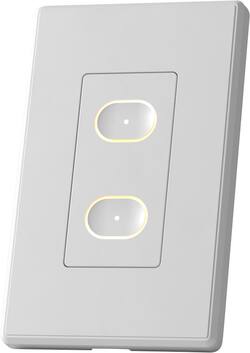
LIFX - Smart Switch - White
Model: LFSPWHT1FUS
SKU: 6481970
This item is no longer available in new condition. See similar items below
Customers are delighted by the Smart Switch's ease of use, sleek design, broad compatibility, haptic feedback, and overall quality. However, some customers have expressed concerns regarding the app's intuitiveness and occasional unresponsiveness, as well as difficulties during the installation process. Additionally, a few users have reported issues with WiFi connectivity, which can be frustrating.
REVIEW LIFX - SMART SWITCH – WHITE Model:LFSPWHT1FUS Best Buy Tech Insider Network GOOD SWITCH – BEST FOR LIFX BULBS SUMMARY: I had no major problems installing the LIFX – SMART SWITCH. It seems well built, etc. At its heart it is really more about the Two (2) WiFi connected smart buttons that can trigger other LIFX devices (bulbs). As a bonus, it also has a built in ON/OFF RELAY SWITCH (non-dimming) to support non-LIFX bulbs and other 120 volt devices that might be attached to and outlet / switch. Because the LIFX – SMART SWITCH (bottom button) uses an instant on relay, technically you can also use this to control a switched electrical outlet (within wattage limits specified). This would be perfect, for example, if you have a room with no built in lights, but one of the outlets is on a switch for a floor lamp. However, if you already have built in lights, and want to be able to dim them, this device will not do that (confirmed with support). SETUP: I have a house full of dimmable LED lights, and I have been working my way through house replacing my old on/off switches with “Smart Switches” from a different mfg. Most of my legacy light switches just have 2 black wires + ground, so I was at first confused that the LIFX – SMART SWITCH had Black, White, Red + ground. Once I realized it was not a traditional light switch or dimmer switch but was instead a software controlled “smart relay”, I was easily able to wire it appropriately. It did take some experimentation as the LIFX – SMART SWITCH pays attention to which “black” wire carries the load. Just wire one black house wire to the black switch wire and the other black house wire to the red switch wire (white to white and green to ground). If you don’t get any lights on the switch when you turn the breaker back on, then reverse which black house wire goes to the red wire on the switch (disclaimer, consult an electrician, etc). Once I had it wired correctly, I pressed both buttons for 10 seconds to put the switch into discovery mode, and the app was easily able to find the switch and allowed me to configure it. However, right away I realized, I could not use the app/buttons to dim my lights. On/Off only. For me this is not what I want. I will need to move the the LIFX – SMART SWITCH to a different location, where I only care about on/off or I want to only use “smart buttons”. I was not able to test with LIFX lights. I have the switch 5 feet from my router and it shows 4/5 bars signal strength. The website says their switches are only on the 2.4Ghz network and I can confirm it is connecting to the 2.4Ghz network. TIPS FOR GEEKS At times, the phone App would just not respond to any button presses. I would eventually get an error message along the lines of “app has stopped responding”. I could only get the app working again by rebooting the phone. Then it would work for a few hours, then die again. Eventually, I could only get it to work by uninstalling the app, and reinstalling the app. Soon the switch itself stopped connecting to the internet and would not control anything from the “top” button which requires the internet. Only the bottom button will work when offline (from the web) to manually trigger the relay of hardwired lights. The error message in the manual says an orange light means it can’t connect to the “cloud”. This means it is connected to my WiFi, but can’t get “out” to the web. My default DNS was comcast/xfinity 75.75.75.75 and that domain was having problems resolving whatever name was being requested. I switched my DNS settings on my router (and DHCP settings) to Google DNS 8.8.8.8 and went through setup again, and now it all seems to be working, even the phone app has stopped crashing. My best guess is this was a DNS issue. PROS: - Well Built / Good Quality - Compact Size overall easily fits into existing boxes - Attractive and nicely backlit - Does not require a Hub to control the device - On/Off of hardwired lights/outlets works even if not connected to the internet - Included wall plate (1 gang) SUMMARY If you need 2 buttons to control your other LIFX devices this works perfectly, they also make switches with more buttons if you just need more buttons. It also connects to the various platforms (IFTTT / SmarThings) so you can use these buttons on those platforms. If you have a switched outlet that you want to keep as a switched outlet, the LIFX – SMART SWITCH will work for that as well. However, if you want to dim non-LIFX bulbs, this will not work for that use case. I assume they did that for safety reasons, but it would be nice to at least be able to turn on dimming as an option, even if it came up with 10 warnings before it let you enable a voltage controlled dimming mode. I’m knocking off one star, because they really do not make it overly clear that dimming is not supported, which I assume will lead to many unhappy customers and returned devices. If you don’t need dimming it is great otherwise.
Posted by TheOffice1234
I love these switches. They can replace a wall switch. One button controls the former switch while the other button is used to trigger various events. I does take a lot of patience to set them up. It might seem like it isn't working until you try one more time... then it works. A recent update allows you to change the color of the LEDs that illuminate the buttons. There is haptic feedback that can be adjusted, as well. This is my favorite Smart Home switch... for what it's worth ;)
Posted by formerx69
I have a number of smart bulbs in my home and of course, when I have them installed in overhead lights I have to make sure my light switch is in the fixed 'ON' position. It gets a little tiring having to ALWAYS use an app or voice control so I thought I'd test out the LIFX switch. Installation: The installation is pretty vague, though I would imagine intentionally so given the fact that you're messing with live electricity. After cutting power at the breaker and pulling out my existing dumb switch I was disappointed to find that I did not have 4 neatly color coded wires to align with the wires on the back of the smart switch. Fortunately my father in law is an electrician and was able to help me identify the load, line, ground, and neutral. The big thing for me was that I had two black wires - one was the line (hot) and the other went to the bulbs and I had no idea which was which. Once I got the wires figured out the rest of the physical install was pretty easy. The holes accepting the mounting screws are oval and had lots of room for maneuvering which probably makes sense to allow for adjustments, but it was a pain in the butt to keep the switch level because it would want to travel to one side of the hole as you tightened the screws. Make sure your switch is tight and straight before snapping on the cover plate. Once it's on it's kind of a pain to pry back off. The app install definitely a one-star experience. Tapping + to add a switch was fine, then it instructed me to connect to the wif-fi signal coming from the LIFX, that went OK, then it told me to select my Wi-Fi....it spun....and spun....and the only option to select was 'other'. So I tapped other and typed in my wifi name and password. Nothing. Finally I found another review on here that had the same issue and using 'other' worked for him, so I tried again. I eventually got it to work by selecting the different security options. I mean who knows off the top of their head if they use WPA2, or WPA2 Mixed, or WPA2 Double Secret Probation edition? Once I got passed that the rest was easy enough. I was able to program the top button to turn on my smart bar and bottom button toggles my ceinling fixture. I was a little perturbed that the switch does not appear to be HomeKit compatible even though all my LIFX bulbs are. Fortunately, everything I want to control is available from the LIFX app, but I would have loved to be able to easily control my overhead light with HomeKit too. In conclusion, if you've invested in LIFX bulbs then I would recommend the switch. Frustrations aside with the app, the quality of the product is good, the look and feel are exactly what I wanted, and it meets my needs. If you want a versatile switch that integrates with your other ecosystems I would do your research and look for alternatives.
Posted by Farns
The vast majority of our reviews come from verified purchases. Reviews from customers may include My Best Buy members, employees, and Tech Insider Network members (as tagged). Select reviewers may receive discounted products, promotional considerations or entries into drawings for honest, helpful reviews.