Customer Ratings & Reviews



- Model:
- LFSPWHT1FUS
- SKU:
- 6481970
Rating by feature
- Value
Rating 4.4 out of 5 stars
- Quality
Rating 4.5 out of 5 stars
- Ease of Use
Rating 4.1 out of 5 stars
Customers are saying
Customers are delighted by the Smart Switch's ease of use, sleek design, broad compatibility, haptic feedback, and overall quality. However, some customers have expressed concerns regarding the app's intuitiveness and occasional unresponsiveness, as well as difficulties during the installation process. Additionally, a few users have reported issues with WiFi connectivity, which can be frustrating.
This summary was generated by AI based on customer reviews.
- Pros mentioned:Compatibility, Ease of use, QualityCons mentioned:App, Wifi connectivity

GOOD SWITCH – BEST FOR LIFX BULBS
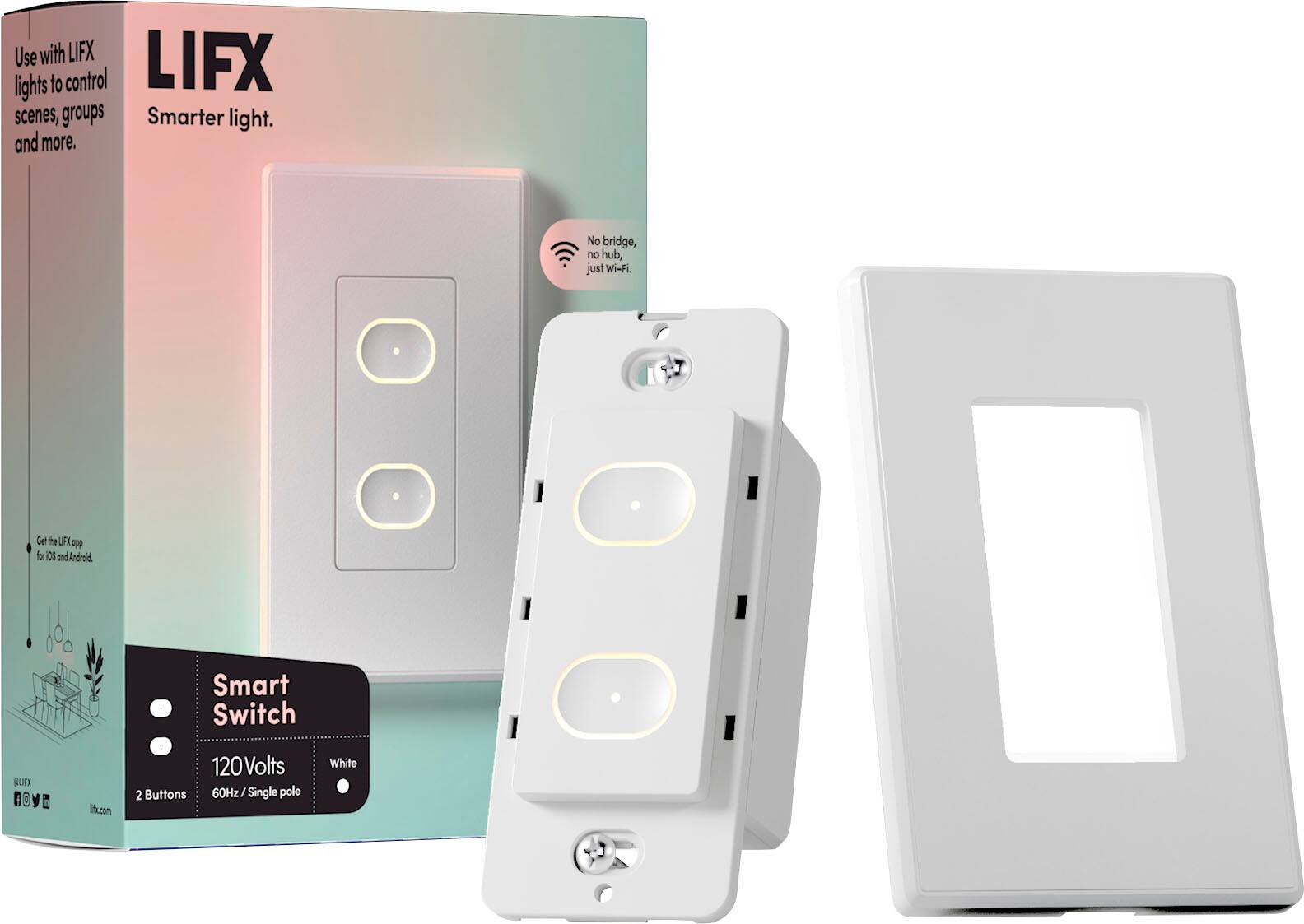
|Posted .This reviewer received promo considerations or sweepstakes entry for writing a review.REVIEW LIFX - SMART SWITCH – WHITE Model:LFSPWHT1FUS Best Buy Tech Insider Network GOOD SWITCH – BEST FOR LIFX BULBS SUMMARY: I had no major problems installing the LIFX – SMART SWITCH. It seems well built, etc. At its heart it is really more about the Two (2) WiFi connected smart buttons that can trigger other LIFX devices (bulbs). As a bonus, it also has a built in ON/OFF RELAY SWITCH (non-dimming) to support non-LIFX bulbs and other 120 volt devices that might be attached to and outlet / switch. Because the LIFX – SMART SWITCH (bottom button) uses an instant on relay, technically you can also use this to control a switched electrical outlet (within wattage limits specified). This would be perfect, for example, if you have a room with no built in lights, but one of the outlets is on a switch for a floor lamp. However, if you already have built in lights, and want to be able to dim them, this device will not do that (confirmed with support). SETUP: I have a house full of dimmable LED lights, and I have been working my way through house replacing my old on/off switches with “Smart Switches” from a different mfg. Most of my legacy light switches just have 2 black wires + ground, so I was at first confused that the LIFX – SMART SWITCH had Black, White, Red + ground. Once I realized it was not a traditional light switch or dimmer switch but was instead a software controlled “smart relay”, I was easily able to wire it appropriately. It did take some experimentation as the LIFX – SMART SWITCH pays attention to which “black” wire carries the load. Just wire one black house wire to the black switch wire and the other black house wire to the red switch wire (white to white and green to ground). If you don’t get any lights on the switch when you turn the breaker back on, then reverse which black house wire goes to the red wire on the switch (disclaimer, consult an electrician, etc). Once I had it wired correctly, I pressed both buttons for 10 seconds to put the switch into discovery mode, and the app was easily able to find the switch and allowed me to configure it. However, right away I realized, I could not use the app/buttons to dim my lights. On/Off only. For me this is not what I want. I will need to move the the LIFX – SMART SWITCH to a different location, where I only care about on/off or I want to only use “smart buttons”. I was not able to test with LIFX lights. I have the switch 5 feet from my router and it shows 4/5 bars signal strength. The website says their switches are only on the 2.4Ghz network and I can confirm it is connecting to the 2.4Ghz network. TIPS FOR GEEKS At times, the phone App would just not respond to any button presses. I would eventually get an error message along the lines of “app has stopped responding”. I could only get the app working again by rebooting the phone. Then it would work for a few hours, then die again. Eventually, I could only get it to work by uninstalling the app, and reinstalling the app. Soon the switch itself stopped connecting to the internet and would not control anything from the “top” button which requires the internet. Only the bottom button will work when offline (from the web) to manually trigger the relay of hardwired lights. The error message in the manual says an orange light means it can’t connect to the “cloud”. This means it is connected to my WiFi, but can’t get “out” to the web. My default DNS was comcast/xfinity 75.75.75.75 and that domain was having problems resolving whatever name was being requested. I switched my DNS settings on my router (and DHCP settings) to Google DNS 8.8.8.8 and went through setup again, and now it all seems to be working, even the phone app has stopped crashing. My best guess is this was a DNS issue. PROS: - Well Built / Good Quality - Compact Size overall easily fits into existing boxes - Attractive and nicely backlit - Does not require a Hub to control the device - On/Off of hardwired lights/outlets works even if not connected to the internet - Included wall plate (1 gang) SUMMARY If you need 2 buttons to control your other LIFX devices this works perfectly, they also make switches with more buttons if you just need more buttons. It also connects to the various platforms (IFTTT / SmarThings) so you can use these buttons on those platforms. If you have a switched outlet that you want to keep as a switched outlet, the LIFX – SMART SWITCH will work for that as well. However, if you want to dim non-LIFX bulbs, this will not work for that use case. I assume they did that for safety reasons, but it would be nice to at least be able to turn on dimming as an option, even if it came up with 10 warnings before it let you enable a voltage controlled dimming mode. I’m knocking off one star, because they really do not make it overly clear that dimming is not supported, which I assume will lead to many unhappy customers and returned devices. If you don’t need dimming it is great otherwise.
I would recommend this to a friend - Pros mentioned:Ease of use, Haptic feedback
Tricky to set-up but impressive when you do
||Posted . Owned for 3 weeks when reviewed.This reviewer received promo considerations or sweepstakes entry for writing a review.I love these switches. They can replace a wall switch. One button controls the former switch while the other button is used to trigger various events. I does take a lot of patience to set them up. It might seem like it isn't working until you try one more time... then it works. A recent update allows you to change the color of the LEDs that illuminate the buttons. There is haptic feedback that can be adjusted, as well. This is my favorite Smart Home switch... for what it's worth ;)
I would recommend this to a friend - Pros mentioned:Design, QualityCons mentioned:App, Installation
I mean...It looks good?
|Posted .This reviewer received promo considerations or sweepstakes entry for writing a review.I have a number of smart bulbs in my home and of course, when I have them installed in overhead lights I have to make sure my light switch is in the fixed 'ON' position. It gets a little tiring having to ALWAYS use an app or voice control so I thought I'd test out the LIFX switch. Installation: The installation is pretty vague, though I would imagine intentionally so given the fact that you're messing with live electricity. After cutting power at the breaker and pulling out my existing dumb switch I was disappointed to find that I did not have 4 neatly color coded wires to align with the wires on the back of the smart switch. Fortunately my father in law is an electrician and was able to help me identify the load, line, ground, and neutral. The big thing for me was that I had two black wires - one was the line (hot) and the other went to the bulbs and I had no idea which was which. Once I got the wires figured out the rest of the physical install was pretty easy. The holes accepting the mounting screws are oval and had lots of room for maneuvering which probably makes sense to allow for adjustments, but it was a pain in the butt to keep the switch level because it would want to travel to one side of the hole as you tightened the screws. Make sure your switch is tight and straight before snapping on the cover plate. Once it's on it's kind of a pain to pry back off. The app install definitely a one-star experience. Tapping + to add a switch was fine, then it instructed me to connect to the wif-fi signal coming from the LIFX, that went OK, then it told me to select my Wi-Fi....it spun....and spun....and the only option to select was 'other'. So I tapped other and typed in my wifi name and password. Nothing. Finally I found another review on here that had the same issue and using 'other' worked for him, so I tried again. I eventually got it to work by selecting the different security options. I mean who knows off the top of their head if they use WPA2, or WPA2 Mixed, or WPA2 Double Secret Probation edition? Once I got passed that the rest was easy enough. I was able to program the top button to turn on my smart bar and bottom button toggles my ceinling fixture. I was a little perturbed that the switch does not appear to be HomeKit compatible even though all my LIFX bulbs are. Fortunately, everything I want to control is available from the LIFX app, but I would have loved to be able to easily control my overhead light with HomeKit too. In conclusion, if you've invested in LIFX bulbs then I would recommend the switch. Frustrations aside with the app, the quality of the product is good, the look and feel are exactly what I wanted, and it meets my needs. If you want a versatile switch that integrates with your other ecosystems I would do your research and look for alternatives.
I would recommend this to a friend - Pros mentioned:Compatibility
Great Switch, especially if you use LIFX bulbs!
|Posted .This reviewer received promo considerations or sweepstakes entry for writing a review.LIFX is known for their smart lights with many bulbs having customizable colors. What you often run into, is the need to use the LIFX app to control the smart light, while most smart switches will simply power on your ceiling fan or standard lighting. LIFX looks to bridge this gap, by offering a switch that will not only perform the basic power on/off functions of other switches, but also offer independent control of your LIFX bulbs on other fixtures. In the box you’ll find the switch, with an attached wall plate, screws for securing to your wall socket, and four twist on wire connectors. Installation will require a Philips screwdriver to secure the switch to your wall. You’ll need to remember to turn off the power to your light switch, to ensure you eliminate the risk of electrocution during installation. I made note of the current wiring, as you’ll need to identify the hot, lead, neutral, and ground wire. If you’re in a newer home, you’ll either have a red wire for the switch, black for the lead, green for ground (or exposed copper wire), and white for neutral. If you’re already comfortable with installing light switches, installation will only take a few minutes. After which you can power the switch back on, and begin set up in the LIFX app. There is an indicator light in the upper left which will provide you with a status during boot and setup. In my case, the switch wouldn’t properly start up and broadcast its initial Wi-Fi signal but was able to get around this by resetting the switch by pressing and holding both buttons until the status lights flashed green. I should note the status light will only flash or show the light for about a minute, and then will display the status light about every half hour until the connectivity issue or setup is complete. This is where the app setup was a bit finicky, as the device walk through would never display my Wi-Fi network (or any network), necessitating that I hit “Other” and manually enter my network information. Once I realized it wasn’t scanning for Wi-Fi, entering the information took only a minute and it connected right away. IF you must manually enter the network name and password, you’ll need to know the security standard (WPA2, etc.) to properly connect. In my case, I didn’t run into any further issues once the device was properly set up in the app, and the device was up to date when installed. Once the app has set up the switch, you’ll go through the process of confirming the groups and location of the device. The app will ask you about setting up the two buttons to control your normal switch function and add a smart bulb to the first button. In my case, I had an existing LIFX smart bulb installed another light fixture and was able to select this from the device list. Once you’ve programmed the two buttons, the device is essentially ready to go! If you’ve already setup LIFX with HomeKit and Alexa, the switch is immediately available using either Smart Assistant (Siri and Alexa), or you can set up your Google Assistant if you’re using their platform. The switch itself displays a nice warm amber glow on either button when they’re turned on, and a slightly dim amber light when powered off; making the switch easy to find in the dark. I found the LIFX button (topmost button) for the bulb was instantaneously powering on/off my LIFX bulb without delay. The bottom button was used to power my ceiling fan, and unlike other buttons there is no click noise or any mechanical movement. It’s simply a touch panel, and when engaged will light up the button being tapped. There is no dimming feature to this switch, as it’s simply turning on/off the connected bulb or fixture. If you’re using a LIFX switch for the top button, it will simply turn on the device on the most recent setting (for instance will turn on purple if it was set to purple when powered off). I have yet to experience any power loss issues and haven’t run into any connectivity problems with the switch. The switch also doesn’t benefit from “Power Restore” setting in the app, which would return the switch to its previous power state in the event of power loss. I can only assume if the power goes out, the switch will just turn back on. It will not, however, disable the feature on your existing LIFX bulbs if you’ve already toggled the setting on. The LIFX app does offer scheduling options for your switch and bulb; so, it’s easy to select times for power on/off events in the app (including sunrise/sunsets). If you’re already using Alexa or Siri to control your lights, you’ll find that you can add them to routines without any issues. Overall, the LIFX switch offered more functionality than my previous smart switch, was easy to install, and had the benefit of controlling my LIFX bulb group in the process. The single gang size makes this ideal for multi-switch wall plates, alongside other switches, and worked well with my Mesh Wi-Fi network. Any issues seen during installation were easily rectified using the touch buttons to reset the device, and the switch has been very responsive in the LIFX app, with my Alexa voice control, and the warm glow makes it easy to see when walking into a dark room.
I would recommend this to a friend - Pros mentioned:Haptic feedbackCons mentioned:Installation
A versatile Wi-Fi switch with options
|Posted .This reviewer received promo considerations or sweepstakes entry for writing a review.In short, it’s a Wi-Fi light switch that does two things. Operate Standard lights with a relay or LIFX lights via Wi-Fi. You can run LIFX lights, single or in a group and up to 650 watts of Standard lights on the relay circuit. You set it all up with the app. Haptic feedback is a nice touch too. NOTE: This is a single pole switch meaning it will not work with a 3-way switch system for standard lighting. Link to LIFX site with Switch Specs: www.lifx.com/products/smart-switch-2-button Digging a little deeper, the Smart Switch will control LIFX Wi-Fi smart lights or “standard” lights regardless of whether they’re LED, CFL, incandescent or fluorescent. That’s because it uses a relay for those things, it also means it should work with inductive loads as well as resistive or anything else provided you don’t exceed the current ratings. 650 watts for incandescent or 240 watts for LED. With a relay, that I can hear click on and off, I thought it would have a little higher load rating. But the packaging only mentions two types of loads: Incandescent lights, resistive load, or LED which is a resistive load too. A relay doesn’t care what kind of load it is. It physically closes electrical contacts when the coil in energized. So, using the switch to control a ceiling fan, inductive load, is probably fine but do it at your own risk since they don’t list it. The switch’s buttons light up and look nice. It looked like it was going to be simple to install and for the most part it was. I’m an HVAC contractor and electrical work is a large part of my job. So, wiring it up was no problem for me. If you don’t have a neutral wire, (white) in the home’s wiring circuit at the switch in the box then tie the smart switches’ neutral and ground together and connect it to the house’s ground in the box and you should be fine. You will need to make absolutely sure which black wire is hot. After you do that, cut the power off to the switches’ circuit at the panel. Also make sure that anyone else there knows what you are doing and doesn’t go turn the power back on while you're installing the switch. I speak from experience!! Connect the hot wire to the switches' black wire and the wire going to the light to the switches’ red wire. Make sure you get the wire nuts good and tight. Turn the power back on and the switch will light up. Plenty of info online for wiring up a switch in a house. However, if you do not think you are up to job, call an electrician. Download the app, open the app, hold both buttons ten seconds to put the switch in discover mode, tell the app to add device and follow directions. It worked for me the first time without problems. The app will let you name the switch, its location, put in a group and such. I integrated it with Alexa and it works fine. I have my switch controlling three 38 watt LED shop lights. Here’s is where I did have a problem. The people that designed this device must have never worked as an electrician else I wouldn’t have run into the problem I did. The switch needs to be a little bit bigger so the top and bottom extend far enough to cover the wall material and not sink too far down for the snap-on cover to... snap on. This is why standard outlets, switches and pretty much everything that goes into an electrical box in a wall have either “ears” or extends out farther. Finish work around boxes can vary greatly and can be pretty sloppy. I don’t think they thought about that and I had to use washers to get the switch high enough for the plate to snap on. Either that or hit it hard to do it and it still not snap on. However, it sticks out a bit too far now. I’ll remove a washer from top and bottom and use a standard plate instead. The two holes above the mounting holes are for mounting a standard plate. See Photos Other than the mounting problem above, I’m pleased with the switch. It looks and feels good. Looks very well made. Has a 2 year warranty. The mounting problem cost it star but I do solidly recommend it. Especially if you already use LIFX lights.
I would recommend this to a friend - Pros mentioned:DesignCons mentioned:App
A Stylish Upgrade with Room for Improvement
||Posted . Owned for 3 weeks when reviewed.This reviewer received promo considerations or sweepstakes entry for writing a review.The LIFX 2 Button Smart Switch is a modern and attractive addition to any smart home. The sleek black design seamlessly blends into my decor, and the subtle LED glow around the buttons is a nice touch for finding it in the dark. The tactile feel of the buttons is satisfying, providing a reassuring click with each press. There's a noticeable delay between pressing the button and the lights turning on/off. The LIFX app isn't the most intuitive, especially when setting up the switch for non-LIFX bulbs. The second button can only be used for specific LIFX features, not for controlling a second light.
No, I would not recommend this to a friend - Cons mentioned:App
Clean look, needs better documentation
|Posted .This reviewer received promo considerations or sweepstakes entry for writing a review.I have a number of smart bulbs and other smart devices and figured I would try a LIFX smart switch to control some regular ceiling lights and a fan. I like the fact that it doesn’t require additional hardware like a smart hub. One thing it does require is a “4th” neutral wire - see picture. If you have an older house, your light switches may not have all the wires you need to install this. It would be helpful if that was stated in the product description. Luckily I was able to install it in the sunroom that was a newer addition to the house and had proper wiring. Once you download and install the LIFX app, the rest of the setup is fairly straightforward, as long as you have a strong Wi-Fi signal which must be 2.4 GHz. I had some trouble connecting the LIFX app with my Google Home, had to do it a couple of times before it recognized it and accepted simple voice commands. Also, the LIFX App takes lots of getting used to. It has way too many screens and options that makes it confusing and not very intuitive. Moreover there is practically no documentation included. Overall a clean modern look, great concept, needs a simpler App and more documentation.
I would recommend this to a friend - Pros mentioned:Ease of use, Quality
Great, except…….
||Posted . Owned for less than 1 week when reviewed.This reviewer received promo considerations or sweepstakes entry for writing a review.Works great, easy to install, but I will try to make this quick, so You have a light in your bedroom, you want it to be smart, says it makes dumb lights smart, yea great!!!!! you can turn your light on and off, awesome!!!!! The top button controls my LIFX bulb on my night stand, awesome!!!! So cool, yea…….and then…..wait…….how do I dim my standard bulb like my DUMB dimmer did, oh YOU CANT!!!!!!!100% pointless in my opinion, but I can’t figure out where it says it doesn’t dim a standard bulb, so now I go buy a LIFX bulb for my ceiling light and it pretty much negates the entire point of the switch, 4 stars cause I’m not going to bash what it doesn’t do, it does what it says, just doesn’t do what it doesn’t say……great quality, set up is simple, super cool looking but super pointless in the end, I’m keeping it just cause I’m to lazy to take it back but I doubt I’ll ever touch it when I get a LIFX bulb in my fixture so I can dim the bulb. Think about how you will use it before you purchase.
I would recommend this to a friend - Pros mentioned:Design
Smart Switch stylish and functional
||Posted . Owned for 1 month when reviewed.This reviewer received promo considerations or sweepstakes entry for writing a review.The LIFX Smart Switch is a stylish and functional addition to any smart home. Its sleek design, versatile control options, and smart home integration make it a compelling choice. Those who want to control both smart and traditional bulbs with a single switch
I would recommend this to a friend - Pros mentioned:Design
Smart home need!
||Posted . Owned for 1 year when reviewed.This reviewer received promo considerations or sweepstakes entry for writing a review.Its sleek design seamlessly integrates with any decor. With remote control and customizable features, it adds convenience and enhances the ambiance of my home. A must-have for any smart home setup.
I would recommend this to a friend Keeps getting better.
||Posted . Owned for 11 months when reviewed.This reviewer received promo considerations or sweepstakes entry for writing a review.Keeps getting better. I have had some issues but they seem to resolve the with regular firmware updates. I like that i can now choose button color and add functiobs for double tapping and holing a button. I's like turning a single switch into six.
I would recommend this to a friend- Pros mentioned:Ease of use
Must have for LIFX ecosystem
||Posted . Owned for less than 1 week when reviewed.This reviewer received promo considerations or sweepstakes entry for writing a review.Great addition for LIFX lightbulbs. Easy to install and works perfectly. Looks great as well. Wish they would make these for general use as well.
I would recommend this to a friend - Pros mentioned:Compatibility
Smart switch for dumb lights
||Posted . Owned for 3 weeks when reviewed.This reviewer received promo considerations or sweepstakes entry for writing a review.Works great with any type of lights. Perfect alternative if you don't have smart bulbs.
I would recommend this to a friend Not for everyone
||Posted . Owned for 1 month when reviewed.This reviewer received promo considerations or sweepstakes entry for writing a review.Just my opinion because it couldn’t work for my situation. Cannot use as a real dual switch. One is regular and the other HAS to be a LIFX smart bulb
No, I would not recommend this to a friend- Pros mentioned:Compatibility
Smart Home Approved
||Posted . Owned for 3 weeks when reviewed.This reviewer received promo considerations or sweepstakes entry for writing a review.This works great with regular lights or lifx lights. We were able to turn a fan that cannot have a lifx light into a smart light with this switch and it works well with our smart home.
I would recommend this to a friend - Pros mentioned:Design, Ease of useCons mentioned:App
App has issues
|Posted .This reviewer received promo considerations or sweepstakes entry for writing a review.I like the idea of this smart switch, and if you are planning on having an ecosystem of LIFX products in your home then it makes even more sense to add at least one of these. It is relatively easy to install given some knowledge of how to do electrical work, and you absolutely must have a neutral wire otherwise keep looking as this will not work for you. It looks very sleek and has nice backlit buttons. Buttons is a relative term as they are capacitive not physical but do offer nice haptic feedback when touched. Each button is simply 1 touch on 1 touch off for whatever function you assign to it via the app which is required to get the full scope of what this switch does operating properly. When on the backlight is stronger, and when off the backlight is very dim. For me this switch was a great solution to a problem I consider my house to have in one room, where half of each outlet is wired to a light switch for plugging in lamps and there is only one conventional light fixture. Wiring this switch to that wiring run allows me now to keep the power going to all those plugs I formerly did not have good access to with one button and using a smart bulb from LIFX in the lamp I have in there allows me to use the other button to turn that bulb on or off as if it were a fixed light instead of a lamp. I have looked for some way to do exactly that without leaving the light switch visibly in the on position which bothers me for many years and here we are finally. So that is frankly wonderful. So far everything is working exactly how I set it up, one button controls total power the other operates the light bulb for the lamp. Now for the reasons I could not give it 5 stars in my review. First and foremost, I made it sound like the app was easy to use and get everything setup. That is far from the case unfortunately. I spent well over an hour simply trying to add the device to my account so I could get everything setup, troubleshooting, checking wiring, trying the setup wizard repeatedly, checking the website for help, and had briefly given up considering allowing it to be a nice looking but dumb switch. Eventually I finally came across a note suggesting that turning off cellular on my phone while running the setup in the app would help it get things done. That was the ticket and thankfully it finally worked. I am frustrated that the app is poorly designed enough to allow for an issue like that to occur when I have never experienced anything similar on any other smart home device, which is a very large number in my home. It really soured my initial impressions to have such problems with it like I did. After adding the device to my app account, I must still shut off cellular even to change settings and button operations which is insane to me. It all works now, and I shouldn’t have to spend much time in the app anymore but considering how important the app is to getting it working it is a huge oversight that needs to be addressed. I would prefer that I be able to add the switch to my HomeKit like I can with the smart bulb from them, but with how I have things setup it is not completely necessary just odd. Knowing what I know now about the app in hindsight I would still recommend this switch so long as you know about the cellular data issue it has. It is still elegant, works well now post setup and provided me with a long sought after solution to a specific problem for which I am very excited.
I would recommend this to a friend - Cons mentioned:Wifi connectivity
Do not purchase!
||Posted . Owned for 2 months when reviewed.This reviewer received promo considerations or sweepstakes entry for writing a review.I want to start off by saying I am a huge LIFX fan. I have 4 of their BR30 bulbs and 3 of their a19 bulbs. Trash. Do not waste your money. I ended up returning this product. Would not connect to wifi. I have a fully Unifi setup(security gateway pro, 24 port poe switch, 2 wifi 6 AP) and it would not even connect for longer than 2 minutes. Once it connected to wifi, it was no longer available in the app. I tried to reset the device and it could not even get a factory reset to go. I even tried turning breaker off and on. Do not waste your money.
No, I would not recommend this to a friend - Pros mentioned:Ease of use
Nice Switch
||Posted . Owned for less than 1 week when reviewed.This reviewer received promo considerations or sweepstakes entry for writing a review.Easy to wire. Works as expected to control lights.
I would recommend this to a friend - Pros mentioned:Ease of useCons mentioned:App, Wifi connectivity
Nice Switch that needs App Improvements
|Posted .This reviewer received promo considerations or sweepstakes entry for writing a review.I’ve had this switch for 7 days. Physical installation was straight forward with no issues. The instructions were good for the install. You do need a Neutral wire in your box where it will be installed. The appearance and perceived quality are good. I like the lighted buttons and the nice feedback when you touch one of the buttons. I have spent at least 10 hours trying to get it to work! I have used the limited support on the app, but was most successful getting help at support via Email on their website. After at least 15 tries to try to get the switch connected to my Wi-Fi, I found that updating my I phone to IOS 15 gave me the results I needed to get connected. In summary, you have to have your cellular turned off on your phone (or airplane mode on), you can’t find your home Wi-Fi SSID through the app (upgrade to come) you must manually enter it, you must enter your type of security protocol your Wi-Fi is using (I have never seen this on any other product while connecting to Wi-Fi). And after all this you might get connected to your home Wi-Fi! This was probably the longest and most difficult product that I have ever had to get connected to a Wi-Fi network. And trust me I don’t have an antiquated Router. I’m using an Arris WIFI 6 mesh network router with over 25 devices connected. Alexa interface needs work! Using the LIfX app to LINK with Alexa does not work! Going through the Alexa app LifX is not listed for a switch install. Within the Alexa app there is a LifX link for their bulbs. I used that and got some results, but not enough to make the TOP button work with Alexa, only helped the Bottom Button! According to Tech support, that’s a bug that is being worked on with future updates. CONCLUSION: The device needs more time for the company to get the bugs worked out. It think it’s got great possibilities, but with the time and the effort I had to put into getting this far, it’s not worth it! It’s really tarnished my feelings about the whole system. I hate when companies release products that are not ready! It’s frustrating for the consumer and tarnishes their reputation. No, I would not recommend this to a friend unless they are willing to spend hours getting it to work.
No, I would not recommend this to a friend - Pros mentioned:DesignCons mentioned:App, Installation
Works well, wish they had videos though
|Posted .This reviewer received promo considerations or sweepstakes entry for writing a review.I am using this to control the lights in the home office area and installation was fine, although I wasn't successful at first. My home is 9 years old so it has the Neutral wire. I got that connected no problem; but it had same color wire for Live vs. Load so I just took a guess and guessed wrong the first time, but after switching them it worked fine. I don't find the app to be very intuitive, I probably spent an hour or so searching various youtube videos to get it figured out along with just trial and error in the Alexa app; but after a couple of hours I am very, very happy with the result. I have 2 Alexa routines, "Alexa, Start Work" and "Alexa, I Quit!" which turn the office lights on and off. Response is quick. The switch even looks good, another positive. If I could give LIFX some constructive criticism here, it would be to create a Youtube channel and show both the installation of the switch as well as step by step integration with Alexa and Google. That would have gotten this product a 5th star. I still recommend this switch though, and hope to buy an additional one for my master bedroom light/ceiling fan once I get a question I have answered; I have 2 different switches for the light currently; will it still work for that kind of setup? The instructions don't say one way or the other.
I would recommend this to a friend