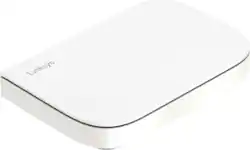
Linksys - Velop AX3000 Dual Band Micro Mesh System (1-pack) - White
Model: LN1101
SKU: 6569791
This item is no longer available in new condition. See similar items below
The Velop Micro 6 Mesh router is a terrific option for anyone looking to conquer their home’s Wi-Fi dead spots and also don’t require “extras” like Ethernet ports on the child nodes, in addition to the parent node (router), or the very latest Wi-Fi standard, Wi-Fi 7. What I like most is that the Micro 6 is powerful without being a giant eyesore. It’s significantly smaller than most other mesh systems. It truly is micro-sized and can easily hide in plain sight. MY SITUATION My previous mesh Wi-Fi 5 router (802.11ac) + two child nodes dates back to 2017. Frankly it’s all I needed for my 4 level, 1800 sq ft townhouse until now. Recently though the number of smart devices/IoT I’ve added to my home has multiplied to the point this router couldn’t handle all the traffic. The result was devices started randomly disconnecting or would be slow to respond to commands. Speed-wise, I was still fine since I only have 300Mbps up and down broadband and I few Wi-Fi 6E devices and zero Wi-Fi 7. So when I saw the affordable Velop Micro 6 Mesh router that included with two child nodes I thought I’d give it a try. The Micro 6 Mesh has what Linksys calls “Cognitive Mesh,” which, as I understand it helps better manage IoT devices, one of my big problems with my older router, just what I needed. SIZE AND PORTS This system is really shrunken down from the size of a typical mesh router, especially the child nodes compared to my older system. The main node is flat-ish, similar to a traditional MIMO router, but without the external antennas. It has a clean unassuming look. Don’t mistake that for lacking features though. It has four speedy 2.5 Gbps Ethernet ports and one WAN port. There’s also reset and power buttons. The child nodes, on the other hand, are as basic as you get, just a single USB-C port for power. Perhaps because of its diminutive side, there is Ethernet port here. This may be a non-starter for those with, or planning to buy, IoT devices that depend on Ethernet or hub that requires Ethernet to work. An example here is the Philips Hue lighting system. With Ethernet only on the main node it limits placement of these kind of hubs and devices. Otherwise enjoy the child node’s diminutive size, similar to a 12oz soda can, that goes unnoticed on a shelf. You won’t miss not having Ethernet here. SET UP PROCESS Linksys also claims its Cognitive Mesh technology makes setup super easy. On paper that certainly looked to be true – plug in the router and nodes per instructions, install the Linksys app, snap a QR code on the user’s guide embedded with routers SSID and password, Select the router’s SSID on your device and follow the app’s instructions. The whole process at this point takes a couple of minutes to complete. However, I did run into a few glitches, but overcame them after a quick troubleshooting. I won’t go into detail because I believe these were one-offs as I had no problems the 2nd try, and this doesn’t impact my opinion of this router. But I will say I’m not a fan of the set-up process or Linksys’s app. For one it assumes the user wants “WPA2/WPA3 Transitional” security. To be honest, I don’t know the formal SSID and password requirements for WPA3. What I do know is, based on the demands in the app, I’d have to update my Wi-Fi settings in all my smart devices as my current SSID and password were a character too short and had no symbols, just alpha-numeric. Only after I set up the router could I go back into the app and roll back security to WPA2 with my old SSID and password. I will eventually go WPA3 but this was not the day and I didn’t like being “forced” before I was ready. PERFORMANCE Once set-up I moved the location of the two child nodes around to find the optimal rooms to place each in. The main router must always be on the first floor because that’s where my Internet cable enters the house. I’ll add that my house is an open floor plan – only the bedrooms and bathrooms have doors. As a reminder, I have 300/300 Internet service. I placed the two nodes in different floors and then do a speed check. “Rinse and Repeat” in different rooms until I was satisfied I tried enough combinations. My best result was a nodes in the halls on level 2 and 3. In this configuration my Internet speeds, with the bedroom doors open, were: level 1 300Mbps, level 2 300, level 3 250, level 4 175. For three of four levels that’s exactly or very close to my actual Internet service, something my previous mesh router never came close to getting. Even the 175 on level 4, while low, was better than I got with last router. Pretty impressive. But it’s not all glory, there is a “but,” here. Inside the bedrooms, with doors closed, speeds dropped 25%. I will note that the interior doors in my house are standard builder’s grade and hollow, so YMMV if you have solid doors. Actually, since every house is different, it’s all a YMMV, but it looks like the Micro 6 Mesh has the power to fill in any dead zones your previous router could not. At least that is true in my situation.
This review is from Linksys - Velop AX3000 Dual Band Micro Mesh System (3-pack) - White
Posted by TechO
I have used multiple Linksys routers over the years, as they are one of the most well known and reputable companies in the space. This product met my expectations and it provides a terrific home WiFi set-up. Pros: - First, this device had the easiest and most pain-free set-up process I have ever had with a WiFi router. All I had to do was unplug my old router, plug in this new one, reboot my modem, then scan a QR code in the quick start guide. Then I was able to change the name and password for my WiFi directly from my phone. I didn't have to install an app or anything. This was great! - This device can handle up to 3 Gbps over WiFi. My ISP only provides 300 Mbps and it certainly handled those speeds with no issue. Thanks to the dual-band Mesh technology, I did not experience any latency issues while gaming, and our family of 4 had no issues streaming in HD on multiple devices at the same time. - The extra nodes that are included help ensure that you have coverage over a wider area. The two nodes that were included with my router were more than enough to cover my 2300sq ft home and also some coverage outdoors as well. - The extra nodes are nice and small, a bit smaller than a soda can, and can hide well in plain sight. Cons: - The cost of this WiFi product is a little on the high-end, but you do get what you pay for. The strong performance and thorough coverage of your home is worth it.
This review is from Linksys - Velop AX3000 Dual Band Micro Mesh System (3-pack) - White
Posted by jsisko76
The Velop 6 has completely solved my dead spot issues in my house. Single story, nothing too big, but I was having issues for what seemed like ages with coverage and “outages” within my network. First off, the devices themselves are very low key. They are not giant eyesores, but blend in nicely with my decor. That is a huge plus for me. The package comes with a parent node that plugs into your modem, and two child nodes. The child nodes themselves are simple, and easy to set up. The parent node has 2.5gb ethernet ports, power buttons, and a reset button. The system comes built in with a “cognitive mesh” that assists with managing your connected devices to help with optimal efficiency. Setup wise, you just follow the instructions (plug in first), install the Linksys app from your phone's app store, scan the QR code and let the app do its thing! It couldn’t be easier. Once the setup was done. Testing on my 1gb fiber I was able to pull between 650-850mbps depending on how close I was to a node and where in the house I was. Even on my front porch I was about to stream netflix with little to no issues. Overall, I am super happy with this small but mighty mesh system from Linksys. Highly recommend!
This review is from Linksys - Velop AX3000 Dual Band Micro Mesh System (3-pack) - White
Posted by clow18
The vast majority of our reviews come from verified purchases. Reviews from customers may include My Best Buy members, employees, and Tech Insider Network members (as tagged). Select reviewers may receive discounted products, promotional considerations or entries into drawings for honest, helpful reviews.