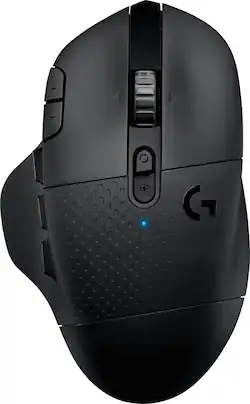
Logitech - G604 LIGHTSPEED Wireless Optical Gaming Mouse with 25000 DPI HERO sensor - Wireless - Black
Model: 910-005622
SKU: 6372599
This item is no longer available in new condition. See similar items below
Customers enjoy the long battery life, Bluetooth connectivity, and abundance of programmable buttons on the G604 mouse. Many appreciate its comfortable design and the smooth, precise scrolling offered by the unique scroll wheel. However, some find the mouse too heavy or large, and others have reported issues with the software or occasional double-clicking. The price point is generally considered favorable.
The vast majority of our reviews come from verified purchases. Reviews from customers may include My Best Buy members, employees, and Tech Insider Network members (as tagged). Select reviewers may receive discounted products, promotional considerations or entries into drawings for honest, helpful reviews.
I have been using a G604 Wireless mouse for about a year and a half now. I recently bought another one, so now I have 2. I have gamed with it and used it for work. I primarily use it for work functions as I have a G Pro Wireless, Razer Deathadder V3 Pro, and a Steel Series Aerox 9 that are used for most of my gaming sessions. However, that isn’t a knock against the G604 since I like it a lot for gaming – it just happened to travel with me for work. That’s why I bought a second one in order to leave at work, so I could have one at home full time. I have 3 locations where I work – home, office, and my lab/proto shop. Having to work in 3 different places meant I need/required a wireless mouse. I previously used an M705 Marathon wireless mouse for work because I love the hyperscroll, and I used it constantly. In my experience this is the best work productivity mouse I have ever used – I hope they never discontinue it. Prior to buying the G604 I had owned a G602, which I loved and used to game with. However, it lacked hyperscroll so I really couldn’t use it for work, and I ended up replacing it with a G Pro Wireless. I forgot my M705 on a work trip, so I hit up the closest Best Buy to buy another. I wasn’t aware of the G604 at the time, but I saw it was on sale and it had hyperscroll. Instant buy for me, since I loved the feel of the G602 and the additional buttons for productivity were a blessing. The mouse itself was nicely packed in its box. The mouse comes a single AA battery, a USB extension cable, and the Lightspeed wireless receiver. The mouse worked within seconds of turning it on and having the receiver installed into a USB port – no need for Windows to do any setup. I already had the Logitech G software on my machine, so I pulled it up and went about customizing the button assignments. I work with several CAD platforms (Solidworks, SolidEdge, and CREO), CorelDraw, and other database tools. I setup onboard profiles based on the software I am using and saved my customized buttons there. This is super handy as well if you are moving between devices and want to retain your button settings for games. The G604 can also connect via Bluetooth, so you can have it paired with 2 devices at the same time. You toggle the connection type via a button on top of the mouse. Comfort of the G604 is top notch. I use it 8+ hours a day without feeling uncomfortable or fatigued. All 6 side buttons are easily in reach along with the 2 DPI buttons on top. The thumb-rest makes long sessions more comfortable, and it keeps your thumb from dragging on your mousepad. The grippy sections of the mouse make it easier to hold onto and they are softer to the touch than plastic – again adding to the comfort. Weight of the mouse is up there at 135g, but that’s lighter than the old G602 at 152g. I know some people decry wireless mice for their short battery life, but I am only now about to replace the battery for the 2nd time in 18 months of ownership (6 months of life for a single AA battery). The hyperscroll wheel is fantastic, and honestly much better than the one on the M705. It is smooth and doesn’t bounce at the end of the roll. Switching into normal scrolling is done by hitting the button just above (below?) the wheel. The wheel moves with a nice, chunky cadence that is easy to get used to when needed. For gaming the mouse works great. The side buttons are easy to access and make a nice click. The LMB/RMB have a nice click sound and activation distance – I don’t find myself making any misclicks due to it being too light. You can get the button to click easily no matter where you are pressing, so people with average, long, or short fingers won’t find it hard to use. It glides across the mousepad well, and the optical sensor has no problem working on multiple surface types – I have used it on mousepads, granite counters, and steel shop tables. Overall, I love this mouse. It is worth every penny for my office/productivity needs and has the added bonus of being a solid gaming mouse. I preach its usefulness to my coworkers, and have even converted a few people to buy one for themselves – all with positive results. It has a great number of features – BT or wireless, 6 shoulder buttons + 2 DPI, thumb-rest, battery life, and hyperscroll. Altogether it really is a nice mouse, and I have had zero issues for 18 months of everyday use.
Posted by DaveW
I used a large heavy wired mouse for years to play video games with and finally choose to replace it with this wireless mouse. I can’t tell the difference between the wired vs wireless except the wires aren’t in the way! This mouse is a medium size and weight. I added the picture of the Xbox controller for reference. The mouse scroll wheel has 2 settings where it can spin almost freely and where you can easily choose how many times you want it to scroll up or down. This 2nd setting is great when I’m navigating items and want to make sure I only scroll up or down a certain number of times. 6 thumb buttons were overkill for me as I only use two, but the others are there if needed.
Posted by Craig
Great mouse, can connect through usb or Bluetooth, impressive response, multiple programmable buttons. Only negative is there are no removeable weights like on other Logitech mice.
Posted by AKcrazyathome