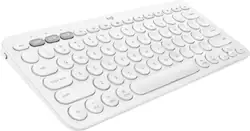
Logitech - K380 TKL Bluetooth Scissor Keyboard for Mac with Compact Slim Profile - Off-White
Model: 920-009729
SKU: 6404200
This item is no longer available in new condition. See similar items below
Customers love the ease of use, lightweight design, and high quality of the K380 TKL Bluetooth keyboard. Many appreciate its compact size, compatibility with multiple devices, and long battery life. Positive feedback also highlights the attractive color options and sleek design. While some minor issues with key feel and the lack of a caps lock indicator were noted, these were less frequent concerns.
Unboxing: This comes with the keyboard and already installed AAA batteries with an insulation paper. These batteries are estimated to last 2 years according to the Logitech. There are also some paperwork of course. I would have preferred some velvet cloth in the box so that the keyboard would be properly protected from scratches while in your bag. Build: Great. I bought the white and its looks so beautiful in person. It feels solid, has some weight to it. This weight and the attached rubber feet prevents it from sliding around while you type. Typing Experience: Keyboard travel is ideal. I type much faster than using the on-screen keyboard on my iPad. I am actually typing this review with this keyboard. Connectivity: Easy. Just long-press the connection number you want to connect your device to and it puts the keyboard in connection mode. Put your device in connection mode, select “K380 For Mac” from the available devices list. Enter the number you see on the screen using the keyboard and press “RETURN”. You also don’t get the notification: Using “K380 For Mac” may affect Wi-Fi and Bluetooth connectivity as you get with most Bluetooth devices that connect to the iPad. I got this notification on the other Logitech 380 keyboard for Windows and the non-apple Bluetooth mice I used. Flow (Switching between devices on the fly) also works beautifully. Other Devices: It works on my Samsung Galaxy Note8. It also works on my Windows computer and my FireTV Stick 4K. I actually tested both K380 types. However, on Windows, the “Start” button becomes “Command” and some other slight changes. Once you get a hang of it, it works well. On Android, the commands are basically unchanged. The function keys also work well on both Windows and Android. Windows also has the capability of changing the assigned functions of some 4 function Keys using the “Logitech Options” software. Conclusion: If you want an external keyboard and you own an Apple device, this Keyboard is for you even though you own Android and Windows and you use a FireTV stick. This is an excellent keyboard for the iPad. Thanks for reading. Peace!
Posted by Davoncci
The keyboard is worth the money. You won't get an Apple keyboard alternative or direct analog for the money, but a basic wireless keyboard with awkward round keys and a lot of pressure resistance. Uncomfortable. Giving 5-stars only due to a price.
Posted by Leila
I love this keyboard! It's heavier than you'd expect, and the build quality is excellent. It connected right to my iMac without any issue-- the setup was a breeze and I love that I can switch it to my iPad with just a tap of the button! I will admit I was worried the keys would be awkward, and at first they were, but after an hour or so my hands adjusted to the form factor and now it feels just as natural as square shaped keys! There's nothing to dislike about this keyboard, really. It's a great piece of hardware and I'm looking forward to having it for a long time!
Posted by Katie
The vast majority of our reviews come from verified purchases. Reviews from customers may include My Best Buy members, employees, and Tech Insider Network members (as tagged). Select reviewers may receive discounted products, promotional considerations or entries into drawings for honest, helpful reviews.