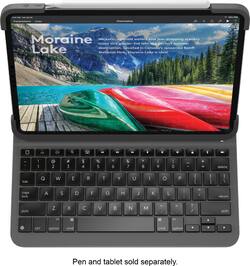
Logitech - Slim Folio Pro Keyboard Case for Apple iPad Pro 11"
Model: 920-009154
SKU: 6342887
This item is no longer available in new condition. See similar items below
Customers praise the Slim Folio Pro Keyboard Case for its high-quality keyboard, excellent protection for the iPad, and good battery life. They also appreciate its ease of use and the convenient storage for the Apple Pencil, finding it to be a good value for the price. However, some find the case adds noticeable weight and bulk to the iPad. The case's added protection and functionality are generally seen as outweighing these drawbacks.
I did a bit of research. I looked at 4 different folio keyboards and also thought about just getting the folio case with a separate keyboard. It came down to Logitech or Apple. I haven’t seen Apple’s folio keyboard in person but from what I read it’s not as bulky as Logitech’s folio keyboard and you don’t have to charge it separately because it gets its charge from the connectors on the back the same way the second generation Apple Pencil does. I’m actually really glad I went with Logitech. I don’t consider it bulky I think it’s sturdy, it feels good in my arms when I carry it around. I really like that there is a magnetic strap that comes down over my Pencil so now I feel like I definitely wont loose it. The Apple folio keyboard does not have a backlit keyboard and Logitech does. I really didn’t think it was going to be the big of a deal to have it or not but I find myself using it a lot. So I am definitely really happy with that feature. It doesn’t bother me at all that I have to charge the case. It says that a single charge will last up to 3 months with an average use of 2 hours a day. At night before I go to bed I will charge my IPad, if it doesn’t need charged then I will just go ahead and charge the folio keyboard. It was definitely a good buy!
Posted by Awesome
I didn’t think i would enjoy this keyboard case as much as i have been. Considering that the only other keyboard case i ever used was the official apple keyboard case, i was never a huge fan of them. I got this case because i would rely on a Bluetooth keyboard and while the keyboard was excellent, it wasn’t convenient. This case make it easy to protect my expensive iPad while providing a slim keyboard with backlit keys!!! Not to mention this is cheaper than the apple keyboard case. After using it for a month straight, i can’t see myself using any other case. P.S. the case does add a bit of “bulk/weight” to my iPad but personally, i like it. It give it a sturdy and premium feel.
Posted by victor
When I say my odyssey through keyboard land for my iPad Pro 11 has been exhausting AND expensive, you simply have no idea. In all, I’ve purchased 4 other Bluetooth Keyboards. None of them met my needs, until that is, I got the Logitech Slim Folio for iPad Pro. This review may be long, but maybe it can help you avoid making the mistakes I’ve made. The first keyboard I bought was one of the very first aftermarket keyboards for iPad Pro 11 available. There were so few available at the time. It was a folio style keyboard, but the keyboard attached to the folio by magnet, which promptly fell off to the floor. It did have some iOS Shortcut keys, but oddly missing was the key to bring up the onscreen keyboard, which is necessary if you want to insert emojis into text messages or text to speech. Fail The next keyboard case wasn’t totally bad. It had the necessary iOS Shortcut keys and was backlit with a rainbow of colors. But there are times I want to use the iPad like a tablet and with this one you just couldn’t do that unless you removed the iPad from the case. Fail Third was a 360-degree rotating keyboard, which at least would let you use the iPad in tablet mode. It too had the rainbow of backlit key options and the necessary iOS Shortcut keys. But it was too plasticky didn’t provide a very good typing experience. And the rotating hinge just feels like a break waiting to happen. Fail The final one was from a big-name brand in Bluetooth keyboards. It wasn’t inexpensive. The typing experience was decent, but in terms of how it was finished, I don’t know what they were thinking. It had too many contrasting finishes. The keyboard was covered in a grey vinyl material and the backside was clad in a different color grey fabric. The case the iPad sits in was black plastic. The iPad could be released from the keyboard to use it in tablet mode, but it attached to the keyboard by a thin magnetic strip, which seemed flimsy and too easily broken. To use the keyboard in type mode, you had pull down another flap, making the whole thing unstable if used in your lap. It was returned for refund. Fail Enter the Logitech Slim Folio for iPad Pro 11 or 12.9. This combines the best of Folio design with hard-shell design. Charge this puppy up with the USB C cable and power brick you got with your iPad Pro (Note: Logitech does not supply a cable in the box). Next place the iPad in the case, which is a bit challenging the first time. One of the advantages of the Logitech is how much protection it provides your iPad. But the top portion of the keyboard case covers the power and volume buttons and on the other side, it also covers the corner of the iPad. The top portions require that you flex them to get them to seat correctly. Of course, there’s really no reason to remove the iPad from the case, so once it’s on you’re done. And my iPad has a screen protector, which the case didn’t cause any issues with. As soon as you place the iPad in the magnetic groove on the keyboard, the power light blinks white to let you know it’s ready to pair. Open the Settings App > Bluetooth on your iPad and the Logitech will appear below the list of devices already paired to the iPad. Tap the Logitech Keyboard on the screen and a box will open on your iPad with a 6-digit number. Enter the number on the keyboard and this is important as the dialog box DOES NOT tell you this, but you need to tap the enter key after you have typed the code for the keyboard to pair. Once you’re paired, you never have to do this again. There is no power button on the keyboard. But not to worry, Logitech says it will stay charged for at least three months and it only turns on when you place the iPad in the magnetic groove on the keyboard. What’s unusual is, it’s ready to type the moment you place it there. And that’s because Logitech is using Bluetooth LE on this keyboard. Why is that good? With many Bluetooth Keyboards, when you first turn them on (even if they’ve been paired previously), it can take several seconds for the keyboard to be ready to type on. Not with the Logitech. Because of Bluetooth LE, the second it’s placed in the magnetic groove, you can immediately tart typing. And of course, when you take the iPad out of the magnetic groove, the keyboard is turned off to conserve battery life. The Logitech Slim Folio lets you use your iPad in three modes. Type Mode, Sketch Mode and Read Mode. The latter two let you collapse the iPad on the keyboard to use the iPad as a tablet or read or draw if you have the Apple Pencil 2. Speaking of Apple Pencil. People lose them all the time. Most keyboards available for the new iPad Pro’s do permit Pencil Charging. But they don’t offer the unique and oh so convenient way to store the pencil when the case is closed as it does on the Logitech. There’s a vinyl flap which keeps the pencil in place when closed and there’s even a slot in the flap to store the pencil if you don’t want it to be attached to the iPad when you’re using it. Nice! The keyboard is backlit. With one color. White. Three of the lesser keyboards I purchased had multiple colors. I guess that’s OK, if for some reason you haven’t lived until you’ve typed with keys backlit in Red, Green, Blue, Aqua, Yellow, White or Purple. I don’t happen to be one of those people. I just want to be able to see the keys when typing in low light and this keyboard provides three brightness levels, from low, medium and high. It does its job well, which is all I need. In terms of iOS Shortcut keys, all the ones you could need are there. It includes the important key to bring up the Onscreen Keyboard as well as volume, backlit up/down, home, volume up/down/mute, play/pause/previous/next track, lock, search and one most don’t provide – Battery Check. Nice! Interestingly though, if you use the Battery Widget on your iPad, the Logitech Keyboard will NOT appear in the battery list. This is an omission Logitech should reconsider. I personally like knowing the exact percentage of charge remaining. The whole reason for buying a Bluetooth Keyboard is to type on it. So, what’s the typing experience like on the Logitech? This puppy has excellent tactile feel. Keystroke is short and feels uniformly excellent. This isn’t surprising since Logitech has been making Bluetooth Keyboards for a LONG time. They are a Swiss company, who has been making PC peripherals, since 1981. They make Mice, Smart Home controls, Speakers, Security Cameras, Video equipment and Keyboards. They’ve clearly learned a thing or two about making great keyboards along the way. The keys click with a nice sound. They feel like you’re typing on a real laptop. Far better than the cheap keyboards I purchased. It won’t take you any time at all to really appreciate the quality and comfortable typing experience you’ll get with the Slim Folio. If you type a lot, you’ll really appreciate how great the keyboard itself is. So is there anything I don’t like. Yes. But nothing major. For one, if you do lay the iPad flat to draw on, it’s not actually flat, which isn’t necessarily bad. It’s at an angle. But since it’s sitting on the vinyl back flap, if you draw towards the sides of the iPad, it’s not as stable as you might like. As mentioned earlier, there’s only one angle you can use to type on the keyboard with your iPad. If you need the ability to adjust your screen in more than one angle you won’t get that with the Logitech. And I don’t understand why Logitech felt it necessary to put plastic covers over the volume and power buttons. They aren’t necessary IMHO, and it requires more pressure to adjust the volume or turn on the iPad. Finally, the Logitech is called the “Slim Folio.” That’s somewhat of a misnomer. It’s definitely NOT slim. They should have just called this the Logitech Folio Pro. Finally, while the packaging your keyboard arrives in is excellent as you’d expect from a company like Logitech. There is no real user guide. There’s a small paper pamphlet with how to place the iPad in the case, which also provides the address to Logitech.com for the online user guide. Until I went there, I couldn’t get the iPad to pair because I didn’t know you needed to tap the enter key after typing the 6-digit code. Logitech should at least have included a quick start guide to get you up and running. Still, if this is all I can complain about, it’s very minor. Very minor indeed. Honestly, there’s a reason cheap keyboards aren’t satisfying. You get what you pay for. At $119.99 for the Logitech, you get a far better keyboard, with many more features, more flexibility, better protection and a great typing experience, all for less money than the iPad manufacturer’s much more expensive Smart Folio keyboard. The Logitech Slim Folio is a very good keyboard case. Yes, very good indeed!
Posted by RBrylawski
The vast majority of our reviews come from verified purchases. Reviews from customers may include My Best Buy members, employees, and Tech Insider Network members (as tagged). Select reviewers may receive discounted products, promotional considerations or entries into drawings for honest, helpful reviews.