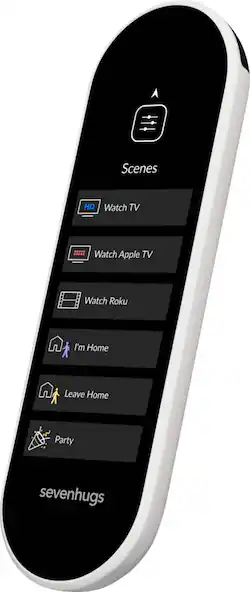
Sevenhugs - Smart Remote X - White
Model: SR1AS0WH
SKU: 6311764
This item is no longer available in new condition. See similar items below
Customers are impressed with the Smart Remote X's ease of use, elegant design, and Bluetooth capabilities, finding setup straightforward and the point mode innovative. However, some users cite concerns regarding battery life, compatibility issues with certain devices, and the remote's size and high price point. The touchscreen, while praised by some for its responsiveness, is criticized by others for its lack of physical buttons and small screen size. Overall, the Smart Remote X receives positive feedback for its user-friendly features but also faces criticism regarding several aspects of its functionality and cost.
The vast majority of our reviews come from verified purchases. Reviews from customers may include My Best Buy members, employees, and Tech Insider Network members (as tagged). Select reviewers may receive discounted products, promotional considerations or entries into drawings for honest, helpful reviews.
My husband and I love gadgets and we're also control freaks, so when we saw the Smart Remote video we were dying to try it. So far so good! We're really enjoying it. Here are some of my observations as one of the first people to try it: - The remote itself is beautiful. I really love the way it looks. And when you hold it in your hand you can really feel the quality. - We mostly own products that Smart Remote supports, but we’ve got a few smart lights and switches that aren’t yet available (IKEA Trafri and Lutron). The current list of compatible smart home devices is bit limited right now, but Sevenhugs says they’ll be adding more devices every month. I'll be eagerly awaiting their Samsung SmartThings integration. - I’ve setup a few universal remotes in my time and this one was by far the fastest and easiest remote I’ve ever set up. The Smart Remote app does a really nice job and it took about 10-15 minutes from start to finish. - We successfully replaced 6 remotes with Smart Remote (woohoo!): TV, cable box, Roku, Blu-ray player, audio receiver and CD changer. A couple of the buttons on our TV and audio receiver were missing, but we were able to add them with infrared learning. We were also able to edit the controls and remove a couple buttons we didn’t need. That’s one of the nice things about a touchscreen remote—everything is customizable! - Smart Remote’s AV Scene feature makes it super simple to control our entertainment center. You just create a scene for each media player you want to watch and all the options appear in a list on Smart Remote. From there, all we need to do is just tap what device we want to watch. Smart Remote will turn on our TV, AVR and whichever media player we selected and switch all the inputs. Really like this one-touch control feature. - Point Mode makes me feel like Harry Potter (at least a little :-). Being able to just point at what you want to control is super cool and also pretty darn convenient. Really innovation tech! - The Room Sensors that make Point Mode possible need to be placed high on your walls and they need to be visible. They aren’t very noticeable on our white walls, but they will stand out a bit if you have dark color walls. Seems like a small price to pay for having the latest and greatest technology though. - Controlling smart lights and plugs is easy and is actually quite a lot of fun now, especially when using Point Mode. The UI is really well done and makes it really fun to play with your lights and try new colors. - If you use Spotify, you’re gonna love the Spotify integration on Smart Remote. It's super convenient to just browse and launch playlists without needing to pull out my phone. - The battery only lasts a day and overnight charging is pretty much required. Small price to pay for everything else this remote does well though.
This review is from Sevenhugs - Smart Remote X - Black
Posted by techgal
Like most people, I’ve got a basket with 5 or 6 remotes sitting on my coffee table and it seems ridiculous to have so many controls. I’ve tried Harmony and other options in the past, but had issues with setup and could never get my wife comfortable with using a remote with a lot of buttons. So, I’ve been waiting for a new solution to appear. Also, I recently convinced my wife to try out a few smart home products like smart bulbs in various room in our home, but I’m the only person who typically uses them. She doesn’t always keep her phone with her and hasn’t really taken to using voice control yet. When I talked with my wife about solving our TV and lighting challenges with Smart Remote, she really liked the simple control screens and was open to trying it. After a few days of using Smart Remote now, we’re sold. Turning on everything connected to the TV is super easy. All we need to do is just tap the Roku or cable TV button in the menu and Smart Remote does the rest. My wife is even using our TP-Link smart lights thanks to Smart Remote with Point Mode. She was a little reluctant at first to install sensors on our walls, but it couldn’t be easier to control things now with the proper setup. Just point at the TV or the lights and tap...it works like magic! I’ve also been using Smart Remote to stream Spotify to my Bose speakers, which has been a really nice bonus feature. It’s like having the Spotify app on your remote. I can browse playlists and select music to play, control volume and skip tracks. The only thing it’s missing is the ability to type in searches like you can in the Spotify app. Hopefully they’ll add that functionality soon. A couple other things to be aware of: - The battery life seems pretty short, so you’ll need to get in the habit of charging it up every night. - Point Mode is really handy when you have some smart home devices spread around the room, but you won’t be able to point and control individual devices connected to your TV. If your devices are close together, you’ll need to manually swipe to select which one you want to control. Smart Remote isn’t perfect, but it has surpassed my expectations. Definitely nice to finally have a remote that eliminates clutter and makes controlling things pretty easy and intuitive.
This review is from Sevenhugs - Smart Remote X - Black
Posted by HomeWizard
Sevenhugs smart remote that plans to control your entire connected home. The remote is nicely built with a responsive touch screen. Setup was a breeze once the remote is charge connect it to your WiFi, download the app from (Google Play or Apple store) and your good to go. During setup the remote will try to find connected devices on its own, but you also have the option to add them manually. Once you have your devices setup you will create Scenes of your choice. You swipe left or right to toggle through your functions and others, like diming your lights you swipe up or down. The remote is not that big, some people may not like that, me personally it felt great in the hand, due to it's size functions are easily reachable with your fingers. One neat feature that this remote has is the point and control, in which you aim at specific device and the remote will automatically switch to the controls that is associated with that device. I do love that feature but it will take some time to set up. There are 3 included sensors that has to be positioned throughout your room and they have to be in certain locations to mapped your room properly. Why is this feature so good because instead of scrolling though the remote to find the device all you have to do is point at it to bring it up automatically on the screen. Now that been said this feature will have some issues with stacked up equipment such as cable box, Blu-ray, gaming consoles, etcetera and that’s because they are on the same line of sight, regardless you move up or down. This is a smart remote but it also has its limitation, it mostly controls smart home devices that are Wi-Fi connected. In my case I use z-wave light switches and plugs, connect it through Samsung Smartthings hub, neither the light switches or the hub are compatible with this remote. According to their website they are working to integrate the Smartthings hub. I also have Phillips hue light and they work flawlessly. If you have a Nest thermostat at the time of this review it is still not compatible. You will also find hard to control things that are behind cabinets since the remote doesn’t have separate IR blaster like the Logitech Harmony Elite. Another things that his remote lacks is a microphone for voice commands. When the remote is placed on the charging base it looks beautiful, but it does have a flaw. The remote charging base uses a USB-C connection which is good, but that single connector is the only thing holding the remote in place, any wrong hard move and I’ll see that USB-C connector getting damage, plus in the dark it may be little hard to find. I believe this remote has potential once it becomes fully functional, and if they only had added IR capabilities to the charging base this will definitely be a contender against the Logitech Harmony Elite. Overall this a very nice sleek, easy to use universal remote with unique features that will get the job done in a modern way, but at not at this price range. In the box it comes with the remote, charging base, 3 sensors, manuals and the power brick (Europe version comes with universal plugs). I rate this a 4 because there is no 3.5 stars which in my opinion is what it deserve as of now , and that's due to the lack compatibility, functionality, and the high price for what it does. Pro: Design Point Control Feature Responsive Touch Screen Ease of Use Cons: Price Not compatible with smart hubs Hard to control devices behind cabinets Not compatible with Z-wave or Zigbee No Mic
This review is from Sevenhugs - Smart Remote X - Black
Posted by Wishkid