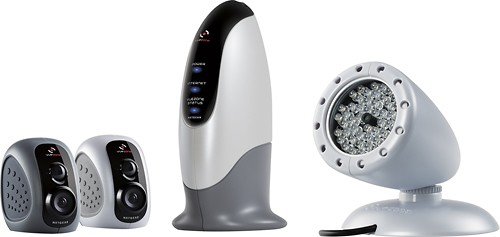
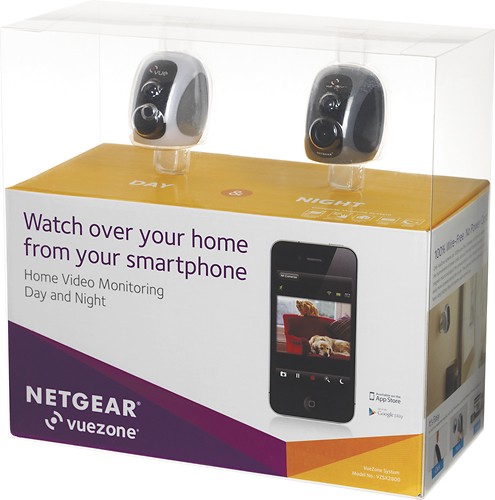
NETGEAR - VueZone Day & Night Wireless Video Monitoring System
This item is no longer available in new condition.
See similar items below.
Description
Features
2 video monitoring cameras
Include 1 VZCM2050 camera with 650 nm daylight IR filter and 1 VZCN2060 camera with 850 nm night-vision IR filter, plus full-color CMOS image sensors, to capture crisp footage.
Wide 110° viewing angle
For expansive coverage.
Motion sensor
Automatically triggers recording when unexpected events occur within a range of up to 15' and sends you a snapshot in JPEG format with up to 1600 x 1200 pixels resolution via e-mail, so you can easily stay informed.
Battery-powered design
Offers simple wireless operation for versatile positioning and provide up to 6 months of operation on a full charge.
FrameMesh wireless video encryption
Helps keep your footage private.
2x and 4x digital pan and zoom
Let you home in for a more detailed view. Auto adaptive white-and-black balance and exposure ensure high-quality videos.
Selectable recording resolutions
Include VGA (640 x 480) at 3 fps and QVGA (320 x 240) at 6 fps to suit your needs.
Fast Ethernet LAN port
Located on the base station enables simple Web connection. A more than 300' wireless range enables flexible placement.
Remote viewing and operation
Lets you easily view live footage, adjust motion sensitivity and arm or disarm motion detection with your PC or Mac, Apple® iPad® or iPhone® or Android device.
VueZone gateway sync button
Allows you to pair cameras to your account with a single touch. Simple online activation makes it easy to configure your video monitoring system in as little as 10 minutes.
Apple, the Apple logo and iTunes are trademarks of Apple Computer, Inc., registered in the U.S. and other countries. iPod is a trademark of Apple Computer, Inc.
iPad is a trademark of Apple Inc., registered in the U.S. and other countries
What's Included
NETGEAR VueZone motion-detection camera (VZCM2050), night-vision motion-detection camera (VZCN2060), base station, infrared lamp with power cord
AC adapter, 5' Ethernet cable
4 lithium photo batteries (CR123A), 4 wall mounts
Owner's manual
Q: QuestionIs there any subscription required? Does it save pics/videos?
Asked by Anonymous.
- A:Answer There is no subscription required for basic 2 cameras. If you want more than 2 cameras along with additional memory on the cloud based platform that pictures/video or recorded too, there is a subscription fee. Google netgear viewzone for more details.
Answered by wxman1234
Q: QuestionDoes this have an SD memory card?
Asked by Anonymous.
- A:Answer No. The only way to save anything is buying a service plan and those are limited to 250 MB and 500 MB. This is not a system that records constantly. Only quick 90 second videos when motion is detected or snapshots, depending on setting preferences.
Answered by kckliodna
Q: Questioncan this be used outdoors?
Asked by Mike.
- A:Answer Yes, but you have to buy the covers for it separately to protect them from the weather and I'm not sure if they are completely waterproof unless they are angled downward a bit.
Answered by kckliodna
Q: QuestionHow Many Connections?How many people can log in and view the video stream at once?
Asked by Anonymous.
- A:Answer I don't know how many in terms of maximum, but my wife and I have been able to log in and view the cameras simultaneously with 2 separate devices.
Answered by wxman1234
Q: QuestionCar vandalism monitoringCan I use this to monitor car vandalism ? My car is parked in a car port which is within the range of my home wifi. However, we dont have any power outlet in car port. So either I can mount this inside the car or somewhere in the car port to monitor vandalism. Will it work ?
Asked by Anonymous.
- A:Answer Yes, as long as it's within 100ft of the base station it'll connect to your wifi. It would be good to alert you if something was happening, but the picture quality isn't very good it would be pretty hard to make out the persons face.
Answered by WinstonRo
Q: QuestionOwners ManualWhere can I get or downloaed an owners manual?
Asked by Anonymous.
- A:Answer www.vuezone.com click on customer support in upper right hand corner click on whatever system or camera you are looking for, there will be pdf files you can download including the manual for each product.
Answered by kckliodna