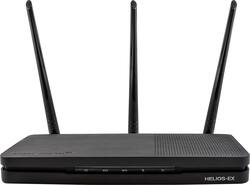
Amped Wireless - HELIOS-EX High Power AC2200 Tri-Band Wi-Fi Range Extender with DirectLink™ - Black
Model: RE2200T
SKU: 5713031
This item is no longer available in new condition. See similar items below
Customers regard the HELIOS-EX High Power AC2200 Tri-Band Wi-Fi Range Extender with DirectLink™ very favorably, frequently praising its extended Wi-Fi range, strong signal strength, and ease of setup. Many users highlighted the improved coverage throughout their homes and appreciated the convenient features like the USB port. The extender's performance was also lauded for its ability to eliminate dead zones and provide a reliable connection. Overall, customer feedback paints a picture of a highly effective and user-friendly device.
The vast majority of our reviews come from verified purchases. Reviews from customers may include My Best Buy members, employees, and Tech Insider Network members (as tagged). Select reviewers may receive discounted products, promotional considerations or entries into drawings for honest, helpful reviews.
The Helios-EX RE2200T is the new Tri-band 802.11ac wave 2 range extender from Amped it uses “DirectLink” technology to create a dedicated 5GHz link to the home network, freeing up the remaining two bands, resulting in up to 2X the speed of other extenders. Amped has equipped this extender with a Quad Core Arm Processor, 4 antennas (one internal and three external) The unit packs (4) 5ghz reception ampifiers and (4) 5ghz high power tranmission amplifiers. It also has (2) 2.4ghz reception and (2) 2.4 ghz high power transmission amplifiers. Normal extenders receive the signal from the original router and rebroadcast that signal to Wi-Fi clients. This reduces an extender's efficiency by 50 percent. The Helios-Ex “DirectLink” technology creates a dedicated 5GHz link to the home network, freeing up the remaining two bands This unit also uses MU-MIMO technology that enables multiple devices to receive data at once, great for households with multiple wireless devices. The normal set up is to connect to your main wifi router with a 5 GHZ “DirectLink” and the Helios-Ex transmits a 5ghz and 2.4ghz signal from that. You can connect to a 2.4ghz WiFi signal as well but it is not necessary or recommended if you have a good 5ghz signal. I used this extender to replace my Linksys RE7000 and the speed was remarkably better. On top of the increased speed the range of the extender was at least double any other extender I have ever owned. The setup was very easy just connect wirelessly to the network created by the router Amped_HeliosEX_2.4 or Amped_HeliosEX_5.0 and connect to the web interface using a browser http://setup.ampedwireless.com and follow the prompts. Link to the directions here http://www.ampedwireless.com/docs/setupguide/RE2200T_SetupGuide_English.pdf If you want the best performance make sure your base router has 5ghz wireless AC and is at least Dual band. The max speeds you can achive are 2.4GHz 399Mbps, 5GHz 866Mbps + 5GHz 866Mbps. This will vary (I get 232Mbps) using 5GHz. This router is compatible with all Apple networking features, AirPlay®, AirPrint™, & Home Sharing. There is a USB 3.0 connector for a drive that you can share on the network. There are 5 Gigabit Ethernet ports on this extender for wired game consoles, Smart Tv and other devices. With all the improvements Amped packed into this Extender you can get up to 12,000 SqFt of coverage depending on your environment. Thanks to Amped I now get a solid 5ghzWiFi signal on my back deck and yard as well as every nook and cranny of my WiFi unfriendly house!
Posted by Idoc
What this product is: It extends Wi-Fi networks, by using a dedicated radio to connect to an existing Wi-Fi router. Then it creates a new Wi-Fi network (The extended network) with a separate radio for 5 GHz network and a 2.4 GHz network, using the same IP network from the upstream router (i.e. It is not a flat IP network with multiple Wi-Fi networks). What this product is not: It's not a router (i.e. it needs an existing Wi-Fi network) and it's not an access point (i.e. it cannot connect over Ethernet to an existing network, only over Wi-Fi). The hardware is nice: The three Wi-Fi antennas are removable. The enclosure has a nice patterned finish, and can either lay flat on vertical with the included pedestal, which I'd suggest to use because it generates some heat and has vents on both sides. It has some very bright lights on the front, which change color depending on the status (but thankfully, do not blink). Lights are very bright but recessed, and has a physical switch to turn the status lights on or off. Very nice. It has a power switch push button, and five gigabit ports to connect PCs, printers, media players, etc. Also has an USB 3.0 to use as a file server, with an external hard drive or USB stick. Radios: The 5 GHz radio has configurable channel widths of 80/40/20. (Some few last-gen routers have 160 MHz channels, but are still very rare). Lots of advanced, low level settings for wireless that are set correctly set by default: TxBeanforming enabled with MU-MIMO disabled, etc. Very detailed settings for radio power, channels can be left to auto of statically set. The comprehensiveness of the radio options are something I rarely see on home network gear. For the novice can be confusing, but the default values are OK, so if you don't know, leave it as is and should work fine. For the upstream home network, by default locks into specific channels from the upstream router. It can manually set to auto. Supports multiple guest networks, that can be separated between 5 GHz and 2.4 GHz radios, with different IDs and permissions. It also has some basic scheduling. Doesn't support VLANs but supports spanning tree (for business routers), and supports Radius for Wi-Fi authentication (Business use). This range extender is unique because it has a dedicate radio for upstream connectivity, so bridging does not materially degrade speed as with other extenders. The range of the Wi-Fi signal is excellent. It covers a medium sized house with two floors by itself with no issue. However, there are some peculiarities that can be a deal breaker for some: First, the network SSID (The name of the Wi-Fi network) has to be different than of the main router. I find this to be a real caveat because one has to remember to configure every Wi-Fi device with the new network ID, and walking around the house with a PC, phone or tablet, they will try to hold onto the already connected SSID instead of jumping to the closer access point. I tried to manually rename the extended network, while locking on a channel on the home router, and it ended up creating a network loop and had to factory-reset the extender to get it back. I think many buyers won't be aware of this issue until purchased. Another major issue is that while this is a Wi-Fi extender and works well as that, it cannot easily be set as an access point by connecting it to Ethernet, if needs change. A minor issue that is also common with other routers is that the file sharing cannot be disabled, even with nothing connected to the USB port. It's constantly advertising itself as a file service although it can't do it.
Posted by emiliosic
I placed the extender on my room where I get little signal from my router. Now I get full bars and the full speed of my connection. The setup was easy and all you need to know if the name of your routers current 5 ghz band and the password. The extender configures itself. After installing it, I don't have any dead spots on my home anymore. One thing to consider is, after setting everything up, I was not able to enter the extender's web configuration anymore, however following the instructions on this ampedwireless's support forum 1st and 2nd post I was able to again: http://www.forums.ampedwireless.com/viewtopic.php?f=4&t=12 PROS: +Very slim design, can be setup vertically with the included stand. +the leds are not that bright, my pic makes it seem so, however they can be turned off. The extender signal led will allow you to easily place the extender where it gets the best signal. +Came with last firmware. +Supports mu-mimo. CONS: - Only con is I could not enter the extender's web config page anymore after configured it, however I followed the above link instructions and I was able to again. Should be explained in the manual.
Posted by JamexRZ