Customer Ratings & Reviews

- Model:
- RE2200T
- SKU:
- 5713031
to a friend
Customers are saying
Customers regard the HELIOS-EX High Power AC2200 Tri-Band Wi-Fi Range Extender with DirectLink™ very favorably, frequently praising its extended Wi-Fi range, strong signal strength, and ease of setup. Many users highlighted the improved coverage throughout their homes and appreciated the convenient features like the USB port. The extender's performance was also lauded for its ability to eliminate dead zones and provide a reliable connection. Overall, customer feedback paints a picture of a highly effective and user-friendly device.
This summary was generated by AI based on customer reviews.
- Pros mentioned:Ease of use, Speed

Best AC Wifi Rage Extender Yet!
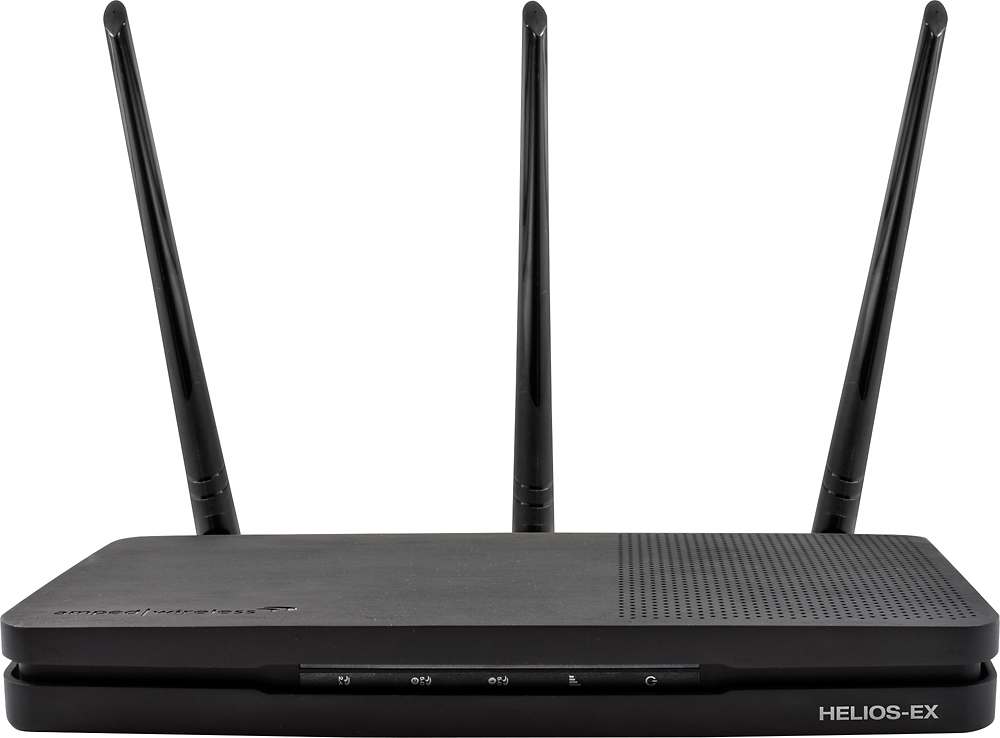
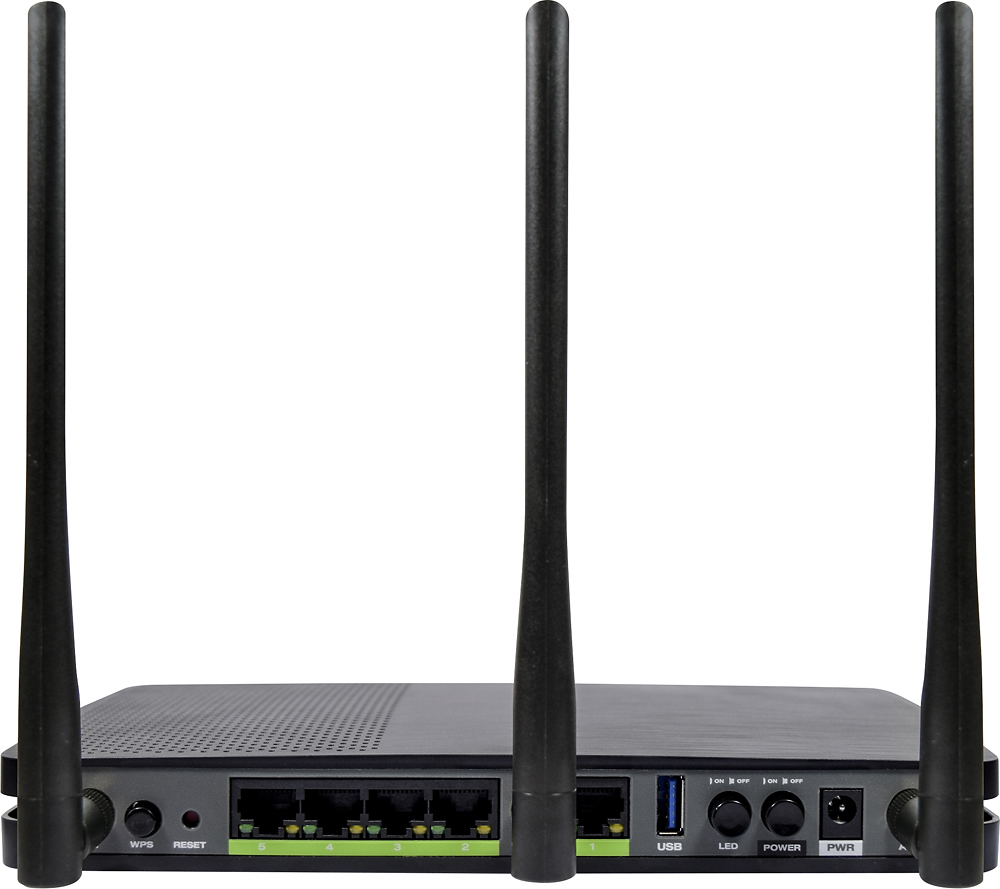
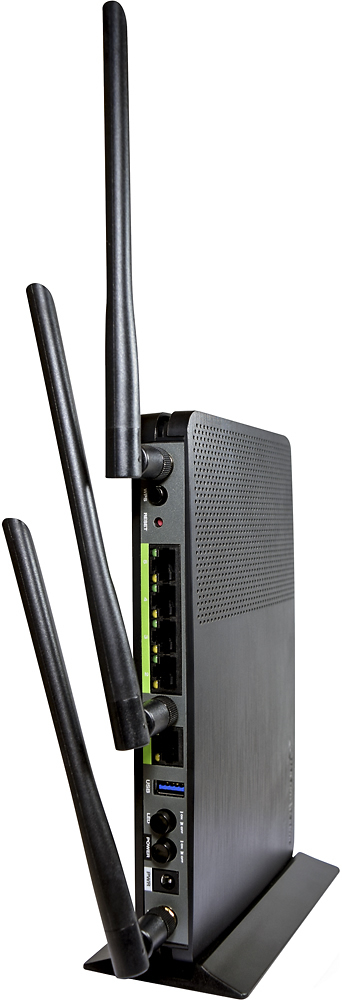
|Posted .This reviewer received promo considerations or sweepstakes entry for writing a review.The Helios-EX RE2200T is the new Tri-band 802.11ac wave 2 range extender from Amped it uses “DirectLink” technology to create a dedicated 5GHz link to the home network, freeing up the remaining two bands, resulting in up to 2X the speed of other extenders. Amped has equipped this extender with a Quad Core Arm Processor, 4 antennas (one internal and three external) The unit packs (4) 5ghz reception ampifiers and (4) 5ghz high power tranmission amplifiers. It also has (2) 2.4ghz reception and (2) 2.4 ghz high power transmission amplifiers. Normal extenders receive the signal from the original router and rebroadcast that signal to Wi-Fi clients. This reduces an extender's efficiency by 50 percent. The Helios-Ex “DirectLink” technology creates a dedicated 5GHz link to the home network, freeing up the remaining two bands This unit also uses MU-MIMO technology that enables multiple devices to receive data at once, great for households with multiple wireless devices. The normal set up is to connect to your main wifi router with a 5 GHZ “DirectLink” and the Helios-Ex transmits a 5ghz and 2.4ghz signal from that. You can connect to a 2.4ghz WiFi signal as well but it is not necessary or recommended if you have a good 5ghz signal. I used this extender to replace my Linksys RE7000 and the speed was remarkably better. On top of the increased speed the range of the extender was at least double any other extender I have ever owned. The setup was very easy just connect wirelessly to the network created by the router Amped_HeliosEX_2.4 or Amped_HeliosEX_5.0 and connect to the web interface using a browser http://setup.ampedwireless.com and follow the prompts. Link to the directions here http://www.ampedwireless.com/docs/setupguide/RE2200T_SetupGuide_English.pdf If you want the best performance make sure your base router has 5ghz wireless AC and is at least Dual band. The max speeds you can achive are 2.4GHz 399Mbps, 5GHz 866Mbps + 5GHz 866Mbps. This will vary (I get 232Mbps) using 5GHz. This router is compatible with all Apple networking features, AirPlay®, AirPrint™, & Home Sharing. There is a USB 3.0 connector for a drive that you can share on the network. There are 5 Gigabit Ethernet ports on this extender for wired game consoles, Smart Tv and other devices. With all the improvements Amped packed into this Extender you can get up to 12,000 SqFt of coverage depending on your environment. Thanks to Amped I now get a solid 5ghzWiFi signal on my back deck and yard as well as every nook and cranny of my WiFi unfriendly house!
I would recommend this to a friend - Pros mentioned:Wi-fi range
Nice hardware. Software has potential
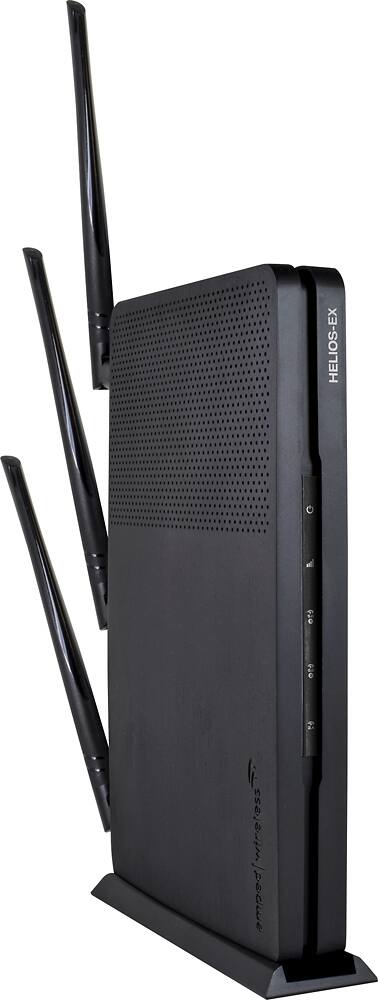
|Posted .This reviewer received promo considerations or sweepstakes entry for writing a review.What this product is: It extends Wi-Fi networks, by using a dedicated radio to connect to an existing Wi-Fi router. Then it creates a new Wi-Fi network (The extended network) with a separate radio for 5 GHz network and a 2.4 GHz network, using the same IP network from the upstream router (i.e. It is not a flat IP network with multiple Wi-Fi networks). What this product is not: It's not a router (i.e. it needs an existing Wi-Fi network) and it's not an access point (i.e. it cannot connect over Ethernet to an existing network, only over Wi-Fi). The hardware is nice: The three Wi-Fi antennas are removable. The enclosure has a nice patterned finish, and can either lay flat on vertical with the included pedestal, which I'd suggest to use because it generates some heat and has vents on both sides. It has some very bright lights on the front, which change color depending on the status (but thankfully, do not blink). Lights are very bright but recessed, and has a physical switch to turn the status lights on or off. Very nice. It has a power switch push button, and five gigabit ports to connect PCs, printers, media players, etc. Also has an USB 3.0 to use as a file server, with an external hard drive or USB stick. Radios: The 5 GHz radio has configurable channel widths of 80/40/20. (Some few last-gen routers have 160 MHz channels, but are still very rare). Lots of advanced, low level settings for wireless that are set correctly set by default: TxBeanforming enabled with MU-MIMO disabled, etc. Very detailed settings for radio power, channels can be left to auto of statically set. The comprehensiveness of the radio options are something I rarely see on home network gear. For the novice can be confusing, but the default values are OK, so if you don't know, leave it as is and should work fine. For the upstream home network, by default locks into specific channels from the upstream router. It can manually set to auto. Supports multiple guest networks, that can be separated between 5 GHz and 2.4 GHz radios, with different IDs and permissions. It also has some basic scheduling. Doesn't support VLANs but supports spanning tree (for business routers), and supports Radius for Wi-Fi authentication (Business use). This range extender is unique because it has a dedicate radio for upstream connectivity, so bridging does not materially degrade speed as with other extenders. The range of the Wi-Fi signal is excellent. It covers a medium sized house with two floors by itself with no issue. However, there are some peculiarities that can be a deal breaker for some: First, the network SSID (The name of the Wi-Fi network) has to be different than of the main router. I find this to be a real caveat because one has to remember to configure every Wi-Fi device with the new network ID, and walking around the house with a PC, phone or tablet, they will try to hold onto the already connected SSID instead of jumping to the closer access point. I tried to manually rename the extended network, while locking on a channel on the home router, and it ended up creating a network loop and had to factory-reset the extender to get it back. I think many buyers won't be aware of this issue until purchased. Another major issue is that while this is a Wi-Fi extender and works well as that, it cannot easily be set as an access point by connecting it to Ethernet, if needs change. A minor issue that is also common with other routers is that the file sharing cannot be disabled, even with nothing connected to the USB port. It's constantly advertising itself as a file service although it can't do it.
I would recommend this to a friend - Pros mentioned:Setup, Signal strength
Strong signal and fast!
|Posted .This reviewer received promo considerations or sweepstakes entry for writing a review.I placed the extender on my room where I get little signal from my router. Now I get full bars and the full speed of my connection. The setup was easy and all you need to know if the name of your routers current 5 ghz band and the password. The extender configures itself. After installing it, I don't have any dead spots on my home anymore. One thing to consider is, after setting everything up, I was not able to enter the extender's web configuration anymore, however following the instructions on this ampedwireless's support forum 1st and 2nd post I was able to again: http://www.forums.ampedwireless.com/viewtopic.php?f=4&t=12 PROS: +Very slim design, can be setup vertically with the included stand. +the leds are not that bright, my pic makes it seem so, however they can be turned off. The extender signal led will allow you to easily place the extender where it gets the best signal. +Came with last firmware. +Supports mu-mimo. CONS: - Only con is I could not enter the extender's web config page anymore after configured it, however I followed the above link instructions and I was able to again. Should be explained in the manual.
I would recommend this to a friend - Pros mentioned:Wi-fi range
Great Wi-Fi coverage
|Posted .This reviewer received promo considerations or sweepstakes entry for writing a review.I've been using the Amped Wireless AC2200 Range Extender for a few weeks and so far it's solving the problem I had. I basically have a detached garage that sits about 75+ft away from my main house. I could connect to the router in the house, but sometimes the connection was almost unusable. The router is at the opposite end of my house from the garage, so when I got the AC2200, I put it at the other end, closest to the garage. The installation was not without issue however. When you first set up the unit, you can connect to it wirelessly, which is what I chose to do. The initial setup went fine, but after the unit rebooted, I could not reconnect to the settings page. I could see the new 5 GHz and 2.4 Ghz networks, connect to them and use them, but I could not access the settings for the unit. I called Amped support and after about 30 mins or so, they determined that my router (Linksys WRT 3200ACM) had some issues with IPV6. I'm not really sure what happened, but I think my router was mistakenly giving the Amped Extender an IPV6 address instead of an IPV4 and because of that, the settings page could not be served from the device. Amped really didn't have a solution since the problem was with my router, so after I got off of the phone, I disabled IPV6 on my router and tried everything again... problem solved. Since then, my garage is completely under Wi-Fi coverage, and the speeds are the same as inside my house! So, in a nutshell, this product has done what it's supposed to do. There are of course other features that I haven't fooled around with. You can view logs of network traffic, etc., add a USB for network storage, restrict access based on MAC address, restrict access based a timed schedule, and most interestingly to me, you can actually control the coverage of the extended networks by decreasing the output power. I'm quite pleased with this product so far, but the phone support is a bit hard to contact. The first time I called during the initial setup, my call was answered almost immediately, and although they couldn't solve the problem, they pointed me in the correct direction so that I could solve it myself. A few days later, however, after going through the documentation again, I discovered the following: " LED Indicators 5.0GHz (1) Wireless Activity: Blinks rapidly when wireless data traffic is transmitted or received over the 5GHz (1) wireless network. 5.0GHz (2) Wireless Activity: Blinks rapidly when wireless data traffic is transmitted or received over the 5GHz (2) wireless network. 2.4GHz (1) Wireless Activity: Blinks rapidly when wireless data traffic is transmitted or received over the 2.4GHz (1) wireless network. " Since the LEDs on my unit were staying solid, and I was absolutely certain based on the device's own logs that network traffic was being transmitted through the device, I tried calling support again. The first few times I hung up after listening to music for about half an hour. I kept trying, and when I finally got someone, he was very helpful. Although he couldn't tell me whether the documentation was incorrect or if something was wrong with the unit, he said he would contact the engineering department about the problem and email me the results. So, as of this writing, I'm not sure if the LEDs are supposed to blink or if the documentation is incorrect, but the device is working flawlessly otherwise. All in all, I'm very happy with this product. My experience with phone support has been a bit arduous, but once you do get them, they are helpful.... I'll give support a pass on the difficulty I've had contacting them since the product seems to be doing a great job for me, at least so far. I would definitely recommend this product if you have an area of your house that doesn't quite have the Wi-Fi coverage you need.
I would recommend this to a friend - Pros mentioned:Signal strength, Speed
Great signal with fast speeds throughout!
|Posted .This reviewer received promo considerations or sweepstakes entry for writing a review.I recently set this up in my home with my wifi mesh system (a major brand). I thought it would have difficulty connecting, but it immediately recognized my network (with 100% signal) and started the setup quickly. I wish this had the ability to share the same SSID, but you're stuck with the need to have a unique identifier for this one (both 2.4 and 5 Ghz frequencies). What I really loved about this, was the fact that it was providing full internet speed on the 5ghz frequency to my iPhone in 4 different rooms. I pay for 300 Mbps, and was getting 325 easily on speedtests from the speedtest apps available. My other devices were also reporting faster speeds from the start. I'm really impressed with this. If you have a standard router (modem/router combo's or a standalone router) and need more dead zone coverage, this is a great product. Especially if you don't want to spend $400 on a new mesh system. If you're wanting the same SSID, and roaming, I'd recommend a mesh system. However, for the price some of those major standalone MU-MIMO routers, this is a great add on. I also appreciate the ability to turn the LEDs off with a button on the back. I hooked this up to an existing switch also, and those devices immediately picked up on the added speed. It also comes with a stand, but it wasn't the easiest to pop on; took some effort.
I would recommend this to a friend - Pros mentioned:Ease of use, Signal strength
Very effective Wi-Fi range extender solution
|Posted .This reviewer received promo considerations or sweepstakes entry for writing a review.AMPED AC2200 WI-FI Range Extender Very effective Wi-Fi range extender. Please see my screen grabs of the 100Mbps service across my home which illustrates no measurable signal loss. I found the AMPED to be easy to setup. (See details below.) The idea behind a range extender is that this device will amplify the distance your current Wi-Fi reaches around your home (or office). The Wi-Fi signal from your “home” router will inevitably fall off with increased distance and with obstacles in the way. Get far enough away, and you lose the signal. The AMPED will capture the Wi-Fi signal being broadcast from your “home” or main router, and rebroadcast it along additional channels. What makes the AMPED more effective is the dedicated radio for capturing the original signals and rebroadcasting them using their powerful radios. I have 3 recommendations for buyers: 1- Forget everything you’ve been told about range extenders by friends or relatives. Once upon a time they might have been ineffective compared to actually wiring up another distant location with ethernet. Not now, with this advanced device. 2- Watch the video link provided by the support folks. It does a nice job simplifying the setup (which isn’t terribly complicated) for those who are going to find the written instructions frustrating. The setup is MUCH easier than the written documents imply. Really. Watch the video! 3- If you have problems or questions, call customer support. I wanted some help expanding on the setup choices and the person responding was Very helpful and friendly. *** I have one recommendation for AMPED: rethink the written instructions. Start with the video script, and add notes as needed. I really like it. Highly recommended. A quick and easy solution to a problem we all have. [Look carefully at the images; you need to add the DOWNload number to the UPload number. The screen grab of my service shows 120.8Mbps (109.2+11.6) using the AMPED. A comparison screen grab shows 105.8Mbps (94.2+11.6 from my hard wired Airport express, repeating and broadcasting the same service. The AMPED loses less signal in this test run . And, yes, it does look like TWC was over-providing service on this particular afternoon. And yes, some of the difference in performance is the unpredictable nature of Wi-Fi as well as the variable service from TWC at any given moment.]
I would recommend this to a friend - Pros mentioned:Setup, Speed
Does the Job
||Posted .This reviewer received promo considerations or sweepstakes entry for writing a review.I needed a good extender to reach the wireless security camera in my shed. I could not easily relocate my wireless router and cable modem to another location to get around obstacles, like my refrigerator, for example. All I needed was a good high speed solution to repeat my WiFi through. This unit performs flawlessly. The setup was easy and I used its 5 ghz bridging capability to give the HD security camera full speed access. Everything works like a charm and I cannot ask for more. If it holds up over time, then it will be worth every penny.
I would recommend this to a friend - Pros mentioned:Setup, Signal strength
Works great
||Posted .This reviewer received promo considerations or sweepstakes entry for writing a review.Easy set up, and I received a strong signal throughout my home.
I would recommend this to a friend - Pros mentioned:Speed
Great range extender
||Posted .This reviewer received promo considerations or sweepstakes entry for writing a review.This is a great extender. Fast. Covers so much more area than router alone. Full speed repeater.
I would recommend this to a friend - Pros mentioned:Wi-fi range
Great extender
||Posted .This reviewer received promo considerations or sweepstakes entry for writing a review.Was having alot of connection problems in my backyard. Hooked this bad boy up and problem solved
I would recommend this to a friend excellet
||Posted .This reviewer received promo considerations or sweepstakes entry for writing a review.Works as engineered. I have installed dozens of these...they simply work.
I would recommend this to a friend- Pros mentioned:Signal strength
Use when traveling
||Posted .This reviewer received promo considerations or sweepstakes entry for writing a review.We use in our RV when campgrounds have free WiFi to boost the signal
I would recommend this to a friend - Pros mentioned:Signal strength
Good WiFi booster
||Posted .This reviewer received promo considerations or sweepstakes entry for writing a review.Works well to boost WiFi throughout the 2 nd floor of house. Use it mostly to boost signal to ruku stick which keeps it from the picture buffering also great for laptop
I would recommend this to a friend - Pros mentioned:Ease of use, Wi-fi range
Great Wifi Extender
||Posted .This reviewer received promo considerations or sweepstakes entry for writing a review.This is a great product. We have many wifi usesr in our home. Our home wifi from comcast was to slow for us. We have the highest speed possible. So it would stall trying to watch a movie in our room. But with this extender in our room the movies no longer stalls and my lap top is also on the extender. I had lagging issue on fb but not anymore. Well worth the money for this product. Very easy to install.
I would recommend this to a friend - Pros mentioned:Speed
Great Wifi Extender
||Posted .This reviewer received promo considerations or sweepstakes entry for writing a review.This is a great extender. My cable box and wi fi was in opposite side of my house. When i was streaming it would lag. But not it does not do it with this extender.
I would recommend this to a friend - Pros mentioned:Setup
Great range extender
||Posted .This reviewer received promo considerations or sweepstakes entry for writing a review.Extremely simple to set up. You can either do it on a computer or through your phone. Great range and doesn’t drastically reduce your internet speed.
I would recommend this to a friend - Pros mentioned:Setup, Signal strength
Easy set up / seamless integration w/ main router
||Posted .This reviewer received promo considerations or sweepstakes entry for writing a review.Our router sits in the attic and parts of our downstairs and outside struggled to get a consistent and strong signal. This extender does the job. We now get a strong signal throughout the house as well as about 50 yards away from the house. Set up was easy and it seamlessly navigates from the main router connection to the extender when needed. Great product.
I would recommend this to a friend - Pros mentioned:Setup
Powerful - Easy set up
||Posted .This reviewer received promo considerations or sweepstakes entry for writing a review.Bought this for my daughter's dorm room. Easy setup and blasted over the other kids routers. I was connecting from out in the parking lot!
I would recommend this to a friend - Pros mentioned:Wi-fi range
Just what we needed.
||Posted .This reviewer received promo considerations or sweepstakes entry for writing a review.I had been searching for a reliable extender for our 2-story house. After reading other reviews, I decided to get and install this one. It has proven to be just what we needed to get our Wi-Fi signal throughout the house. The main modem is upstairs, and the extender is downstairs. It is now providing the best signal downstairs that we have ever had, thus, enabling performance of iPhone and iPad task that were not possible before. An even stronger signal would always be welcomed, but without this extender we had virtually nothing that was reliable...always hit-or-miss, weak and constantly being dropped. This extender has changed that for the better. As a bonus, it also was easy to install.
I would recommend this to a friend - Pros mentioned:Ease of use, Setup, Signal strength
Powerful WiFi range extender
|Posted .This reviewer received promo considerations or sweepstakes entry for writing a review.I received this product in exchange for a review. Overview I found this device easy to set up and use. I was impressed with the performance. I normally set up my modem and router on the main floor to make sure there are no dead zones in coverage. However, with the help of this extender, I was able to move my network setup to an out of the way spot in the basement yet still achieve the full bandwidth promised by my ISP. The only thing needed is a power outlet, so was glad to be able to move this to an out of the way location. Setup The setup on the extender is simple. They provide clear instructions right out of the box. Once you unpack everything from the box, you just need to screw on the three antennas and plug the power adapter in. Once it starts up, the device produces a few wireless networks that you can connect to to start configuration. After connecting to one of the networks, you can launch their setup portal URL on a computer or mobile device. There is an easy to use web application that helps you get connected to an existing network, set up names and passwords and get started using the new network. I was able to get through the setup in about 5 minutes. Performance As I mentioned above, I relocated my main router to the basement to test out this extender. In this setup, I could still connect to my network on the second floor of my home, but I could only get a limited bandwidth from the weak signal. I was recording anywhere from 0.5 to 2 Mbps. I then plugged in the extender on the first floor and set it up. After connecting to the newly extended network, I recorded Internet speeds of 60+ Mbps, which is the speed I pay for with my ISP. I was very impressed with that instant improvement. The signal strength and bandwidth improvements I achieved was consistent between both network frequencies (2.4 and 5 GHz). Additional Features In addition to the guided setup, the web portal allows you to do more customization of the extender. You can control router signal power, set access schedules for when the network is available and set up multiple guest networks. All of this customization is available for both the 2.4GHz and 5GHz networks that this router. Also, on the back of the extender is a USB port for setting up a storage device. The configuration screen allows you to set password protection and other network settings around the storage. It has a WPS button for easy setup of compatible devices.
I would recommend this to a friend