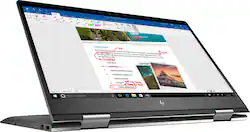
Envy x360 2-in-1 15.6" Touch-Screen Laptop - AMD Ryzen 5 - 8GB Memory - 1TB Hard Drive - HP Finish In Dark Ash Silver
Model: 15M-BQ121DX
SKU: 6124570
This item is no longer available in new condition. See similar items below
Customers value the Envy x360 2-in-1 laptop for its touch screen capabilities, affordable price, user-friendly interface, and impressive performance. While some users have concerns about battery life, fan noise, overheating, and limited storage, many find that the pros outweigh the cons.
Bought this on sale for $130 off which is a steal for this awesome machine. Put a 256GB PCIe SSD in to go with the 1TB drive that already comes with it as well as upgraded the memory from 8GB to 16GB. Reinstalled Windows 10 with the latest ISO image from the Microsoft website using a Samsung USB 3.0 flash drive. It is sick how fast this machine is and the Vega integrated graphics are killer. I am not a gamer though so YMMV. Buy this 2-in-1 laptop and ditch your MacBook Pro/iPad/Apple whatever on eBay.
Posted by macvelli
Coming off an immensely successful launch on the desktop, the Ryzen architecture has thoroughly dazzled with impressive multithreaded performance coupled with an affordable price tag. Having personally used the Ryzen 7 1700, I could not wait to see what Ryzen had in store for mobile devices. With the HP Envy X360, the Ryzen 5 2500U makes an impressive mobile debut, combining both efficiency and performance to power an outstanding laptop from HP. Once unboxed, the laptop itself has a gorgeous brushed finish and has a nice weight to it that added to its quality. Furthermore, it was actually a bit heavier than I expected, however, it is still the lightest laptop I have used personally. In addition, the display easily bended back without any resistance; no sound could be heard at the pivots of the display. Dimensions wise, the X360 sports a razor thin 0.8 inch frame that is sure to impress even with the laptop off. The craftsmanship is definitely top notch and atheistically it is amazingly sleek. As for connectivity, there are two USB 3.1 (Gen1) ports as well as one USB 3.1 (Gen 1) Type-C port. Additionally, there is one HDMI 2.0b, an SD slot, and a standard 3.5mm headphone jack. In addition, I appreciated that they included an LED light for both the HDD activity and battery status. On the right hand side, there is a volume control button that I thought was quite handy. In addition, the included power adapter is extremely compact, especially given its square shape appearance. It definitely accompanies the sleekness of the laptop. Lastly, for upgrades as others have mentioned, there are two RAM slots that you can access as well as an M.2 slot for an SSD upgrade. However, I caution that you only attempt upgrades as long as you have the experience to do so. For my benchmarks, I wanted to focus directly on an out of box experience. Thus, I wanted to keep any modifications of the laptop to a minimum, though I did have to make a few. I disabled all the non-Microsoft services and turned off OneDrive from starting up. I uninstalled the McAfee Internet Security (more details later), defragmented the hard drive, set the page file to its recommended size, and then cleaned the registry with CC Cleaner. Lastly, I changed the power plan to high performance and disabled all power saving features. I also changed the minimum and maximum processor state to 1% to 100% respectively. All benchmarks were executed while the laptop was connected to the power adapter. For CPU benchmarks, I used our only laptop that houses an i3-7100U as well as two of my custom built desktops that houses an older i7-3770K and lastly a more recent i5-7500. During all benchmarks, I monitored the thermals using HW Monitor. For a multithreaded benchmark, I wanted to see how both the Ryzen 2500U and Vega 8 performed in relation to Intel's offering. Using 3D Mark, I ran the Cloud Gate Benchmark on a laptop that houses a i3-7100U as well as the HD 620 integrated graphics. In addition, I ran the same test on a desktop that houses an i5-7500 and the HD 630. Ryzen/Vega 8 - Overall: 12,017/Graphics: 16,626 (74.08 FPS/70.58 FPS)/Physics: 6,100 (19.37 FPS) i5-7500/HD 630 - Overall: 8,787/Graphics: 10,332 (46.02 FPS/43.80)/Physics: 5,780 (18.35 FPS) i3-7100U/HD 620 - Overall: 5,681/Graphics: 8,000 (36.02 FPS/33.63 FPS)/Physics: 2,821 (8.96 FPS) Immediately it is clear that the Ryzen 2500U and Vega 8 obliterates the competition. It performed well over expectations. The results are staggering! Temperatures hovered round 60-70 Celsius. Power consumption never exceeded 11 Watts and was well under its 15 Watt rated TDP. Comparatively, the i5-7500 consumed between 32-36 watts! Amazing! I would like affirm though that this test was specifically designed for laptops and mobile solutions. I caution that while you may be able to render some games playable on low settings, or even run older games, the Vega 8 GPU is still an integrated solution. Newer games will be difficult to run so keep your expectations reasonable. However, for what it is, the Vega 8 is a beast and really shines as an efficient mobile GPU solution. For the second multithreaded benchmark, I decided to run an aggressive video encode using Handbrake 1.07. For my test, I encoded a 91 minute movie using the very fast 1080p preset. I set both the frame rate and audio equal to the source video. I ran the test on both our laptops. Ryzen 2500U: 1 Hour 20 Minutes 6 Seconds (28.0 FPS) i3: 7100U: 2 Hour 35 Minutes 0 Seconds (14.2 FPS) As you can see, the Ryzen wins without trouble. During the test, the i3's power consumption hovered around 8 watts while the Ryzen never exceeded 11 watts. Although, while the i3 is only a dual core CPU (4 threads), it still gives you an idea where Ryzen will aggressively challenge other CPUs. It should directly challenge most of Intel's current i5 and i7 mobile offerings. For a single threaded test, I used MusicBee 2.4 and LAME 3.99 to encode a 24 minute WAV file to MP3. The encoder was set to a constant bit rate of 320 and the internal algorithm was set to 0 for the highest quality (-q command). The test was ran three times per CPU. MusicBee's maximum encoding thread setting was set to one. In addition, I added my older i7-3770K to the test. I5-7500: 1 Minute 49 Seconds/1 Minute 47 Seconds/1 Minute 47 Seconds Ryzen 2500: 2 Minutes 0 Seconds/2 Minutes 1 Second/2 Minutes 0 Seconds i7-3770K: 2 Minutes 6 Seconds/2 Minutes 6 Seconds/2 Minutes 6 Seconds The results are quite staggering as the Ryzen 2500U managed to beat my older i7-3770K and comes relatively close to the more recent Kaby Lake i5-7500! It is completely unheard of to retain this much performance from a single mobile CPU, let alone actually beating my desktop's i7. One of the main complaints of the X360 Envy is that HP included a 1 TB HGST 7200 RPM mechanical hard drive with the computer. However, the drive itself is not slow, but it is overworked by HP's cluttered windows installation on startup. On top of this, the hard drive is extremely fragmented (15%) right out of the box. Monitoring task manager, I noted that McAfee (ESET is a fabulous alternative) was one of a few processes that was holding the hard drive hostage at nearly 100% by reading/writing anywhere from a few hundred kilobytes up to 2- 5 megabytes. Once uninstalled, the laptop was immediately much more responsive. I even freed up about 12% of the RAM while doing so. Afterwards, you should notice a much lower and consistent drive usage. Periodically, there will be some hard usage spikes so I strongly recommend to keep an eye on task manager. To verify my results, I ran the drive using CrystalDisk Mark 6.0. Sequential Read/Write - 116.8 MB/s & 109.8 MB/s 4KQ1 Read/Write - 0.385 MB/s & 0.617 MB/s While the 4KQ1 numbers are alright for a laptop drive, it is easy to see why the drive was easily overwhelmed by the small reads and writes by the startup executables. Lastly, a quick copy test using my SanDisk Extreme Pro USB 3.0 flash drive, I was able to copy a 28.3 GB M2TS file averaging around 90-110 MB/s. Overall, I am pleased with the drive performance and its fairly quiet operation. In the future, a possible SSD upgrade is always a good option to have, but by no means is it absolutely necessary. As for the battery, I wanted to see it how performs given a worst case scenario. I left all the power settings on high performance, along with the display brightness set to max and the keyboard backlight turned on. I started a 90 minute movie and maximized it to full screen. After 30 minutes, the battery was at 81%. At little over the hour mark, I noted that the battery was at 62%. At the end of the movie, it was at 46%. Overall, most will see a longer battery life, but this should give you an idea of the minimum battery life you should expect. As somewhat of a music enthusiast, the sound quality of the laptop was actually quite good. I played my FLAC collection over both the speakers and headphones. Instruments and vocals are crisp and clear as well as dialogue during the videos that I watched. At 50% volume, the laptop is really loud. For once, it was quite refreshing to have laptop that does not lack in sound. Granted, I would caution to keep your sound expectations reasonable as this will not produce earth shattering bass or replace your home theater. However, for laptop sound, most should be content with the sound. The X360 IPS display was also a pleasant surprise while I was watching videos and managing my photos. The colors are fairly vibrant and had a decent contrast to it. During web browsing sessions, I found that text was sharp and legible, even more so than previous laptops. At first, I though the whites were a little washed out but my eyes quickly adjusted. As for the touch screen, during tablet mode, I found it responsive and extremely accurate even though I did not have a stylus for it. However, I do wish that HP would have included one. I also would have liked if HP would have included some sort of cover for the keyboard so that when you flip the unit over the keys are protected while using it as a tablet. Nonetheless, I do enjoy the ability to flip it over into a tablet. In conclusion, the X360 has almost everything going for it and at its price point, I think almost everyone will be pleased. With the Ryzen 2500U and 8 GB of RAM, it has more than enough power to chew through all your demanding computational needs all the while remaining efficient with both its usage and power consumption. The CPU is a real winner. Although somewhat held back by HP's windows installation, it is easily fixable and afterwards my experience was both fast and smooth. Additionally, the display has gorgeous contrast and text was sharp. The touch screen was both responsive and the sound was both crisp and enjoyable. Overall, its premium feel and sleek aesthetics complete this highly recommended package.
Posted by Dragonhunter281
Its so thin , light and i love the keyboard ans its tought screen . Its a all in one laptop
Posted by BG559
The vast majority of our reviews come from verified purchases. Reviews from customers may include My Best Buy members, employees, and Tech Insider Network members (as tagged). Select reviewers may receive discounted products, promotional considerations or entries into drawings for honest, helpful reviews.