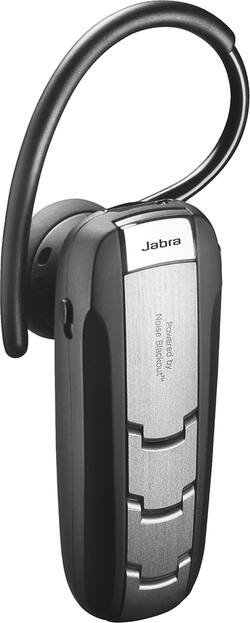
Jabra - Extreme2+ Bluetooth Headset - Brushed Metal
- Key Specs
- Connection Type: Wireless
- Wireless Connectivity: Bluetooth (The manner in which a device sends data to another device over a short distance without the use of wires or cables.)
- True Wireless: false (These headphones not only lack wires between the device and headphones, they also lack wires between the headphones themselves. (true wireless is really only possible with in-ear headphones))
- Maximum Wireless Range: 33 feet
- Headphone Fit: In-Ear
- Battery Life: 6 hours (Battery life will vary depending on the product configuration, product model, applications loaded on the product, power management setting of the product and the product features used by the customer. As with all batteries, the maximum capacity of this battery will decrease with time and usage.)
- Battery Charge Time: 2 hours (Battery charge time will vary depending on the product configuration, product model, applications loaded on the product, power management setting of the product and the product features used by the customer. Charging time will likely decrease with time and usage of the battery.)
- General
- Product Name: Extreme2+ Bluetooth Headset
- Brand: Jabra
- Model Number: 100-95500021-14
- Color: Brushed Metal
- Audio
- Sound Isolating: false
- Connectivity
- Connection Type: Wireless
- Wireless Connectivity: Bluetooth (The manner in which a device sends data to another device over a short distance without the use of wires or cables.)
- True Wireless: false (These headphones not only lack wires between the device and headphones, they also lack wires between the headphones themselves. (true wireless is really only possible with in-ear headphones))
- Bluetooth Version: Other (The Bluetooth specification formalized by the Bluetooth Special Interest Group. All versions of the Bluetooth standard are backwards compatible with previous versions.)
- Maximum Wireless Range: 33 feet
- Number Of Devices Connectable Simultaneously: 2
- Features
- Controls: Call, Mute, Volume
- Maximum Talk Time: 5.5 hours
- Stand-By Time: 10.5 days (Amount of time it takes for the device to deplete a single battery charge when powered on but not in active use. This length of time is dependent on the network environment the device is connected to, if applicable, and the applications running.)
- Design
- Headphone Fit: In-Ear
- Style: Travel
- Power
- Rechargeable: true
- Battery Life: 6 hours (Battery life will vary depending on the product configuration, product model, applications loaded on the product, power management setting of the product and the product features used by the customer. As with all batteries, the maximum capacity of this battery will decrease with time and usage.)
- Battery Charge Time: 2 hours (Battery charge time will vary depending on the product configuration, product model, applications loaded on the product, power management setting of the product and the product features used by the customer. Charging time will likely decrease with time and usage of the battery.)
- On/Off Switch: Yes
- Warranty
- Manufacturer's Warranty - Parts: 1 year
- Manufacturer's Warranty - Labor: 1 year limited
- Other
- UPC: 615822007474
With this Jabra Extreme2+ 100-95500021-14 Bluetooth headset, you can listen to music, stream GPS directions and answer hands-free phone calls at the office or on the road. Noise Blackout technology reduces environmental noise for crystal-clear audio.
- Compatible with most Bluetooth-enabled devices: Including a wide variety of cell phones and MP3 players, so you can make hands-free phone calls, stream music and more.
- Noise Blackout dual microphone technology: Eliminates background noise for clear audio and uninterrupted speech recognition.
- Voice Control system: Allows you to adjust settings and answer calls using voice commands.
- Ultimate-Comfort Eargels: Fit comfortably for extended wear.
Whats Included
- Extreme2+ Bluetooth Headset
- 2 Ultimate-Comfort Eargels, 2 ear hooks
- USB charger, dual car charger
- Owner's manual
A: If you are hard of hearing this ear piece is not the one for you. Nothing wrong with my hearing and have all but shoved it up through my ear trying to hear.
A: You can listen to music through the earpiece, but, other than volume control, you can not control the music. I use my watch for that.
A: Hello JB, Yes. You will need to press the answer end button (hold 1 second with a beep heard) to answer the incoming call and hold the active call. Another press to switch between the 2 active call and a tap to end one. Hope this helps!
Q: Can you mute while talking on a call ?
A: Hello Glo Yes you can mute from the Jabra Extreme2. I have listed the instructions below, they can also be found in the quick start guide that came in the box and on our website. To mute - press both volume up and down at the same time. A low beep alert plays during a muted call. To un-mute - tap either of the volume buttons. Thank you for your question.
A: Yes, depending on the phone it is paired with. that is a feature that must be supported by the phone to work.
Q: Can this headset be used with hearing aids? That means can it go over the years and not in the ears?
A: No
Q: Where is the multifunction button.
A: Hi Cj. It is the bigger button under the Jabra logo. Thanks for your question. https://www.jabra.com/bluetooth-headsets/jabra-extreme2
Q: Will the extreme 2 work well with my hearing aids? Does it have enough volume? Paul
A: Hello Paul - The Jabra Extreme2+ is not designed to be used with hearing aids. Depending on what kind of hearing aid you use, it may not fit comfortably since the Extreme2+ is an in-ear headset. We do have some styles which sit the headset on top of the ear, like the Jabra Supreme and Jabra Style (now called the Jabra Talk 30). Feel free to reach out to our support team if you have any other questions: https://www.jabra.com/ServiceMenu/contact/ContactJabraSupport/ContactJabraSupportConsumer





















