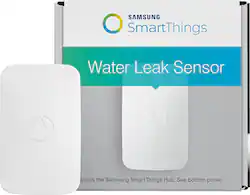
Samsung - SmartThings Water Leak Sensor
- General
- Product Name: SmartThings Water Leak Sensor
- Brand: Samsung
- Other
- UPC: 856418004471
Samsung SmartThings Water Leak Sensor: Stay informed of water leaks wherever you go with this sensor, which pairs with your existing SmartThings hub and your Apple® iOS, Android or Windows device. Just place the sensor next to your sump pump to receive mobile alerts if there's any excess water. The sensor also triggers a light or siren.
- Works with SmartThings hub: For use with your existing setup. Meets Zigbee HA 1.2 protocol and has a 50' to 150' range.
- Receive alerts on your Apple iOS, Android or Windows mobile device: The sensor sends an alert to your smartphone at the first sign of excess water. Just place the sensor next to your sump pump in the basement to stay informed if it fails.
- Triggers a light or siren: So you're immediately alerted when there's a water leak.
Whats Included
- SmartThings Water Leak Sensor
- CR-2 battery
- Owner's manual
A: I haven't but I plan to zip tie it to the pipe I'd rather lose a 35 dollar Sensor than flood my basement again.
A: Yea, actually you can. Go to your my home Select your sensor Select SmartApps-up top to the far right Select Notify me when Then select Minimum time between messages. This will allow you to set the time frame that you would like to receive notifications. Hope this helps. Took me a while to figure it out as well.
A: It can be placed anywhere water could leak. But beware, mine disconnected from the hub freqently.
A: It’s only designed to sit on flat surfaces. We use it to sense water overflowing from the washing machine pump. When it senses water the washing machine shuts off.
A: The leak notifications are configured through the Smart Home Monitor section on the dashboard tab of the app. I don’t see that you can configure multiple alerts for the same event but you can have it do multiple things on alarm - push notifications, flash lights, sound alarm (if you have one), etc.
A: Download from the play store or apple store...
A: I'm afraid this sensor is not meant to be submerged. There are other sensors that have a wire with two probes that I use to tell if my sump pump does not turn on.
Q: which branch water leak sensor wifi will compatible with Xfinity home security system. Thanks,
A: Not sure if any water leak sensor on market has interoperability with a security system platform.




















