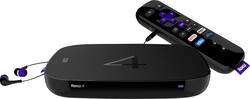
Roku - 4 Streaming Media Player - Black
- Key Specs
- Maximum Supported Resolution: 2160p (4K)
- Operating System Compatibility: Android
- Remote Control Included: true
- Media Card Slot: true
- General
- Product Name: 4 Streaming Media Player
- Brand: Roku
- TV Compatibility: Most HDTVs with up to 4K Ultra HD resolution
- Model Number: 4400R
- Features
- Smart Capable: false (Smart, or smart-capable devices are able to connect directly to your home network in order to stream content from the Internet, run Internet-based apps, or connect to other smart devices.)
- Compatibility
- Compatible Wireless Standard(s): Wireless AC (The wireless networking standard(s) the device is backwards compatible with. This includes networking protocols based on the IEEE 802.11 standard (alphabetically ascending) and the Wi-Fi Alliance standard (numerically ascending), both of which provide high-throughput wireless local area networks (WLANs). Devices designed to work with specific standard(s) will be backwards compatible with previous versions but may not run at optimal performance when using earlier iterations.)
- Media Card Compatibility: microSD
- Other
- UPC: 829610000770
Roku 4 Streaming Media Player: Thousands of entertainment options are at your fingertips with this Roku 4 streaming media player. Access free and subscription channels like Netflix, Hulu, HBO Now and Amazon Prime for instant streaming of your favorite TV shows and movies, and search quickly and easily using the voice search function.
- A vast selection of entertainment: With access to over 2,500 different channels, including Netflix, Hulu, Amazon Prime, NBC Sports and MLB, you can watch your favorite TV shows, movies and sports instantly.
- Search quickly and easily with voice function: The Roku search function lets you browse across channels to find the best options. Simply speak into the enhanced remote to find your favorite entertainment.
- Integrated access to your favorite entertainment: Roku Feed keeps you up to date with the latest content, so you know right away when a new movie or TV show is ready for streaming.
- Use your mobile device as a remote for simple control: Compatible with most Apple® iOS, Android and Windows devices. You can also share content from your mobile device to your TV.
- High-speed wireless connectivity: Built-in dual-band 802.11ac Wi-Fi connects to your home network for fast, smooth video streaming.
- Compatible with most HDTVs: Easily connect to most HDTVs. Upscaling lets you view 720p and 1080p streaming content in vibrant 4K resolution on your compatible Ultra HDTV.
Whats Included
- 4 Streaming Media Player
- Remote, 2 AA batteries
- Power adapter
- In-ear headphones
- Owner's manual
Q: What is the difference between roko4and appletv
A: I know others have mentioned it, but I want to stress that AppleTV doesn't support Amazon Prime. I was told by a Geek Squad representative at my local Best Buy that it would, so we purchased Apple's newest choice, AppleTV 4. You can run Prime but only through a different Apple device, like iPad, and only if it's version 3 or newer. Cons: It was difficult to set up. It comes without a manual, and the online instructions are hard to understand, even though I'm pretty tech-savvy. The basic setup doesn't teach how to use the remote or navigate the Settings menu. It wants you to create an Apple account before doing anything, something we weren't told about. The login and search screens recognized characters very slowly, and frequently not at all. Netflix doesn't come with it and I couldn't access content even after downloading the App. It has far fewer free channels than Roku, and is missing some popular news channels. Pros: It has some fun interfacing features with other Apple products, like photo and iCloud sharing, and content streaming. The few channels I watched, like YouTube, were very high quality, both in picture and sound, and streaming was strong and smooth, with no buffering issues. I was especially impressed with Crackle, which requires a lot of bandwidth, and is completely unwatchable on my Samsung SmartTV. AppleTV 4 allows voice commands, including searching for content across many channels. Roku 3 and 4 offer that same feature. I don't have one yet, but my sister has been using Roku for years and loves it. She says her Roku 3 gets a thousand channels, is quiet and easy to use, and has never given her any trouble. I plan on switching over. I'm sorry this isn't the exact comparison you're asking for, but I hope I gave you some useful information. It's so hard to know what to buy!
A: The Roku itself doesn't have a monthly fee. After you install it, you have the ability to add many different channels. Many of these are free and have commercials while watching the shows. Other channels (like netflix) have monthly fees. Many specialty channels offer a free version with adds and limited content and add free version with a monthly fee with additional content. Personally, I the only pay channel I have is Netflix. All of the rest of the channels that I use are free. I hope this helps
Q: Can I watch ESPN live with this?
A: The Roku 4 offers a free trial to Sling, the latest HD streaming app and one of the only options for watching live cable broadcasts on a device such as the Roku. It is 20.00 a month and you may have to have a preexisting subscription to a cable provider, but it does have the cabibility nonetheless to offer ESPN live as well as other channels in HD streaming quality.
Q: Will this work with a Samsung Smart TV?
A: It will work with any TV that a has an HDMI connection.
Q: Can I watch live local channel
A: The Roku does not stream live local channels.
Q: how do I connect the roku 4 to my tv?
A: You can only use an HDMI cable. BestBuy has plenty of them. Just ask any rep on the floor at BestBuy for an HDMI cable for your ROKU to your TV, providing you have an HDTV with HDMI inputs. That is the ONLY way to connect, the box makes this very clear before you purchased it. I hope that helps. By the way, this is an awesome device, I just bought one myself and I am stunned at the quality of the video. Don't forget as well, this is an internet streaming device, you must have internet at home, with at least 10 Megabytes down to experience it fullest potential. You can either connect with WiFi, or there is an Ethernet port as well, both work flawlessly. Best of luck!
A: I have almost 1000 files playing on the Roku 4. Lists are to large to list.
Q: Will roku support more than one tv .
A: It has HDMI outputs for video. The only way it'll connect to multiple TVs is to use an HMDI splitter of sorts.



















