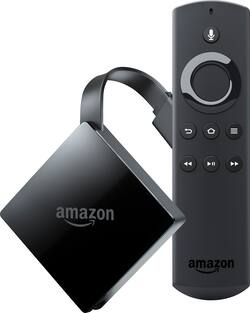
Amazon - Fire TV with 4K Ultra HD and Alexa Voice Remote - Black
- Key Specs
- Voice Assistant Built-in: Amazon Alexa (A digital assistant built into the device that uses voice commands to answer questions and control smart devices.)
- Maximum Supported Resolution: 2160p (4K)
- High Dynamic Range (HDR): false (An HDR-compatible 4K TV or other HDR-compatible product displays HDR video content when it's available from sources like 4K Ultra HD Blu-ray Discs and 4K streaming services.)
- Operating System Compatibility: None
- Remote Control Included: true
- Media Card Slot: false
- Works With: Amazon Alexa (Compatible with or able to be connected to other smart devices or applications.)
- General
- Product Name: Fire TV with 4K Ultra HD and Alexa Voice Remote
- Brand: Amazon
- TV Compatibility: TVs with HDMI capable of 2160p at 24/25/30/50/60 Hz and HDCP 2.2 and TVs with HDMI capable of 1080p or 720p at 50/60 Hz.
- Model Number: B01N32NCPM
- Compatibility
- Voice Assistant Built-in: Amazon Alexa (A digital assistant built into the device that uses voice commands to answer questions and control smart devices.)
- App Compatible: false (The product can be connected to a program or software application on a mobile device, which then receives collected data from the product.)
- Bluetooth Enabled: false (The device is capable of communicating with another device via Bluetooth, provided they are within the required range of each other. A Bluetooth-enabled device must also be the same Bluetooth version or higher than the accessory it is intended to pair with.)
- Compatible Wireless Standard(s): Wireless A, Wireless AC, Wireless B, Wireless G, Wireless N (The wireless networking standard(s) the device is backwards compatible with. This includes networking protocols based on the IEEE 802.11 standard (alphabetically ascending) and the Wi-Fi Alliance standard (numerically ascending), both of which provide high-throughput wireless local area networks (WLANs). Devices designed to work with specific standard(s) will be backwards compatible with previous versions but may not run at optimal performance when using earlier iterations.)
- Interface(s): HDMI (Refers to the types of connections that devices use to interact and communicate with each other.)
- Works With: Amazon Alexa (Compatible with or able to be connected to other smart devices or applications.)
- Audio
- Surround Sound Supported: Dolby Atmos (Surround sound systems use multiple audio channels and speakers to create an immersive sound experience for the listener. There are also various proprietary technologies that imitate this kind of sound via a device's built-in speakers or soundbar.)
- Warranty
- Manufacturer's Warranty - Parts: 1 Year
- Manufacturer's Warranty - Labor: 1 Year
- Other
- UPC: 841667192482
Fire TV connects you to a world of entertainment. With a compatible 4K Ultra HD and High Dynamic Range (HDR) TV, watch as thousands of movies and shows come to life in vibrant colors and detailed contrast. Find your favorites with universal voice search across more than 140 channels and apps or discover new content with personalized recommendations on the home screen.
- Picture-perfect: Fire TV connects you to a world of entertainment. With a compatible 4K Ultra HD and High Dynamic Range (HDR) TV, watch as thousands of movies and shows come to life in vibrant colors and detailed contrast.
- Watch what you want: Watch over 500,000 movies and TV episodes from Netflix, Prime Video, YouTube, Hulu, HBO, Showtime, Starz and more.
- Say it. Play it: Your Alexa Voice remote can easily find, launch, and control content. Simply say "Find suspense thrillers", and Alexa will show you results.
- Immersive entertainment: Enjoy stunning 4K Ultra HD streaming at up to 60 fps and HDR support enabling more vivid, lifelike colors and exceptional clarity.
- Go beyond streaming: Use Alexa to view camera feeds on your Fire TV or to control lights, thermostats, and other compatible smart home devices with your Alexa Voice remote. Also works with Arlo.
- Better with Prime: Prime membership unlocks thousands more movies and TV episodes through Prime Video, including Amazon original series, such as The Tick, The Grand Tour, Mozart in the Jungle, and Just Add Magic.
- No cable? No problem: Watch live TV with subscriptions to DirecTV Now, Hulu, Sling TV and others, or connect an indoor HD antenna to get broadcast networks, such as CBS, FOX, NBC, and PBS for free.
- Simple, fast, and fluid: Simply plug into your HDTV's HDMI port, and connect to the Internet via Wi-Fi or the Amazon Ethernet adapter to start enjoying your favorite content.
Whats Included
- Amazon Fire TV with 4K Ultra HD and Alexa Voice Remote
- USB cable and power adapter
- Quick Start Guide
- Product Guide
- 2 AAA batteries
A: This device is primarily used to stream Internet-based media to a television (smart-tv's already have this functionality built-in). This device does not receive Internet access on its own. Internet access would still need to be provided separately via your cable company, telephone company, etc. This device would then use Wi-Fi (or Ethernet cable via the purchase of a separate adapter, approx. $15) to access the Internet. With Internet access, this device will allow you to install apps to Subscription-based Internet services such as Netflix, Hulu, SlingTV, HBO Go, etc. A valid subscription would be required for each service. If you have an Amazon Prime membership (also subscription based), you would have instant access to Amazon Prime media without having to install any apps (this being an Amazon product and all, wink). Whether or not you have a subscription to any Internet-based media services, you can of coarse always buy or rent media from Amazon! This device can be used in addition to a cable subscription, or replace it. Some people already subscribe to Internet-based services and simply use this device to access those services. Some are able to use this device in-place of a cable box(es) to save on monthly equipment charges. Some use this device in conjunction with an antenna to supplant a cable subscription altogether. The amount you can potentially save compared to a cable subscription would depend on your individual entertainment needs. You can google "Amazon Fire TV apps" to find a list of available apps. There's over 6,000 total apps, with roughly 500 related to Movies/TV. Checking into a few of the featured apps would quickly give an idea of what content and channels can potentially be provided. From there you can tally any potential subscription costs and compare to your current cable subscription. With an honest assessment of your entertainment needs and viewing tendencies, you may be surprised by the comparison. There are other options to potentially add third-party Internet-based media access to this device, but beware of piracy laws! Good luck, perhaps you'll be able to join the vastly growing cord-cutting community, or maybe even find a happy medium!
A: Yes, this is the 2017 model.
A: No, this version does not provide a USB nor SD expansion port. The previous version (2015 model) is still available and provides both.
A: 4K TV not necessary, and even trying to stream 4K is a huge pain and requires an insane bandwidth. I have 4 of the Generation 2 Amazon TV Boxes and absolutely love them. Get on YouTube and research Kodi. Then look into Terrarium TV app, and also search GearsTV and GFSERVERS paid IPTV services. This Android based box is super stable and once you understand how to set it up you will be thrilled beyond words.
Q: Yiu did not answer my question. Can I get this with Ethernet connection on in and out ?
A: This version does not have a built-in Ethernet port like the two prior versions. This version can only add Ethernet connectivity with the purchase of a separate Micro-USB adapter (approx. $15).
Q: If you have a Smart 4K TV with Apps, why do you need Amazon Fire TV!
A: Because your smart TV doesn't allow you to install 3rd party apps.
A: Yes it would make your viewing experience much better (4k) most 4k smart tvs on the market need a 4k streaming device such as the fire tv box. The fire stick will not give you what your looking for there good for extra tv's kids rooms ect...
A: Yes my tv is only 1080 and it works perfect.


















