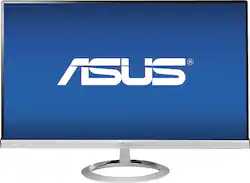
ASUS - 27" IPS LED HD Monitor - Silver
- Key Specs
- Refresh Rate: 60Hz (The number of frames per second the device can produce natively without enhancement. Higher rates help produce smooth, seamless pictures.)
- Maximum Resolution: 1920 x 1080 (Maximum resolution refers to the highest number of pixels that a screen can process and display. Higher resolution signals produce more detailed images.)
- Response Time: 5 milliseconds (The speed at which pixels can change colors is called response time. It is measured in milliseconds (ms).)
- Screen Size: 27 inches (Size of the screen, measured diagonally from corner to corner.)
- General
- Product Name: 27" IPS LED HD Monitor
- Brand: ASUS
- Operating System Compatibility: Windows
- Model Number: MX279H
- Display
- Refresh Rate: 60Hz (The number of frames per second the device can produce natively without enhancement. Higher rates help produce smooth, seamless pictures.)
- Maximum Resolution: 1920 x 1080 (Maximum resolution refers to the highest number of pixels that a screen can process and display. Higher resolution signals produce more detailed images.)
- Contrast Ratio: 80,000,000:1 (Measured difference between a displayed image's brightest whites and darkest blacks. The larger the first number, the more detail and color that can be displayed.)
- Response Time: 5 milliseconds (The speed at which pixels can change colors is called response time. It is measured in milliseconds (ms).)
- Display Type: LED
- Aspect Ratio: 16:9 (The measurement of the width of a screen compared to the height of a screen, expressed as a ratio.)
- Brightness: 250 candela per square meter (A measure of the total light output.)
- Screen Size: 27 inches (Size of the screen, measured diagonally from corner to corner.)
- Horizontal Frequency: 80 kilohertz (Also known as "horizontal scan rate," this measurement describes the number of horizontal lines displayed per second and is used to calculate a screen's refresh rate.)
- Features
- Tiltable: true
- Anti-Glare: false (Product has features, such as a matte finish, that reduce the likelihood for screen glare.)
- Integrated Speaker(s): true
- Dimensions
- Product Width: 24.5 inches (The out of box width of the item. Width is measured as the horizontal distance from one side of the item to the other as it would be primarily used or placed.)
- Product Weight: 11.5 pounds (The out of box weight of the item.)
- Stand Included: true
- Power
- Power Consumption: 37 watts
- Certifications Listings & Approvals
- ENERGY STAR Certified: false (Devices carrying the ENERGY STAR service mark, such as computer products and peripherals, kitchen appliances, and other products, generally use 20% to 30% less energy than required by federal standards.)
- EPEAT Qualified: false (The Electronic Product Environmental Assessment Tool (EPEAT) was designed to provide an environmental assessment tool for purchasers. In order to qualify for EPEAT, a product must meet all 23 required criteria.)
- Warranty
- Manufacturer's Warranty - Parts: 1 year; 3 years: casing, panel
- Manufacturer's Warranty - Labor: 1 year; 3 years: casing, panel
- Other
- UPC: 886227265824
Enjoy crystal-clear visuals with this Asus 27" LED HD monitor that features AH-IPS technology for vibrant color reproduction and Tracer Free technology to ensure fluid video playback. Built-in speakers with SonicMaster technology deliver crisp audio.

- Ultrafast 5 ms response time: Helps prevent ghosting and blurring in fast-paced scenes to clearly display intense action in games, movies and more.
- 27" widescreen flat-panel LED display: With a frameless design provides an expansive viewing area.
- 80,000,000:1 ASCR (Asus Smart Contrast Ratio): Enables lifelike color reproduction with rich, dark blacks and brilliant whites.
- 250 cd/m² brightness: For a highly visible display and clear on-screen images.
- 1920 x 1080 maximum resolution in 16:9 HD format: For a full high-definition display.
- Ultrawide 178° horizontal and vertical viewing angles: Helps eliminate color shift to provide a clear view from multiple vantage points.
- 2 HDMI inputs: Along with DVI-D and VGA inputs make it easy to connect digital and analog devices, including gaming consoles, Blu-ray players, digital cameras and more. The 3.5mm PC audio input allows you to connect audio components.
- Tracer Free technology: Controls voltage levels to ensure fluid video playback with optimal clarity and smooth motion.
- AH-IPS technology: Ensures highly realistic colors and helps minimize energy use. Splendid Video Intelligence technology and 6 preset Splendid video modes deliver high-quality visuals.
- Quick Fit Virtual Scale: With an alignment grid lets you view documents in A4 and letter formats and photos in 8" x 10", 5" x 7", 4" x 6", 3" x 5" and 2" x 2" formats in their native size to simplify editing and printing.
- 3 skin tone selection modes: Along with 4 color temperature modes allow you to adjust the picture to your liking.
- Auto adjustments: Take the guesswork out of calibrating your display.
- Tilting design: Lets you adjust the monitor from 20° to -5°, so you can easily find a comfortable viewing angle.
- Internal speakers: With large, rare-earth magnets create a lush soundscape. SonicMaster technology by Bang & Olufsen ICEpower provides rich, accurate audio.
- PC compatible: For use at home or in the office.
Whats Included
- Asus 27" IPS LED HD Monitor
- Owner's manual
- Power adapter
- Sun dial-inspired stand
- VGA cable, audio cable, power cord, HDMI-to-DVI cable
Q: Is this monitor Mac compatible?
A: Careful! While it "works" with a Mac, there is limited capability. There is no driver available for Macs, so it uses the monitor as a generic monitor. For instance, you cannot change the display size and have no capability to adjust the volume using your Mac, when using HDMI. The monitor was designed for Win 8, and only allows adjustments on Win-based computers.
Q: does this monitor have an auxilary port for headphones
A: Yes. Usually your PC will have an auxiliary headphone output as well for headphones or external PC speakers. Remember to look for shielded headphones or speakers so things like monitor or WiFi routers won't impart a buzz/static into your speaker sound. Hope that helps!
Q: Does this monitor have a camera, if so can you use it for FaceTime on a Mac Book or Mac Mini?
A: No camera. You can get a clip on external camera anywhere.
A: Matte. No glare and still pulls off rich color. I have two and I use dual monitor for gaming. By far the best monitors I've owned.
A: Can't answer dual monitor question but usually you need two video cards in PC. However, if I understand your second question correctly to see EXACT COLOR of printed picture on screen (as monitors tend to be much brighter than printer output) you need a monitor Calibration device and software that will set your screen to match printer output. An example of an easy to use device but somewhat pricey device is the Spyder 4 Pro. If you want to edit photos beyond redeye and brightness, you will need this device with even the best monitors. Good luck!
Q: Is there a DVI input on this monitor?
A: Yes. The monitor doesn't have a dedicated DVI input, but comes with a cable to "convert" DVI to HDMI. DVI/HDMI are basically the same with different connectors, though sometimes the DVI cable won't carry sound. Luckily, mine is doing that just fine. If you're concerned about picture quality using the DVI adapter, don't be.
A: No; this is not VESA compliant. This model is not meant to be mounted. Please try another model.
Q: Which is better for gamming, this one or BENQ RL2455?
A: Short answer: both are great monitors for gaming, depending on what you're looking for. Long answer: I was between this monitor and the RL2755HM, which is a larger version of the monitor you specified. Both have extremely low input lag, but the difference is in the display panel. Asus is IPS and BenQ is TN, which basically means the Asus monitor will have more saturated colors and the BenQ will look more washed out by comparison. The BenQ monitor you mentioned is specifically designed for console gaming and used in the Major League Gaming circuits, and it ends up having a very fast refresh rate of 1ms. The Asus monitor is 5ms, but I have to tell you, I personally can't tell a difference. Color was important to me, because I'm using this monitor for more than competitive gaming. Aesthetically, the Asus monitor looked better to my eye, more mature and high-end in its design, whereas the BenQ is built for gamers and has a gamer-focused design. I bounced between the two monitors for a long time and ultimately ended up on the Asus, but you can't go wrong with either monitor.


















![The text on the image reads:
17 F8 Home P End F10 PgUp it PgDn F12 Ies Del * 8 ( 9 ) 0 I I + = Backspace I o P : [ ] ] I / K L : : .. . Enter M V > . ? / Shift Alt <
The corrected text should be:
17 F8 Home PgUp it PgDn F10 F12 Ies Del * 8 ( 9 ) 0 I I + = Backspace I o P : [ ] ] I / K L : : .. . Enter M V > . ? / Shift Alt <
The corrected text groups the keys in a more organized manner, making it easier to read and understand.](https://pisces.bbystatic.com/image2/BestBuy_US/images/products/699c06f5-6aba-4ab2-bbf6-114986b58b2a.jpg;maxHeight=144;maxWidth=200?format=webp)