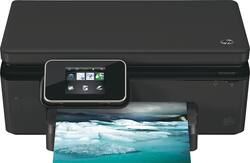
HP - Photosmart 6520 Wireless e-All-in-One Printer - Black
- Key Specs
- Networking: Wireless
- ENERGY STAR Certified: true (Devices carrying the ENERGY STAR service mark, such as computer products and peripherals, kitchen appliances, and other products, generally use 20% to 30% less energy than required by federal standards.)
- Printer Type: All In One
- ISO Color Print Speed: 8.5 pages per minute (The number of color pages able to be printed per minute in the device's default single-side mode, as tested by the International Standards Organization (ISO).)
- ISO Mono Print Speed: 12 pages per minute (The number of black ink (grayscale) pages able to be printed per minute in the device's default single-side mode, as tested by the International Standards Organization (ISO).)
- General
- Product Name: Photosmart 6520 Wireless e-All-in-One Printer
- Brand: HP
- Model Number: 6520
- Dimensions
- Product Height: 17.2 inches (The out of box height of the item. Height is measured as the vertical distance from the bottom of the item to the top as it would be primarily used or placed.)
- Product Width: 17.3 inches (The out of box width of the item. Width is measured as the horizontal distance from one side of the item to the other as it would be primarily used or placed.)
- Product Weight: 13.7 pounds (The out of box weight of the item.)
- Certifications Listings & Approvals
- EPEAT Qualified: false (The Electronic Product Environmental Assessment Tool (EPEAT) was designed to provide an environmental assessment tool for purchasers. In order to qualify for EPEAT, a product must meet all 23 required criteria.)
- Features
- Automatic Reduction/Enlargement: true
- Tray Capacity: 80
- Duty Cycle: Up to 500 (The maximum number of pages per month that the device can produce without failing, as specified by the manufacturer.)
- Scanner Info
- Scanner Type: Flatbed
- Scanner Resolution: Up to 1200 (Refers to the number of pixels/dots, both horizontally and vertically, of the image produced by the scanner. Generally, the higher the resolution, the sharper and cleaner the produced image.)
- Ink
- Compatible Cartridges: HP 564, HP 564XL
- Ink Subscription Service Available: false (The printer monitors ink usage and alerts the subscription provider when levels are low. A purchased subscription provides refills of ink based on usage.)
- Memory
- Memory Card Slot: true
- Paper Info
- Maximum Document Length: 14 inches
- Maximum Document Width: 8.5 inches
- Supported Paper Sizes: Letter, legal, 4" x 6", 5" x 7", 8" x 10", #10 envelopes
- Paper Handling: Up to 80 sheets
- Copier Info
- Maximum Number Of Copies: 50
- Copier Resolution (Black): Up to 600 (Refers to the number of pixels/dots, both horizontally and vertically, of the image produced by the copier in black ink. Generally, the higher the resolution, the sharper and cleaner the produced image.)
- Copier Resolution (Color): Up to 600 (Refers to the number of pixels/dots, both horizontally and vertically, of the image produced by the copier in colored ink. Generally, the higher the resolution, the sharper and cleaner the produced image.)
- Performance
- Printer Resolution (Black): Up to 1200 x 600 (Refers to the number of pixels/dots, both horizontally and vertically, of the image produced by the printer in black ink. Generally, the higher the resolution, the sharper and cleaner the produced image.)
- Printer Resolution (Color): Up to 4800 x 1200 (Refers to the number of pixels/dots, both horizontally and vertically, of the image produced by the printer in colored ink. Generally, the higher the resolution, the sharper and cleaner the produced image.)
- Connectivity
- Minimum System Requirements: PC: 1.0GHz 32- or 64-bit processor or Intel®, Pentium®, II or Celeron® processor; Windows XP (32-bit, SP3 or higher), Vista or 7; 2GB disk space; Mac: Intel® Core™ processor; OS X v10.6 or v10.7; 1GB HD; CD-ROM/DVD; USB port
- Other
- UPC: 886112774059
HP Photosmart 6520 e-All-in-One Printer: Quickly connect this e-all-in-one printer to your home or office Wi-Fi network with HP Auto Wireless Connect, so you can print, scan and copy documents. The included HP Photosmart software simplifies scanning.
- Inkjet printers are best for home or small business use: They offer excellent print quality for photos and documents and accept a variety of paper types and sizes.
- Wireless and mobile printing capability: Connect this printer to your computer easily with built-in Wi-Fi. Plus, print from your smartphone, tablet and other mobile devices with the free HP ePrint app or Apple® AirPrint.
- Scan documents to your computer, SD memory card or e-mail: Using HP Photosmart software to simplify tasks.
- Up to 4800 x 1200 optimized dpi (dots per inch) color resolution: High resolution for producing incredible quality and detail in documents and photos.
- 4 individual print cartridges are economical: Only replace ink cartridges (black, cyan, magenta and yellow) when a color runs out.
- Standard paper handling: 80-sheet input capacity. Also accommodates up to 40 transparencies, up to 40 label sheets, up to 20 photo paper sheets, up to 60 cards or up to 5 envelopes.
- More connectivity options: Built-in memory card slot and 1 USB 2.0 port let you simply plug in your MS Duo, SD or MMC media card or computer and print.
- More print, copy and scan solutions: Automatically print and copy 2-sided documents, scan photos and documents directly to your e-mail and more.
Whats Included
- HP Photosmart 6520 Wireless e-All-in-One Printer
- 564 black, cyan, magenta and yellow ink cartridges
- Owner's manual
- Power cord
- Reference guide, HP Photo Creations software CD
A: 4 cartridge slots, 3 color 1 black. We've printed @ a dozen photos &about the same number of pages of coupons, ink levels are down just a fraction - think the enclosed cartridges will last a while.
Q: Is this Hp 6520 a laser or inkjet printer? Can find it on the box
A: It is an inkjet printer. Inkjets use ink cartridges, where a laser printer uses toner.
Q: Does this come with a USB cable ?
A: A USB Cable is not included.
Q: Is it compatible with Windows 8?
A: This HP Printer is compatible with the Microsoft Windows 8 operating system directly out of the box with the installation disk that ships with the printer.
Q: two identical wireless printers in one area
A: Yes, each printer will have a different name/address.
A: Holds about 1/3 standard pack of paper. To fully load it is easiest to pull tray out, however I have had no issues loading with tray in place.
A: AirPrint is built in. You will need to install the free app on your iPhone or iPad. You will be assigned an email ID to enter in order to send pictures from your device. I tried it right after I got the printer, and it worked fine and was easy to do.
Q: Why is my HP 6520 printer using so much ink?
A: Can't respond to why you are using so much black ink on the newly-installed cartridge. The cartridges included with all new printers contain a minimal amount of ink -- usually just enough to last a few days with normal usage. That way, you have to turn around and buy a new supply of replacement cartridges. If you are not buying the high-capacity cartridges, you should look at doing so. They are more money up front, but the cost-per-page is usually significantly less than with the standard capacity ones.
























