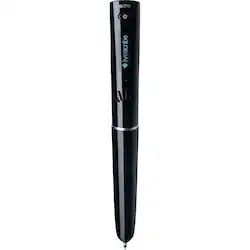
Livescribe - Echo smartpen - Black
- Key Specs
- Model Compatibility: Universal
- Screen Compatibility: Built for Windows Ink (Active)
- Operating System Compatibility: Windows
- General
- Product Name: Echo smartpen
- Brand: Livescribe
- Material: Other
- Model Number: APX-00008
- Color: Black
- Color Category: Black
- Compatibility
- Brand Compatibility: Universal
- Model Compatibility: Universal
- Screen Compatibility: Built for Windows Ink (Active)
- Operating System Compatibility: Windows
- Features
- Comfort Grip: true
- Ergonomic Design: true
- Replaceable Stylus Tip: true
- Integrated Writing Pen: true
- Pocket Clip: false
- Dimensions
- Product Length: 1.12 inches (The out of box length of the item. Length is measured as the longest dimension of the item.)
- Product Diameter: 0.59 inches (The out of box diameter of the item, measured as a straight line passing from side to side of the item, through its center.)
- Warranty
- Manufacturer's Warranty - Parts: 1 year
- Manufacturer's Warranty - Labor: 1 year
- Other
- UPC: 892515002569
Take notes at your next seminar with this Livescribe Echo smartpen, and share them with your co-workers before you even arrive back at the office. This intuitive pen holds 200 hours of audio for later uploading to your computer. Use the micro-USB connection with this Livescribe Echo smartpen to swiftly transfer notes and recordings to share or save.
- Compatible with most Mac or Windows computers that meets system requirements: For wide-ranging use. Mobile device access requires the Livescribe+ App or Flash–enabled web browser.The Echo smartpen only works with Livescribe dot paper.
- Sleek, ergonomic design: The ergnomic grip provides comfort during long meetings and lectures.
- Replaceable ink tip: Simply remove the ink cartridge by pulling it out with your fingertips. Insert a new cartridge until it clicks into place.
- 2GB of memory for recording notes: When digitizing your notes and audio you'll need storage space; with 2GB of memory, your smartpen has it. The 2GB smartpen can hold over 200 hours of audio or over thousands of pages of notes.*
- Record and playback: Smartpens record everything you write and hear so you’ll never miss a word. Replay your meetings or lectures simply by tapping on your notes.| Capture your meetings or lectures with crisp clear sound of microphone.
- Save, search and organize: Echo Desktop saves your notes and recordings to your computer for fast, easy access to what’s important. Search for words within your notes and find what you need fast.
- Send and share: Easily share your notes and audio from Echo Desktop as PDF's or audio files.
- Built–in speaker: Built–in speaker produces rich, full sound to play back your recorded audio.
- Micro-USB connector: Easily transfer recorded notes and audio to your Mac or PC and recharges your smartpen using a USB connection.
- Audio jack: Standard 3.5mm jack fits your own earphones or the Livescribe 3–D Premium Recording Headset to enable binaural recording.
- High–contrast 96 x 18 OLED display: Compact screen for viewing time of records.
Whats Included
- Echo smartpen
- Interactive getting started guide
- One smartpen cap
- Smartpen tips and tricks
- Starter dot paper notebook
- Two ink cartridges
- micro USB cable
A: Jeff, Echo Smartpen recordings are "transcribed" into the computer via the charging cable and are visible within the Echo desktop app. Once downloaded both written content (shown in your own handwriting) and the audio recordings are retrieveable from the separate areas entitled "pages and audio." Hope this helps.
A: I frequently use the Smartpen to record in college auditoriums. There are settings on the pen to help with the quality of the recording. Very seldom have I been disappointed.
A: Smartpen connects to your computer. Download desktop app, connect pen, then follow the prompts. No additional purchase is required..
Q: Can this pen be used to scan important notes when reading a book and store it in memory?
A: Only if the information is spoken. Such as you reading the notes out loud.
A: Sorry, but nope! You cannot erase. If your notes are important enough that you need/want to share them then you must take them carefully! I use the pen occasionally to show students how to do math problems and I stress about making a mistake while pencasting, since you cannot delete/erase.
Q: does this pen real any color paper.
A: While the pen is designed to work with specially formatted paper, it is possible to print out your own Livescribe dot paper documents on sheets of regular white printer paper using the pre-formatted documents available from the manufacturer (livescribe.com/en-us/support/wifi-smartpen/howto/print_dot_paper.html). If you don't use the special paper (must be white with the specially formated dots), it will still write like a normal pen, but your notes will not be recorded.
Q: Do you know how to change the Livescribe echo 2 battery?
A: undefined