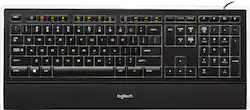
Logitech - K740 Full-size Wired Scissor Illuminated Keyboard - Black
- Key Specs
- Lighting Type: Single color
- Form Factor: Full-size (The size, arrangement, and physical configuration of the product.)
- Keyboard Technology: Scissor (Type of technology that detects a key press.)
- General
- Product Name: K740 Full-size Wired Scissor Illuminated Keyboard
- Brand: Logitech
- Model Number: 920-000914
- Features
- Lighting Type: Single color
- Numeric Keypad: true
- Touchpad: false
- Keyboard Type: Keypad
- Palm Rest: true
- Spill Resistant: true (Designed to resist some degree of accidental liquid spill. The level of spill-resistance is indicated by the product manufacturer, but the degree of protection may not be guaranteed after normal wear of the product.)
- Foldable: false
- Functions
- Form Factor: Full-size (The size, arrangement, and physical configuration of the product.)
- Number Of Keys: 108
- Keyboard Technology: Scissor (Type of technology that detects a key press.)
- Dedicated Macro Keys: false (Perform shortcuts of key sequences to carry out commands with a single key. Key sequences may include key strokes, mouse actions, and/or menu actions.)
- Adjustable Tilt Function: true
- Multimedia Keys: true
- Internet Keys: false
- Connectivity
- Wired Connectivity: USB Type A
- Cable Length: 6 feet
- Compatibility
- Operating System Compatibility: Windows
- Plug and Play Operation: true
- System Requirements: Windows 10, 11 or later (The software that a product must have for it to be able to integrate with another product.)
- Dimensions
- Product Height: 8.3 inches (The out of box height of the item. Height is measured as the vertical distance from the bottom of the item to the top as it would be primarily used or placed.)
- Product Width: 18.7 inches (The out of box width of the item. Width is measured as the horizontal distance from one side of the item to the other as it would be primarily used or placed.)
- Product Weight: 37.04 ounces (The out of box weight of the item.)
- Mouse
- Mouse Included: false
- Other
- UPC: 097855054548
This keyboard features adjustable backlit keys that allow you to easily see your keyboard even in dim light. The PerfectStroke key system elminates slippage and delivers fluid and natural strokes.
- Adjustable backlit keys: Allow you to see your keyboard even in dim light.
- PerfectStroke key system: Distributes force evenly across the surface of the keys, eliminating slippage and delivering fluid and natural strokes.
- Music and volume controls: For customized usage.
- Ultrathin profile and minimalist design: Provides easy access to common task and function keys while adding an elegant touch to your desk.
- Adjustable keyboard height and soft-touch integrated palm rest: For added comfort and support.
- More sustainable: Certified carbon neutral: the carbon impact of the product and packaging has been reduced to zero.
Whats Included
- Logitech Illuminated Keyboard
- Owner's manual
- Software CD-ROM
Q: will the keyboard work with Windows 10
A: Yes, of course. This keyboard will work with most any computer with a USB connection. The fact that it's illuminated does not matter to a pc. By the way. this Logitech keyboard has a brighter light function than the previous model that my Wife and I both used. I think that all keyboards should have a lighted option. Our keyboards are on slide-out drawers under our desk surfaces, so are shadowed from overhead lighting, so having lit keys are necessary for us. Operating system doesn't matter either.
Q: Lumination is not working? Is there a battery that keeps it lit? Thank you!
A: The Logitech K740 wired keyboard does not have a battery. It is powered by your computer's usb port. Is the brightness adjustment key not working? It is located on the the upper right hand side of the keyboard. You can press the button multiple times to adjust brightness or turn off the backlight. There are three levels of brightness. I attached a the page from the owners manual and a photo of my keyboard so that you can see where it is located. If this does not work, try unplugging and plugging the keyboard into a different usb port. Good luck!
Q: Is there a software install that is required?
A: No, it automatically connects to your computer when you turn it on. Very EASY!!!
Q: I've never had an illuminated keyboard. Do the letters and symbols wear off the keys?
A: No, the lettering stays for the life on the keyboard. We use these regularly and have never had any issues
Q: Is this keyboard Mac compatible?
A: yes .. i am using it on a MacBook pro 2013
A: The key at the bottom left with the windows logo will get you to the windows menu. The orange FN key on the opposite side when pressed in conjunction with the keys at the top will activate the keys with the orange on them. Those are hot keys that can get you to your mail, magnifier, music etc more quickly. Those are probably the keys you are talking about. Hope that helps.
A: The Logitech K740 spacebar is very quiet
A: The F & J keys have a little indentation (notch?) so you can position your hands correctly on the keyboard.














