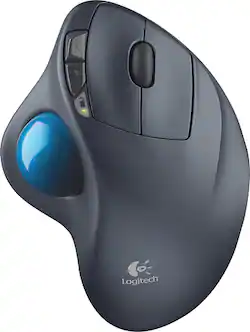
Logitech - M570 Wireless Trackball Mouse - Gray/Blue
- Key Specs
- Number of Buttons (Total): 4
- General
- Product Name: M570 Wireless Trackball Mouse
- Brand: Logitech
- System Requirements: Windows XP, Windows Vista, Windows 7, Windows 8, Windows 10 (The software that a product must have for it to be able to integrate with another product.)
- Model Number: 910-001799
- Features
- Mouse Type: Standard
- Performance
- Mouse Operation: Button(s), Scroll wheel
- Handedness: Right-handed
- Tracking Method: Trackball (There are several types of computer mice, optical and laser being among the most common. Optical mice detect less detail and provide more precise and accurate movement. Laser mice detect more detail and can be used on a wider variety of surfaces, but are more sensitive to small movements.)
- Number of Buttons (Total): 4
- Connectivity
- Wireless Connectivity: Radio Frequency (RF) (The manner in which a device sends data to another device over a short distance without the use of wires or cables.)
- Operating System Compatibility: Windows
- Power
- Mouse Power Source: Battery-powered
- On/Off Switch: true
- Rechargeable Battery (Mouse): false
- Battery Size: AA (The battery size required for operation.)
- Number of Batteries Required: 1
- Batteries Included: true (Indicates whether the product comes with the required batteries for its operation.)
- Dimensions
- Product Height: 2.7 inches (The out of box height of the item. Height is measured as the vertical distance from the bottom of the item to the top as it would be primarily used or placed.)
- Product Length: 8 inches (The out of box length of the item. Length is measured as the longest dimension of the item.)
- Product Width: 8.6 inches (The out of box width of the item. Width is measured as the horizontal distance from one side of the item to the other as it would be primarily used or placed.)
- Product Weight: 317.51 grams (The out of box weight of the item.)
- Warranty
- Manufacturer's Warranty - Parts: 3 years limited
- Manufacturer's Warranty - Labor: 3 years limited
- Other
- UPC: 097855070098
Logitech M570 Wireless Trackball Mouse: Easily use your computer for long periods of time with this trackball mouse, which allows you to precisely navigate features with minimal wrist movement. Enjoy lasting comfort thanks to the sculpted shape, which supports the curves of your hand.
- Trackball mouse with reliable optical tracking: Trackball mice require less wrist movement than traditional mice, since they track the motion of the built-in ball instead of the movement of the entire mouse.
- Wireless connection: Wirelessly connects to the included Logitech Unifying receiver, which plugs in to your computer's USB port.
- 4-button design: Features a scroll wheel and back and forward buttons, so you can easily control computer functions.
- Sculpted shape supports your hand: Allowing you to remain comfortable for long stretches of time.
- Compatible with most Windows and Mac computers: Works across a wide array of computers.
Q: Is it possible to purchase just the USB receiver if it was misplaced? Thank you!
A: Yes! The product is called a Logitech Unifying receiver for mouse and keyboard. Much cheaper than having to buy the trackball all over again too. The person who stole my trackball while I was running sound at our last St. Patrick's day gig here in Michigan will need to buy one of these too. Thankfully Best Buy had a new trackball on sale, so it's all good.
Q: What are the arrow buttons for.??? up and down volume or page controll
A: Those buttons are for going forward and backwards on Web pages.
Q: Is this track ball compatible with Mac ?
A: I loaned mine to a friend, who uses a mac, so he could try it out. He ended up getting his own as he enjoyed it so much.
A: I have been using the mouse on my MSI Gaming Laptop with Win10... for 6 months now... it is wonderful. No connection problems, or any issues.
Q: Will a M570 on a different computer interfere with mine?
A: No. It uses the Logitech Unifying connector and uses software to connect your device to your usb receiver. It won't be recognized by another receiver.
A: You can download Logitech smooth scrolling off their website for the mouse and it prevents that.
A: I find that after about 18 months or so I start having issues with the left button. It will start double clicking or not clicking at all and so I go and get my new spare for the closet and add getting another one to my to do list
A: I am using my mouse on my Windows 10, no problem


















