Leap Motion Controller
INTRODUCING THE LEAP MOTION CONTROLLER

A brand-new way to interact with your computer.

Pre-order now ›

It looks like you're using an older version of Internet Explorer.
To best view our site — and for a better experience overall on the Web — please update your browser using the links below. It's free and it takes just a minute.
Download the latest version of Chrome, FireFox or Internet Explorer.
×

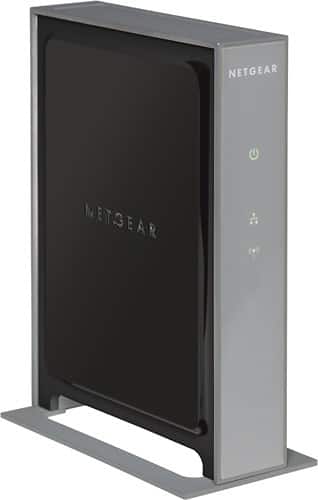
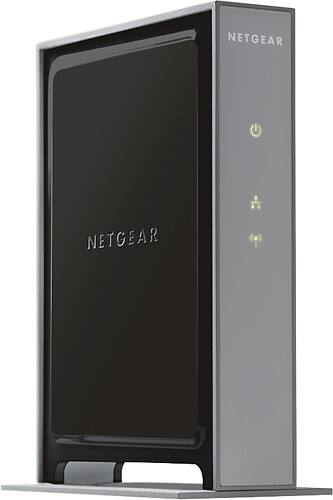
NETGEAR - IEEE 802.11n Wireless Access Point

Best Buy is dedicated to always offering the best value to our customers. We will match the price, at the time of purchase, on a Low Price Guarantee product if you find the same item at a lower price at a Designated Major Online Retailer or at a local retail competitor's store.

Here's how:
  • If you find a qualifying lower price online, call 1-888-BEST BUY and direct a customer service agent to the web site with the lower price, or when visiting a Best Buy store, one of our employees will assist you.
  • On qualifying products, Best Buy will then verify the current price to complete the price match.

Some exclusions apply. See the list of Designated Major Online Retailers and full details.

$119.99
Free Shipping

Item Added. View List

Add to Wish Lists

    No lists found. Create one today.
    Save

    Product Availability

    Special Offers

    Cardholder Offers

    What's Included

    • WN802Tv2 Wireless-N Access Point
    • Power adapter (12V/1.0A)
    • Ethernet cable
    • Stand
    • Resource CD
    • Installation guide
    • Warranty/support information card

    Specifications

    • Warranty Terms - Parts: 3Year
    • Warranty Terms - Labor: 3 years
    • Height: 1.4 inches
    • Width: 7 inches
    • Depth: 7.0 inches
    See All Specs

    ? Advanced Wireless-N technology delivers exceptional range and speed, up to 15x the speed and 5x the coverage of Wireless-G technology - Ensures optimum performance and maximum coverage with multiple preset internal antennas - Internal antennas take the guesswork out of antenna setup ? Multiple antennas extend range and enhance the reception of weak signals ? Maximizes wireless-to-wired performance with a Gigabit Ethernet port ? Supports WMM for traffic prioritization, to put time-sensitive traffic such as VoIP calls ahead of web surfing or file transfers ? Extends your network using WDS point-to-point or point-to-multipoint modes ? Supports WMM-PS to save up to 40% of the battery life of WMM-PS devices connected to the AP ? WiFi-certified for draft 2.0 of 802.11n?, so it will work with all 802.11n draft 2.0 certified notebooks ? Backwards compatible with 802.11b/g WiFi networks to support legacy wireless devices
    Product Features

    Wi-Fi Standard: IEEE 802.11n

    ISM Band: Yes

    ISM Maximum Frequency: 2.40 GHz

    Gigabit Ethernet Port: Yes

    Number of Network (RJ-45) Ports: 1

    Height: 1.4"

    Depth: 7.0"

    Weight (Approximate): 14.07 oz

    Limited Warranty: 3 Year

    Ratings & Reviews

    Overall Customer Rating:
    56% of customers would recommend this product to a friend (9 out of 16)

    Rating Breakdown

    38%
    (6 Reviews)
    25%
    (4 Reviews)
    6%
    (1 Review)
    6%
    (1 Review)
    25%
    (4 Reviews)
    Value for Price:
    3.1
    Ease of Use:
    3.8
    Performance:
    3.3
    Ease of Installation:
    3.5

    Best Buy Customer Reviews

    (9 out of 16)
    This is a great access point
    5
    Posted by: from San Diego, Ca. on 01/28/2013I was looking for an access point to extend the range of the wireless router I already have, and this one was the best choice. After reading some online instructions about how to set up a wireless "repeater," I decided to buy this unit. I followed the instructions that I had compiled from online sources, and from what came with the Netgear, and got the access point up-and-running in a short amount of time. The speed of this access point is amazing! Now, I have screaming fast internet access throughout my entire house; including the garage. Why the garage? Because I work in the garage alot, and use my smart phone from there. I'm totally satisfied with this access point. By the way, I connected this access point to my main router with Netgear's "Powerline" home adapters. They work great, too!
    • I use it in... : Small home

    3 out of 4 found this review helpful.

    Was this review helpful?

    poor range
    1
    Posted by: from appleton, wi on 11/08/2012i own a laptop and still use the standard ethernet cord to connect to the internet but want to go wireless. so this is my first wireless modem and i have to say im very dissapointed. i got the cd-less installation which took forever to figure out when your not a computer geek. like you would read other low rated reviews, it loses connection to your laptop and this "netgear genie" supposedly reconnects the internet to your computer which never happens. then you would have to go reboot the router which takes about 2-3 minutes. I would walk to the next room and it would lose its connection. basically it makes a 2 minute task turn to a 7 minute task if your lucky to hold a connection then. but i have to say when this thing does work properly, you get same connection as you would with the wired connection staying in the same room that is.
    • I use it in... : Apartment

    0 out of 5 found this review helpful.

    Was this review helpful?

    Frustrating!
    1
    Posted by: from Boston, MA on 08/21/2012Several times a day I lose my wireless connection. I then have to unplug the router, wait for it to connect and restore the wireless network. I work from home so this doesnt really lend to productivity. Not to mention the fact that I want to throw it out the window because it happens so often. This is going back to the store!
    • I use it in... : Apartment

    2 out of 4 found this review helpful.

    Was this review helpful?

    easy install, high speed
    5
    Posted by: from Minnesota border with Canada on 06/18/2012This WLAN router is easy to install, fast and dependable. The only real issue I've seen is I cannot set up a secure link to my printers. I'm not convinced the issue is the router, but problem may be the printers. They see the secure network, but won't let me enter the access code. I highly recommend this router. And the FCC uses these in their ongoing monitoring program.
    • I use it in... : Large home

    3 out of 4 found this review helpful.

    Was this review helpful?

    Good Wireless AddOn
    3
    Posted by: from Midwest on 01/12/2012Product works well for addOn to existing NetGear router without wireless. One of the few AP only sold. HAS ISSUES WITH MAC LAPTOPS WPA
    • I use it in... : Large home

    2 out of 2 found this review helpful.

    Was this review helpful?

    A little tricky to set up, but works great
    4
    Posted by: from Texas on 09/08/2011You'll need to know some technical details about your network to get this setup and running, but once it's going it really works well.

    2 out of 2 found this review helpful.

    Was this review helpful?

    You get what you pay for...
    4
    Posted by: from Boston, MA on 09/07/2011performance has been solid stince installed. Only thing preventing 5 stars is complication in configuration. Only a particular IP Address can be used to access the WAP (meaning that your computer has to have a specific IP address when it tries to address the WAP to configure it). This seems like a needlessly complicated step and while fairly simply to accomplish once I figured it out, no instruction was provided in the packaging for how to do this (further it appears that there are two addresses and the one in the configuration materials was not accurate but the other could be found on line).

    3 out of 3 found this review helpful.

    Was this review helpful?

    Great Access Point
    5
    Posted by: from Mississippi on 02/15/2011I just purchased this ACCESS POINT yesterday. I had it up and going in about 10 minutes. It is very easy to use and install. It does help to have a little bit of network knowledge when working with an access point. But I did find it was much easier to use this one than some I have worked with in the past. It has great range of coverage even through walls. It works great with both PCs (Windows) and Macs, including ipads. As it has only been in operation for a day, it is working great. I will be getting a few more to finish a project. Remember this is an ACCESS POINT not a ROUTER.

    9 out of 9 found this review helpful.

    Was this review helpful?

    Wireless acces point, great!
    5
    Posted by: from Florida on 01/21/2011This great gadget is wonderfull, resolve all my problems with my internet and is very easy.

    1 out of 1 found this review helpful.

    Was this review helpful?

    Slow start, but smooth after the upgrade
    4
    Posted by: from on 12/21/2010I unboxed the Netgear access point and it was simple to physically assemble the product. After I turned on the device, it was easy to go through the wizard screens to setup the device. I connected my laptop to the access point and I was getting a lot of dropped connections. After going to the Netgear's website and getting the new firmware download, the access point was great.

    2 out of 2 found this review helpful.

    Was this review helpful?

    Product images, including color, may differ from actual product appearance.

    Rating Breakdown

    38%
    (6 Reviews)
    25%
    (4 Reviews)
    6%
    (1 Review)
    6%
    (1 Review)
    25%
    (4 Reviews)
    Value for Price:
    3.1
    Ease of Use:
    3.8
    Performance:
    3.3
    Ease of Installation:
    3.5