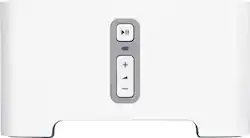
Sonos - CONNECT Wireless Streaming Music Stereo Component - White
- General
- Product Name: CONNECT Wireless Streaming Music Stereo Component
- Brand: Sonos
- Model Number: CTNZPUS1
- Color: White
- Color Category: White
- Warranty
- Manufacturer's Warranty - Parts: 1 year limited
- Manufacturer's Warranty - Labor: 1 year limited
- Compatibility
- Works With: Amazon Alexa (Compatible with or able to be connected to other smart devices or applications.)
- Other
- Product Width: 5.3 inches (The out of box width of the item. Width is measured as the horizontal distance from one side of the item to the other as it would be primarily used or placed.)
- Product Weight: 1.5 pounds (The out of box weight of the item.)
- Product Length: 2.9 inches (The out of box length of the item. Length is measured as the longest dimension of the item.)
- Battery Size: Other (The battery size required for operation.)
- UPC: 180501001185
Sonos Connect: Add new features to your old stereo or home theater equipment; use this Sonos Connect component to integrate your external amplifier, receiver or powered speaker into a wireless audio system.
- Transform your current stereo: Integrate your home theater system or other audio devices with Sonos wireless stereo music players in your home to create a multiroom audio experience.
- Wireless connectivity: Android and iOS devices connect to your Sonos wireless stereo system through your home Wi-Fi network.
- With wireless streaming, the Sonos Connect lets you access all the music you love in one place: Enjoy your music library, radio stations and online services through a single app.
- Compatible with Apple Music: Gain access to over 30 million songs and let experts handpick music you'll love based on what you listen to.
- Receive the best sound settings: Customize sound performance for each space with room-specific bass, treble, balance and loudness controls.
- Control your music from the palm of your hand: Download the free Sonos Controller app on your compatible smartphone, tablet, PC or Mac to search for songs and stations, choose music and control the volume.
- Schedule when a playlist begins: Wake yourself up with an alarm set to your favorite music or Internet radio, and schedule when and for how long music plays for a workout.
- Simple setup: Attach your wired speakers (sold separately) to the Sonos Connect, which connects wirelessly to your home Wi-Fi network. The free Sonos Controller app lets you control them all from a connected device like a smartphone or tablet.
- Additional ports: Analog output. Optical output. Coaxial digital audio output.
Whats Included
- CONNECT Wireless Streaming Music Stereo Component
- Owner's manual
- Power cord, flat Ethernet cable
Q: The sonos connect is what I would start with to able to hear my XM radio throughout my house?
A: I have a Sirius XM account and simply use the Sonos Sirius XM app to play SiriusXM throughout my home. I love it! Sonos can either use your existing home wireless or set up its own Sonos-Net. you pick.
Q: I have a complete home stereo system. I'm only looking to add wireless satellite speakers
A: Sonos. Without a doubt, the best wireless audio equipment that is out there. Pricey, but well worth it and you won't regret it. You shouldn't need the Sonos Connect if your receiver has wireless "broadcasting" capability. The wireless Sonos speakers can connect to whatever wireless broadcast source you specify. If not, then you can hook up a Sonos Connect to your receiver and use it as an input source (though I don't think that will be necessary).
Q: Sonos Connect work with other whole house systems?
A: You cannot control the Yamaha from the SONOS app. You will have to plug the SONOS into the Yamaha and the yamaha will have to be turned on for the SONOS to play music. Once you do that however, you can control the volume and music source from the app on your phone or tablet.
A: Think of the Sonos Connect as a network connected audio source or a Streaming Audio Tuner with connections to thousands of stations available. Its output is a stereo line level analog output, similar to what a CD player would output. This will NOT drive speakers on its own. I plug in Connects to older stereo amplifiers or receivers for an easy streaming tuner with audio volume control from my computer or laptop.
Q: Do i need to connect an amplifier to my ceiling speakers to connect Sono to play/stream music?
A: Yes, the Sonos Connect does not have an amplifier built in to connect speakers. If you need an amp, you could use the Sonos Connect: Amp or the new Sonos Amp.
Q: Do u HAVE to have a Connect to stream music or does it just work better?
A: No; you can setup a SONOS system using only one or more PLAY speakers. Using the iTunes, Android, or PC applications you can stream many music services, and your local music library to the SONOS system. The Connect gives you two added capabilities. - The Line Out can connect to your existing stereo system, letting SONOS stream to your system's speakers. - And, the Line In allows any analog source to play through the entire SONOS system. For instance, the line out of your receiver could be connected to this input, and any record played on your turntable can play through the entire SONOS system. I have an Amazon Echo Dot connected to the Connect analog input and have voice control over what songs play through the entire SONOS system. Note, for the voice control with the Echo Dot you will need a compatible streaming music service.
Q: Is a receiver required to use the Sonos?
A: It would be easier to tell you the options you have with Sonos. 1. With a Sonos bridge, you can add Sonos speakers anywhere within range and listen to the same of difference music source. 2. With a Sonos bridge, you can add a soundbar, two speakers, and a Sonos subwoofer and have a nice home theater system. 3. With a Sonos connect, you can have the same Sonos functionality on your existing standard (or oldschool) receiver and speakers You should go to Sonos website and see all the products and flexibility built into their products. Great sound but a little more expensive when compared to the typical receiver and speaker set-ups.
Q: How to connect to a new i phone 8 ? Previous cell was a IG.
A: All sonos products connect through the sonos app. The specific phone doesnt matter; as long as you can download the sonos app onto it, everything should be fine.

















