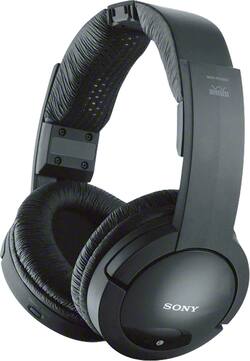
Sony - Wireless FM Over-the-Ear Headphones - Black
- Key Specs
- Connection Type: Wireless
- Wireless Connectivity: Bluetooth (The manner in which a device sends data to another device over a short distance without the use of wires or cables.)
- True Wireless: false (These headphones not only lack wires between the device and headphones, they also lack wires between the headphones themselves. (true wireless is really only possible with in-ear headphones))
- Water Resistant: false (Resists some degree of water penetration.)
- Carrying Case: false
- Headphone Fit: Over-the-Ear
- Adjustable Headband: true
- General
- Product Name: Wireless FM Over-the-Ear Headphones
- Brand: Sony
- Model Number: MDRRF985RK
- Audio
- Sound Isolating: false
- Minimum Frequency Response: 10 hertz (Describes the maximum range of frequencies or musical tones a product can reproduce, from very low tones to very high treble tones. The minimum frequency or musical tone the speaker can reproduce. High treble tones have higher frequencies while low tones and deep bass have lower frequencies.)
- Maximum Frequency Response: 22 kilohertz (Describes the maximum range of frequencies or musical tones a product can reproduce, from very low tones to very high treble tones. The maximum frequency or musical tone the speaker can reproduce. High treble tones have higher frequencies while low tones and deep bass have lower frequencies.)
- Driver Size: 40 millimeters
- Connectivity
- Connection Type: Wireless
- Wireless Connectivity: Bluetooth (The manner in which a device sends data to another device over a short distance without the use of wires or cables.)
- True Wireless: false (These headphones not only lack wires between the device and headphones, they also lack wires between the headphones themselves. (true wireless is really only possible with in-ear headphones))
- Features
- Water Resistant: false (Resists some degree of water penetration.)
- Carrying Case: false
- Design
- Headphone Fit: Over-the-Ear
- Style: Sports and Exercise
- Adjustable Headband: true
- Foldable Design: false
- Power
- Rechargeable: false
- Material
- Ear Cushion Material: Foam
- Other
- UPC: 027242850514
Enjoy clear sound with these Sony MDRRF985RK over-the-ear headphones that include a transmitter and feature automatic tuning, so you can easily listen to music and more at a range of up to 150'. The easy-adjust headband offers comfort.
- Wireless Interface: Connect the included base station to your home theater and enjoy high-fidelity sound up to approximately 150 feet.
- RF stereo transmitter and charging station: Connect the included base station via the wired outputs to your home theater and enjoy high-fidelity sound via the headphones up to approximately 150 feet away.
- Over-the-ear design: With an easily adjustable headband and foam ear cushions offers comfort during extended listening sessions.
- Ferrite magnets: Provide sound reinforcement.
- 40mm drivers: Deliver powerful, expressive audio.
- Automatic tuning: Helps ensure optimal signal reception.
- Up to 150' wireless range: Allows you to listen in a comfortable location.
- Noise-reduction system: Helps minimize transmission noise to ensure audio clarity.
- 3.3' cable: Permits easy wired use.
- Built-in lithium-ion battery: Provides up to 25 hours of use on a single 3.5-hour charge.
- 10Hz - 22kHz frequency response: For faithful sound reproduction.
Whats Included
- Sony Wireless FM Over-the-Ear Headphones
- Lithium-ion battery
- Transmitter
- Owner's manual
- AC adapter
- RCA-to-1/8" mini stereo cable
A: Usually, when the Headphone is connected, the TV Speakers are disabled. Check if the TV has the option to output the sound through its Speakers when a Headphone is connected.
Q: Can I purchase just the headphones and will two headphones work with one transmitter?
A: Yes, you can connect and use an unlimited amount of headphones to one TMR-RF985R transmitter.
Q: What is the difference between TMR-RF985R and MDR-RF985R and do they use the same ear pads
A: Hi Ed, the TMR-RF985R is the wireless transmitter of the MDR-RF985RK. The only headphone between the two is the MDR-RF985RK. Those two are bundled together when purchased. Thanks, -Mark
Q: Do you have replacement ear pads for Sony mdr rf985r headphones
A: Yes, you can acquire parts like the ear pads through our parts and accessories partner by visiting the following link: https://sony.encompass.com/model/SONMDRRF985RK/_/Accessories/Sony/MDRRF985RK/Wireless_Stereo_Headphone_System ~Jeannette
Q: headphones work for 3-5 minutes and then go dead
A: Hello friend, it sounds like your rechargeable batteries are faulty. I would try replacing those batteries and trying new ones. Your headphones should be working for more than 3-5 minutes. If you put new batteries into your headphones and your problem persist, it has to be the headphones themselves. I would get them replaced. Hope this helps.
Q: do i plug into my TV or cable box ?
A: you should be able to do both. But you should always go with the main source where you control volume. That would be your TV.
Q: How do I eliminate the constant, loud hum from the headphones?
A: I also gave an LG i hooked up to the regular headphone plug behind tv, doesn't say headphones but has same plug as if you were going to plug in regular head phones, than when everything is hooked up, go to settings or apps depending on your tv, than go to audio than change from tv speakers to headphones, than u have to set the volume on your headphones on high, than you control volume by adjusting volume on tv with control and don't touch volume on headphone anymore, i also have a samsung, which works different with them, i also plug in to same jack on tv, but on this set, i can lower volume on tv, and adjust only on headphones, i guess all tv's work a little different, hope this helps, also on the LG, the headphone will turn on only when u select headphones at settings...
Q: Can the transmitter function as a headphone charger?
A: Yes, To recharge the headphone battery after use, place the headphones on the transmitter after use. The CHG indicator lights up, then charging starts. When charging is complete, there is no need to remove the headphones from the transmitter. * When the transmitter's contact pins meet the headphones' contact points, the CHG indicator lights up red. If they do not meet, the indicator will not light up. Confirm that the headphones make a “click” sound when you put them on the transmitter. When the headphones are correctly placed on the transmitter, the upper surface of the headphones becomes level with the transmitter.



















