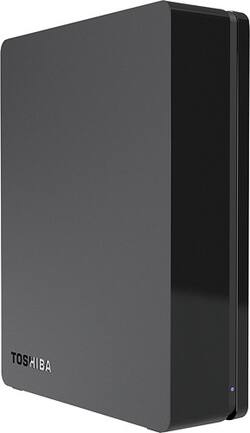
Toshiba - Canvio 3TB External USB 3.0 Hard Drive - Black
- Key Specs
- Rotational Speed: 5700 revolutions per minute (The rate at which the hard drive spins its platters. The higher the rotational speed, the faster the drive can read and write data.)
- Interface(s): USB 3.0 (Refers to the types of connections that devices use to interact and communicate with each other.)
- General
- Product Name: Canvio 3TB External USB 3.0 Hard Drive
- Brand: Toshiba
- Model Number: HDWC130XK3J1
- Performance
- Rotational Speed: 5700 revolutions per minute (The rate at which the hard drive spins its platters. The higher the rotational speed, the faster the drive can read and write data.)
- Compatibility
- Internal Or External: External
- External Hard Drive Type: Desktop (Physical characteristics of the hard drive, including size, weight and how you connect to your device.)
- Interface(s): USB 3.0 (Refers to the types of connections that devices use to interact and communicate with each other.)
- Features
- Security Features: Password Protection
- Memory
- Cache Buffer Size: 32 megabytes (The data capacity of the cache buffer (or disk buffer) that acts as temporary memory for the drive. The cache holds the most recently and frequently used data to save the drive the extra step of pulling it from permanent storage every time it's needed, which helps increase the drive's overall speed.)
- Dimensions
- Product Height: 6.6 inches (The out of box height of the item. Height is measured as the vertical distance from the bottom of the item to the top as it would be primarily used or placed.)
- Product Width: 1.7 inches (The out of box width of the item. Width is measured as the horizontal distance from one side of the item to the other as it would be primarily used or placed.)
- Product Weight: 35.2 ounces (The out of box weight of the item.)
- Included
- Included Software: NTI Backup Now EZ
- Other
- UPC: 022265192160
Back up the data on your PC or Mac with this Toshiba Canvio external hard drive, which features a 3TB capacity for ample storage space and a USB 3.0 interface for flexible connectivity and speedy transfers.
- 3TB storage capacity: Provides ample storage space for your music, movies and other files.
- USB 3.0 interface: Backward compatible with USB 2.0 for wide-ranging compatibility.
- Data transfer rates up to 5 Gbps: For quick response when updating files.
- 32MB cache buffer: Offers increased processing speed.
- 5700 rpm speed: Ensures fast performance.
- 14 ms average seek time: For fast read and write times.
- NTI Backup Now EZ software: Makes file, folder and system backups easy.
- Plug-and-play design: For a simple setup.
- Compatible with Mac and PC: For use with your existing computer.
Whats Included
- Toshiba Canvio 3TB External USB 3.0 Hard Drive
- USB 3.0 cable, AC power adapter
- Owner's manual
Q: How do I install the software?
A: While the drive itself can be used with your Macbook, the NTI Backup Now EZ software on the drive is Windows only.
A: The drive comes with the USB 3.0 cable, which will also work with your USB 2.0 port.
A: If you're still within 15 days of the purchase date, then you should be able to return or exchange your hard drive at any of our retail stores. This period is extended to 30 days for My Best Buy Elite members and to 45 days for Elite Plus members. If you're beyond that timeframe, however, you would need to seek service under the drive's factory warranty coverage by contacting Toshiba directly or by speaking an a technician at your local store's repair counter.
A: Hard drive space has nothing to do with processing power. It either needs a new processor, which really means getting a new laptop, or more RAM, which is fairly cheap and easy to do. If you're only problem is that there isn't enough room on your internal hard drive to install the game, yes, an external will serve your purposes.
Q: How do I get support for HDWC130XK3J1?
A: You can call tech support here: Computers, Tablets and Toshiba Storage Place (800) 457-7777 (toll-free) or (949) 859-4273 We also have webchat available. Choose "Virtual Help Desk" from the menu on the right on this page: http://support.toshiba.com/contact
Q: external hard drive compatibility
A: For Windos systems it is compatible with Windows® XP, Vista®, 7, or 8, so as long as you're running one of those versions it is compatible. Since you asked about the 2TB drive on the 3TB drive page, my answer applies to both drives.
A: The drive does not have it's own powersupply. It is compatible with the Wii U and Apple Products, but not at the same time.
Q: Is this compatible with Windows 8.1?
A: Yes it is compatible with Windows 8.1.


















