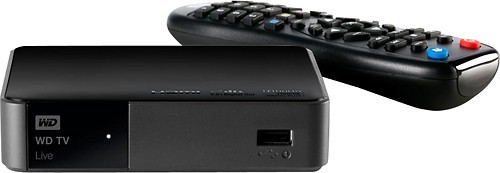
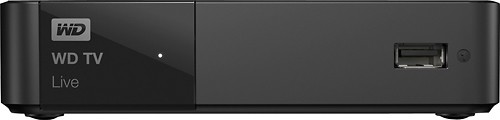
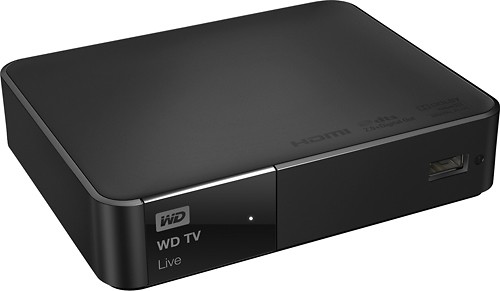
WD - WD TV Live Media Player
This item is no longer available in new condition.
See similar items below.
Description
Features
A huge selection of entertainment on your TV
Access more of what you love, including thousands of hit movies, TV shows, trending videos, sports, music and more.
Easily navigate your entertainment choices
The included programmable remote lets you customize buttons for easy access to your favorite music, photos, videos or menu choices.
Turn your smartphone into a touch-screen remote
Download the free WD TV Remote app and use your smartphone or tablet to select a movie, navigate to your favorite family video, or play a game on your TV.
View your media collection on the big screen
Share home videos, music, and photos from your USB drive, network drive, digital camera, camcorder and any computer in your home. You can play media in almost any file format.
Keyboard for easy searching and updating
The on-screen keyboard makes it easy to input text for searching YouTube videos or updating your Facebook status on your TV. You can also attach a wired or wireless USB keyboard.
Set up with a few simple steps
Connect the player to your TV with an HDMI cable (sold separately) or composite A/V cable (included). Then connect to the Internet wirelessly* or with an Ethernet cable (sold separately).
Support for high-quality video and sound
HDMI connection supports your TV's video quality up to 1080p HD, and the optical audio output supports surround sound.
Wireless connectivity
Built-in extended-range Wi-Fi connects to the Internet through your wireless home network.*
Compatible with virtually any TV
Easily connects to standard or high-definition TVs with an HDMI or composite video connection.
*Wireless router required.
Web-based services and content require high-speed Internet service. Some services may require a subscription.
Included Free
 fubo - Free for 30 days (new subscribers only, not billed unless activated)Watch live TV when you want, where you want for less than the cost of cable. With 100+ top channels to choose from, stream all the sports, shows, movies, and news you love to watch from your TV, computer, and other devices. Plus, stream on the go or at home on as many devices as you want, and record your favorites with 1,000 hours of cloud DVR, all included.
What's Included
WD TV Live Media Player
Programmable remote with 2 AAA batteries
Composite A/V cable, AC adapter
Owner's manual
Other
- Energy Star CompatibleNo
- <a href="javascript:winopengld('1087340810442','pcmcat38200050027','cat12080')">Interface Slot Type</a>USB 2.0
- <a href="javascript:winopengld('1087340810565','pcmcat38200050027','cat12080')">Number of LAN Ports</a>1
- <a href="javascript:winopengld('1087340810477','pcmcat38200050027','cat12080')">LAN Connection</a>Wireless/Ethernet
- Wireless StandardWireless N
- <a href="javascript:winopengld('1218870374819','pcmcat38200050027','cat12080')">ENERGY STAR Certified</a>No
- Smart CapableYes
- UPC718037784410
Customer reviews
Rating 4.2 out of 5 stars with 504 reviews
(504 customer reviews)Rating by feature
- Ease of Use4.1
Rating 4.1 out of 5 stars
Customers are saying
Customers praise the ease of use, streaming capabilities, and compatibility with various media files. Many appreciate the small size and attractive interface, while also noting the generally good picture quality. However, some users experienced performance issues such as pausing and buffering, and others found the remote control to be less than ideal. A few also mentioned slow response times.
This summary was generated by AI based on customer reviews.
- Pros mentioned:Usb
Rated 5 out of 5 stars
Best Video & music Playback Device For Price
Posted .This reviewer received promo considerations or sweepstakes entry for writing a review.This is far most the best playback device there is I had issues at first because it would freeze when I have my 2b WD (that's loaded with music and videos#, but I found the issue. If you have the same problems go to the settings and change the media notifications to when it will Check for the newest media added and there will not be anymore freezes or slow reading issues. I have about 1,200 gigs to about 1,400 gigs of music and movies usage of my 2 TB wd passport. Cons:{The WD TV live viewer Takes about 5 minutes to upload the software to the device you plug in to the WD TV device. This Device Also Lets you access all of your files music and videos from PC when the WD TV device is on # WD TV device has to be linked to Wi-Fi. There are apps for tablets and mobile devices for the touch screen remote fun but the con to that is that your device whether it being a android or apple device has to be on the same Wi-Fi to link with the device. I learned by trying different things myself and I have no issues with this. Best bang for your dollars. Note Apple and iTunes does not work well to none on this device. Also This device has a usb slot on the Front & back Has Ethernet Port Wi-Fi HDMI and AVI capabilities. Thanks For reading.
I would recommend this to a friend - Pros mentioned:Ease of useCons mentioned:Lag
Rated 4 out of 5 stars
I serve all my downloaded videos from PC
||Posted .This reviewer received promo considerations or sweepstakes entry for writing a review.If your looking for primarily to play all your media formats in a very direct layout, add Netflix, YouTube, Pandora music, a few other common apps, access all your music and photos,, all in HD, over wireless network, then this is for you. It has no lag or buffer issues through from 1 room to another even playing HD size files at my house. I use both main drive and usb drive back at the PC that runs SERVIIO with no issues. Used ps3 before the cinavia add on ruined some playback, NO MORE PROBLEMS. Infrared remote is lacking volume and basic tv functions so I plan on getting a learning remote to take this one's place since I haven't found one that uses WD'S code. The only thing that kept me from giving it perfect was no support for Amazon Prime yet. In process of finding a way around that through another app on computer... Will update Does not replace PC that's hooked up to TV in other room but ease of use and layout from serviio to organize my media collection is great. NOTE... I did breakdown and try a roku3 first because of all the apps available but the video formats that it plays is inferior.. I cant remember what it doesn't play but it was either avi, mkv, mp4. If it had played all my formats from my downloaded collection I probably would have kept it.... But the WD LIVE plays them all.
I would recommend this to a friend - Pros mentioned:Ease of use, Size, Streaming
Rated 4 out of 5 stars
Works well.
||Posted .This reviewer received promo considerations or sweepstakes entry for writing a review.Bought this unit primarily to watch downloaded movies. Setup was easy and I was able to add it to our network. However, the instructions were not clear on how to connect to various hard drives on our network, I was able to figure it out, but it took a while. The unit is also capable of streaming services, and it streams Netflix very well. It is small and light weight and I use the optical digital audio output to connect to our surround sound system. I am very pleased with the unit.
I would recommend this to a friend Rated 4 out of 5 stars
Great For Streaming!
||Posted .This reviewer received promo considerations or sweepstakes entry for writing a review.If you're looking for a way to stream videos, this is a great product! I originally purchased the item because I was growing tired of plugging my laptop into my TV in order to watch videos. I purchased the WDTV Live and paired it with a WD My Book Live External Hard Drive. They work extremely well together and have solved the problem of hard-wiring my computer to my TV. I chose the WDTVL because it offered a wider range of video formats compared to similar products such as Apple TV. The applications or "Services", as they are referred to on WDTVL, are another big plus. I no longer utilize my blu-ray player as a Netflix streaming device. The Netflix app is also organized very well compared to other devices. There is a Slingbox Player app as well, which is great if you are planning on streaming your home TV while you're away from home. There are tons of other apps that I have not had the chance to explore yet because I've been so busy with the Netflix and video streaming! !!!!!!!!!! My suggestion would be to not upgrade the firmware. There may be some enhancements that come with the upgrade, but I don't think they are worth the headache. Might want to wait until that gets sorted out. Here are some of the problems I experienced: - Randomly lost video signal when powering the unit on - Lost connection to the WD My Book Live - Frozen applications. I ended up returning the WDTVL and exchanging it for a new one. Aside from the issues I had because of the firmware update, the WDTVL is an awesome product. I would absolutely recommend it to anyone who enjoys streaming video.
I would recommend this to a friend- Pros mentioned:Ease of use
Rated 5 out of 5 stars
WD does it right!
||Posted .This reviewer received promo considerations or sweepstakes entry for writing a review.I have been using the WDTV products for a very very long time. I purchased the first WD multimedia device back in 2005 and I have owned one ever since. I will speak specifically to this device however since this is the one I am using currently. I purchased this because I have an extensive movie collection on an external hard drive. I hook up my HDD to the WDTV via USB and watch 1080p content on my TV. I have never come across a codec that this thing can't handle. I know that there are many similar devices out there but the WDTV can seriously play anything. When I am going through movies to download I never even look to see what the codec is or how big the file is because I have never had the WDTV fail to play everything seamlessly. Also there is the added benefit of all the streaming services built in, I am a big Netflix fan and I watch Netflix all the time with this device. It has BUILT IN WIRELESS!!!! Do you know how awesome it is to take this small box and hook up a power cable and HDMI out to my 42" TV in the bedroom and watch HD Netflix content without having to use some annoying USB dongle, it is great, seriously. I am not a fan of running Cat5/6 cables all over the apartment so I go wireless and when a device has it built in the smiles do not stop. This box does what it is supposed to, it does it well, and it is pretty simple to use. Not only can you do Netflix wireless but you can stream media from another media server in the house. So if I did not want to have my HDD with the movie collection in my bedroom directly connected I could instead hook it up to my PC and share the drive on the network. This is a little more complicated to set up but it works none the less. For the money this little guy packs a punch. It is silent, makes zero noise, gets a little warm to the touch after extended use but nothing abnormal there. I have had many of the WD series of devices and they really are amazing. I tried to go the cheap route one time and got a different product from another manufacturer (whom I love dearly) ASUS. I was furious with their media player and immediately bought another WDTV device instead (ASUS collects dust). If you don't have a huge collection of media and you only use streaming services like HULU and NETFLIX then there are a lot of other products that will work for you. But if you are anything like me and one day you come across a cool movie that is in some "obscure" format and you can't watch it, then you will kick yourself and wish you had purchased this product instead. (P.S.) It is a really small device, so you can pick up the WDTV box, a USB thumb drive with some movies, and then head to a friends house and bring the party to their place! (P.P.S) This does not have any internal storage capacity so you will need an external hard drive, jump drive, or network sharing to view media you own. The WDTV Live Hub has a 1TB built in HDD but that is a completely different story :-)
I would recommend this to a friend - Pros mentioned:Size, Usb
Rated 5 out of 5 stars
Excelent media player for ALL forms
||Posted .This reviewer received promo considerations or sweepstakes entry for writing a review.Excellent media player for just about ever need. Plays every format of media I use and some I have never hear of. Two USB ports make it versatile for mem stiks and HD's. Interface is nice and easy to use. Small size takes up very little room. Nice interface with options. Good price. Full size remote with full set of buttons, unlike Apple TV. HDMI and Stereo audio out (switchable) allows usage with audio systems other than HDMI TV system.
I would recommend this to a friend - Pros mentioned:Compatibility, Ease of useCons mentioned:Performance
Rated 3 out of 5 stars
Good product for the price
||Posted .This reviewer received promo considerations or sweepstakes entry for writing a review.Overall I am pretty happy with my WDTV Live. I wanted this box so that I could view video content from my computer on my living room television. I chose this box over the ROKU versions and Apple TV because of the wide array of file types that are compatible with this box. That has been a really great feature. So far I have not had trouble with any file type. The only downside to this box is that it does freeze occasionally. When this happens, the only fix I have found is to unplug the box. There is a power key on the remote but no physical power button on the box. This is really the only downside that I have found other than that some of the applications can be a little slow, such as Hulu Plus. The box was very easy to set up and for the price and the features, I am happy with this purchase.
I would recommend this to a friend - Pros mentioned:Size, Streaming, Usb
Rated 5 out of 5 stars
Great little media player
||Posted .This reviewer received promo considerations or sweepstakes entry for writing a review.I replaced my media PC with this device after getting tired of all the security patches to my Windows 7 Media Center PC. It's quiet, small, can be connected to external media via 2 USB ports. It streams my audio collection (in FLAC and some .mp3) and my movie collection (.mkv files). No problems with playback on anything I have tried yet. The optical audio works well and surround sound is nice on this (getting that working correctly on my media PC was always problematic).
I would recommend this to a friend
Q: QuestionCan I download all my home videos from a Sony Digital Handycam onto this device?I have a Sony DCR-TRV320 digital Handycam. It is about 10 years old. Would I be able to transfer my home movies to this Live Media Player? Does the device have a hard drive to store video?
Asked by Anonymous.
- A:Answer Maybe. First, you would have to transfer your home movies to a computer somewhere, so that you can see the type of video format that it's converting the movies to. From there, you would have to run a test to see if the WDTVLive would be able to play it. The WDTVLive DOES NOT have it's own HDD of any kind. You could either put the movies on a USB Flash Drive/Jump Drive or even on an USB External Hard Drive, and plug them into the WDTVLive or you could share them over the network. From there, you would have to test to see if the WDTVLive Media Player would be able to decode and play your movies. BJ
Answered by BeeJay
Q: QuestionWork's in BrasilAny one knows if this model works with Netflix in Brasil ? Thanks you !
Asked by Ricardo.
- A:Answer The WD TV Live enables the Netflix app to provide service to any country they're officially available in.
Answered by WDSupport

Q: QuestionWill this connect to a 4tb usb HDDI have a 4tb HDD which can not be recognized by my samsung tv directly. will this device work with the 4tb drive. I have seen others that work with a 2tb
Asked by superlim9.
- A:Answer Yes - the WD TV Live media player has been tested with and recognizes 4TB USB attached drives -- especially the My Book family of direct attached storage.
Answered by WDSupport
Q: QuestionWill this device stream music and videos from most of the audio and video players installed on a Windows PC?
Asked by Jaycee.
- A:Answer yes
Answered by Corkmister
Q: Questionwhere can I use this player?when I telework, I have to be plugged into an ethernet port. can I plug this in any other place other than the room the router is in, or in my detached garage, and it function as if I am plugged directly into router?
Asked by Anonymous.
- A:Answer This item can be used wireless or plugged into a router.
Answered by RedHat1995
Most viewed
- $999.99Your price for this item is $999.99
- $279.99Your price for this item is $279.99$449.99The comparable value for this item is $449.99
- $249.99Your price for this item is $249.99
- $799.00Your price for this item is $799.00
- $69.99Your price for this item is $69.99$449.99The comparable value for this item is $449.99
- $1,199.99Your price for this item is $1,199.99$1,499.99The comparable value for this item is $1,499.99
- $499.99Your price for this item is $499.99
- $1,099.99Your price for this item is $1,099.99
- $999.99Your price for this item is $999.99
- $169.99Your price for this item is $169.99$249.99The comparable value for this item is $249.99
- $379.00Your price for this item is $379.00
- $499.00Your price for this item is $499.00
- $499.99Your price for this item is $499.99
- $109.99Your price for this item is $109.99$149.99The comparable value for this item is $149.99
- $33.34Your price for this item is $33.34/mo.per monthfor 36 mos.; 0% APR
- $139.99Your price for this item is $139.99$299.99The comparable value for this item is $299.99
- $13.99Your price for this item is $13.99
- $183.00Your price for this item is $183.00$319.00The comparable value for this item is $319.00
- $1,699.99Your price for this item is $1,699.99
- $579.99Your price for this item is $579.99$949.99The comparable value for this item is $949.99