BenQ - AQCOLOR PD3205UA Designer 31.5" IPS LED 4K UHD Monitor with HDR10 and Ergo Stand (HDMI/DP/USB-C 90W/USB Type B) - Gray
Screen Size
31.5"Key Accessories:
- Alienware - Pro 75% Wireless Mechanical Gaming Keyboard with RGB Back Lighting - Lunar Light$164.99The price was $199.99
More Buying Options
Related Item

Highlights
- Key Specs
- Refresh Rate: 60Hz (The number of frames per second the device can produce natively without enhancement. Higher rates help produce smooth, seamless pictures.)
- Maximum Resolution: 3840 x 2160 (Maximum resolution refers to the highest number of pixels that a screen can process and display. Higher resolution signals produce more detailed images.)
- Panel Type: IPS (Technology that affects response time and image quality.)
- Synchronization Technology: Not Applicable (Generally, these technologies allow syncing between a computer/console game's frame rate and the device's refresh rate for a smoother display without tearing.)
- Screen Size: 31.5 inches (Size of the screen, measured diagonally from corner to corner.)
- Display Connector(s): 1 x DisplayPort 1.4, 1 x HDMI 2.0 (The number and type of connectors used to connect to an external display.)
- General
- Brand: BenQ
- Model Number: PD3205UA
- Product Name: AQCOLOR PD3205UA Designer 31.5" IPS LED 4K UHD Monitor with HDR10 and Ergo Stand (HDMI/DP/USB-C 90W/USB Type B)
- Color: Gray
- Operating System Compatibility: Windows, Mac
- Display
- Refresh Rate: 60Hz (The number of frames per second the device can produce natively without enhancement. Higher rates help produce smooth, seamless pictures.)
- Maximum Resolution: 3840 x 2160 (Maximum resolution refers to the highest number of pixels that a screen can process and display. Higher resolution signals produce more detailed images.)
- Contrast Ratio: 1000:1 (Measured difference between a displayed image's brightest whites and darkest blacks. The larger the first number, the more detail and color that can be displayed.)
- Display Type: LED
- Panel Type: IPS (Technology that affects response time and image quality.)
- Synchronization Technology: Not Applicable (Generally, these technologies allow syncing between a computer/console game's frame rate and the device's refresh rate for a smoother display without tearing.)
- Aspect Ratio: 16:9 (The measurement of the width of a screen compared to the height of a screen, expressed as a ratio.)
- Curved Screen: false
- Brightness: 350 candela per square meter (A measure of the total light output.)
- Screen Size: 31.5 inches (Size of the screen, measured diagonally from corner to corner.)
- High Dynamic Range (HDR): true (An HDR-compatible 4K TV or other HDR-compatible product displays HDR video content when it's available from sources like 4K Ultra HD Blu-ray Discs and 4K streaming services.)
- High Dynamic Range Format: HDR 10 (There are a few HDR formats that tell the TV or other HDR-compatible product how to best utilize its capabilities to display HDR content. HDR technology can support one or multiple formats, each with various benefits to picture quality.)
- Horizontal Viewing Angle: 178 degrees (The maximum angle at which the display can be viewed with acceptable visual performance from either side.)
- Connectivity
- Number of DisplayPort Inputs (Total): 1
- Number of HDMI Inputs (Total): 1
- Display Connector(s): 1 x DisplayPort 1.4, 1 x HDMI 2.0 (The number and type of connectors used to connect to an external display.)
- Number of USB Ports (Total): 7
- USB Ports: 3 x USB-A 3.2, 1 x USB-C 3.1 (The number and type of USB ports the product has.)
- Headphone Jack: true (The device features an interface that allows for the connection of headphones.)
- Compatibility
- Wall Mountable: true (The product is able to be secured to a wall. Some products are designed ready to mount, while others may require additional hardware/accessories for installation.)
- VESA Wall Mount Standard: 100mm x 100mm (VESA wall mount standards refer to the spacing of screw holes built into a TV in order to fit with standard TV wall mounts. These standards are implemented into most TVs and monitors.)
- Features
- Tiltable: true
- Adjustable Stand Height: true
- Anti-Glare: true (Product has features, such as a matte finish, that reduce the likelihood for screen glare.)
- Eye Relief Features: Anti-glare, Flicker free, Low blue light
- Built-In Webcam: false
- Integrated Speaker(s): true
- Dimensions
- Product Width: 28.1 inches (The out of box width of the item. Width is measured as the horizontal distance from one side of the item to the other as it would be primarily used or placed.)
- Product Weight: 22.3 pounds (The out of box weight of the item.)
- Stand Included: true
- Certifications Listings & Approvals
- ENERGY STAR Certified: false (Devices carrying the ENERGY STAR service mark, such as computer products and peripherals, kitchen appliances, and other products, generally use 20% to 30% less energy than required by federal standards.)
- EPEAT Qualified: false (The Electronic Product Environmental Assessment Tool (EPEAT) was designed to provide an environmental assessment tool for purchasers. In order to qualify for EPEAT, a product must meet all 23 required criteria.)
- Other
- UPC: 840046048686
Unleash your creativity and maximize your workspace with the DesignVue PD3205UA 31.5" 4K HDR Color Accurate Monitor. Its versatile Ergo stand, which easily clamps onto your desk's edge, allows for customized height and tilt adjustments, as well as the ability to rotate the screen 90° for portrait viewing. Get comfortable and productive with this innovative monitor.
- AQCOLOR Technology:: PD3205UA covers 100% sRGB/Rec.709 with Delta E ≤ 3 accuracy on an IPS panel, and Pantone, Pantone SkinTone Validated & Calman Verified
- Ergo arm:: PD Ergo Arm fully supports the flexibilities for swivel, height adjustment, pivoting, tilting, and the amazing cable management inside the arm
- 90W USB-C:: With 90W USB-C to synchronizes images, videos, data seamlessly, and charge your Mac devices all-in-one cable
- Keyboard video mouse (KVM) switch:: Display contents from two PC systems using one set of keyboard and mouse to save space and boost work efficiency
- BenQ ICCsync the P3 promptly:: BenQ ICCsync can be done within one second through the BenQ Display Pilot
Q: Does this monitor have built-in speakers?
A: Yes, the monitor has integrated speakers.
Q: What is the contrast ratio of this monitor?
A: This monitor has a contrast ratio of 1000:1.
Q: How many USB ports does this monitor have in total?
A: This monitor has a total of 7 USB ports.
Q: What is the maximum resolution supported by this monitor?
A: The maximum resolution supported is 3840 x 2160.
Q: What type of panel is used in this monitor?
A: This monitor uses an IPS panel.
Q: Does this monitor have an anti-glare feature?
A: Yes, this monitor comes with an anti-glare feature for eye relief.
Q: What is the difference between model U and UA?
A: undefined
Q: How tall is the mounting arm as measured from the desk.
A: The mounting arm is ~16.3 inches from desk to top of the post. The top of the monitor sits higher - nearly 24” at the highest position. The full product dimensions, including the mounting arm, can be found here: https://esupportdownload.benq.com/esupport/LCD%20MONITOR/CAD/PDF/PD3205UA/PD3205UA_Product%20Dimensions_V001_Others.pdf It’s a great monitor. I love it. (If you get it, use thinner cables when possible. Braided cords are durable, but take up a lot of space that this arm doesn’t really have room for.)
Compare similar products
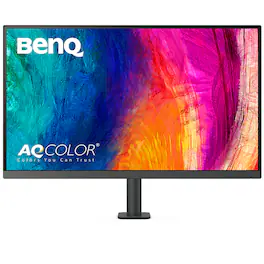
Unleash your creativity and maximize your workspace with the DesignVue PD3205UA 31.5" 4K HDR Color Accurate Monitor. Its versatile Ergo stand, which easily clamps onto your desk's edge, allows for customized height and tilt adjustments, as well as the ability to rotate the screen 90° for portrait viewing. Get comfortable and productive with this innovative monitor.
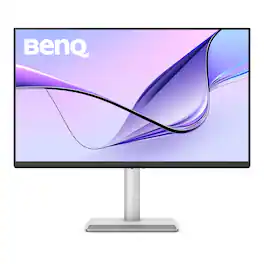

Unleash your creativity with the DesignVue PD3205U 31.5" 4K HDR Color Accurate Monitor - the perfect tool for creative professionals. With its robust functionality and ample connectivity options, this display is specifically designed for color critical works ,such as editing photos and videos, and design works
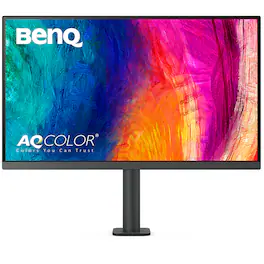
Unleash your creativity and maximize your workspace with the DesignVue PD2705UA 27" 4K Color Accurate Monitor. Its versatile Ergo stand, which easily clamps onto your desk's edge, allows for customized height and tilt adjustments, as well as the ability to rotate the screen 90° for portrait viewing. Get comfortable and productive with this innovative monitor.
| Pros for BenQ - AQCOLOR PD3205UA Designer 31.5" IPS LED 4K UHD Monitor with HDR10 and Ergo Stand (HDMI/DP/USB-C 90W/USB Type B) - Gray | |||
|---|---|---|---|
| Picture Quality | There were no pros for this product— | There were no pros for this product— | There were no pros for this product— |
Specs
Reviews
Customers are saying
Customers are impressed with the AQCOLOR PD3205UA Designer monitor's picture quality. Many users find the visual experience to be very good. There are currently no negative aspects reported about this product.
- Picture Quality (4)
The vast majority of our reviews come from verified purchases. Reviews from customers may include My Best Buy members, employees, and Tech Insider Network members (as tagged). Select reviewers may receive discounted products, promotional considerations or entries into drawings for honest, helpful reviews.
- Rated 5 out of 5 stars
Amazing Monitoring - Highly recommend.
TL/DR: Amazing monitor. Great picture, Great Features. HotKey Puck - the accessory I didn't know I needed, but can't live without! Wish it had 1 or 2 more USB ports & Ethernet port. I shopped for a monitor for months. I have used dual 27" monitors for at least a decade. I've recently started to have trouble with vision - more than just my eyes getting old, but they are too. I thought getting a slightly larger monitor would be nice. The Good: The picture quality is really good and the features are fantastic. The display is plenty bright, without being too bright. It is flicker-free and has settings to minimize blue light. The color calibration is far more than I need. All the various color settings and features are interesting and cool. I don't really use them but did find them interesting enough to check out. There is also a boatload of software that you can download, including eye care software that reminds you periodically to look away from the monitor etc. All good things to help preserve eye health. The Freakin' AWESOME Hot Key Puck The most exciting feature of the monitor is the hot-key puck. With other monitors that have a built-in KVM switch, the switch to changing computers is usually on the monitor itself - not always convenient or easy to reach. The hot-key puck has a 3–4-foot cord and allows you to navigate the on-screen menu without needing to reach the monitor. You can even customize the buttons (hotkeys). This handy-dandy device allows me to change the computer with a click of a button on the hot-key puck. While the cord is plenty long to be within reach without stretching, I do wish it was a tad bit longer or could use an extension cable, so that I could run the cord under my desk to minimize cord clutter. But that's a really petty complaint for a spectacular feature. Monitor Arm The monitor stand is an outstanding feature with a well-thought design. It is very similar to the Ergo Arm that has been used for a few years by another monitor brand. The monitor connects to the stand with a quick-release type of connection giving the back of the monitor a very finished look. This arm has plenty of room in the arm to route your cables through it, IF you use thinner cables. If you like the braided cables, it may be a very tight fit that doesnt' allow all of them to fit. I highly recommend using non-braided cables for this arm as it provides a very finished look and minimizes cord clutter when all the cable route through the arm. Putting it together can be a one-person job. For some, it may be helpful to have an extra set of hands to put the monitor on the arm. Auto-detect orientation I was pleasantly surprised to see that this monitor detects the orientation of the monitor and adapts accordingly. This is a feature that I did not see in the product description & was pleasantly surprised by. Pro Tip: The cables plug into the monitor from the bottom. Once you have the monitor connected to the arm, rotate the monitor to portrait orientation so you can easily see the plugs. Extend the arm so that it is at its farthest point in order to determine how much cable is needed. This will help prevent potential damage to the ports from extending the monitor farther than cords allow later during regular use. The monitor sits roughly 3-4" from the back edge of my desk. This is the farthest back the monitor will actually go. if you have multiple monitor setups like I do, you will want to evaluate the position. This monitor sits on the right side. I initially thought that would allow me to have the most open space on my desk. That didn't work as the angle wasn't right. For multiple monitor setups, I recommend the arm be placed towards the main monitor to keep the best angle for us. The meh There is a single headphone jack on the side of the monitor. Since this monitor sits on the right side of my setup it is not a problem. If you plan to have other monitors to the right of this one, you may want to consider a right angle or u-shaped connector. I found these very helpful on my other BenQ monitor which is the center of my setup. The Could-Be-Betters There is no ethernet port. You can certainly use one of those ethernet-to-USB adapters and plug that into a USB port. I found that to be slower than when I plugged the ethernet adapter directly into my laptop. It also uses a USB port. Which leads to.... There are only 4 USB 3.2 Gen 1 ports (3 USB-A, 1 USB-C) for peripherals. 2 of these ports (1 USB-A & 1 USB-C) are on the side of the monitor. Those are easy to reach, but when in use, they prevent smooth alignment with another monitor for multi-monitor set-ups. 4 USB ports are typical of many, if not most, KVM switches, but fewer than I need. I have a USB hub connected to one of the ports on my monitor. There is 1 display port and 1 HDMI connection. The KVM switch is preset to specific combinations: USB-C, USB1 & DisplayPort, USB2 & HDMI. Adapters might work, but there is limited space under the back cover. One quirk that I experience is that the monitor doesn't always switch to the video source via the hot key puck when waking from sleep or hibernate - specifically when i last used 1 laptop (which is now asleep) and am waking up the other from sleep. I have to use the buttons on the back - which are easy to reach as they are on the bottom right in both portraig or landscape orientation. Prior to researching for a new monitor, I had never heard of BenQ. Given my experience with this product though, they have moved to the top of my list for future monitor purchases.
Amadams Posted
- Rated 5 out of 5 stars
Love it
Love this monitor. It is a great size with great picture quality. It makes it hard to go back to my work monitor when I’m not working from home!
AmberS Posted
- Rated 5 out of 5 stars
Excellent monitor for programming and other things
I went from an ultra wide 34 inch to this monitor. This is my daily monitor for work. I’m a web developer and use this monitor. Does an excellent job so with visual studio for the back-end code and any front-end code I need to do. I also will hook this up to my iPad Pro and the picture is excellent. The ergo mount is a must have. I’m looking at getting a second monitor and I will probably get the same one.
subzerobears Posted
Explore tech essentials Sponsored
 $299.99The price was $369.99