Rating 4.6 out of 5 stars with 97 reviews
4.6- Color (9)
- Gaming (9)
- Refresh rate (8)
- Image quality (7)
- Price (7)
- Stand (5)
- Not vesa compatible (2)
- Speaker (2)
- Backlight (1)
- Cable (1)
Customer Images
The vast majority of our reviews come from verified purchases. Reviews from customers may include My Best Buy members, employees, and Tech Insider Network members (as tagged). Select reviewers may receive discounted products, promotional considerations or entries into drawings for honest, helpful reviews.
- Rated 4 out of 5 stars
Very fast refresh rate and 1440p are a must
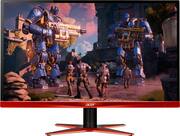
The pros: 1440p 144hz refresh 1ms response Freesync/Gsync compatible The cons: TN panel (although this doesn't make much difference when your going for all out performance imo) No vesa mount (I fixed this with a custom mount courtesy of YouTube) Not color neutral (burnt orange panel on bottom of screen and mount) Buttons on bottom right of the monitor to control function are no intuitive at all. Could have used any kind of usb ports on the back. Good panel but iOS are catching up in response time.
Posted by Jehuty
- Rated 4 out of 5 stars
Great Monitor!
Great monitor for the price. Comes with every cable you could need to connect it do your PC. Refresh rate is great! Colors are good for price. IMPORTANT: you will need to use a display port in order to get the max refresh rate and resolution.
Posted by Shane
- Rated 5 out of 5 stars
Excellent!
The colors are vivid and the 144hz make it’s super smooth feeling. The only thing that this monitor could have done better on was the stand, very limited movement and tilt. But for this price they made the right sacrifice.
Posted by Kevin
- Rated 5 out of 5 stars
Huge difference
I bought this monitor on sale 299. I thought it was a good deal for a 27” QHD 144hz. I have a laptop with a GTX 1070 with a 17” screen at 75hz, so the jump to this monitor was huge. I also bought an Acer 27” shortly after, that went on sale, with a regular FHD “1080” resolution at 144hz, but with an IPS panel type. I have had an older IPS monitor in the past and I know how great the colors look so I thought I would compare the two. In short the QHD’s resolution made a huge difference when a little distance, in game, came into play, “ playing mostly PUBG.” I can’t emphasis the difference I saw. The blue light mode on the panel makes everything look a little blue/green but it really works well and I have no problem staring at the screen for long periods. As far as the other monitor, the IPS looks great as far as color but playing FPS games, trust me, go with the higher resolution if you have the option. That being said I am running PUBG at pretty low settings to maximize my frames at 2560x1440. I am running an average 100 to 130 frames. So if you have a graphics card less than 1070, I would recommend trying out QHD on the games you play before hand, just to make sure you can keep the frames up. Only thing I would say they could improve on is the stand. There is only an up and down tilt movement and NO mounting screws on the back for an auxiliary mount. For me I am just interested in a good looking/performing monitor so this isn’t a big deal, I can work with it. Hope this helps, thanks.
Posted by UNKMAN
- Rated 5 out of 5 stars
Beautiful Monitor
This monitor is the best money can buy, hands down. With its superior contrast ratio, 1 ms response time, and 144 Hz refresh rate, and it’s unparalleled 2K resolution, you simply can’t beat it for the price. I’ve been using it every day since I purchased it, and have not noticed any discoloration or fading as of yet. Usually customizable, and all of the monitor settings are adjustable by a series of six buttons. Would highly recommend.
Posted by Caleb