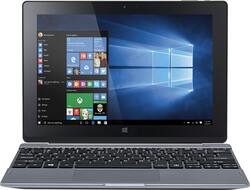
Acer - One 10 - 10.1" - Intel Atom - 32GB - With Keyboard - Silver
- Key Specs
- Screen Size: 10.1 inches (Size of the screen, measured diagonally from corner to corner.)
- Screen Resolution: 1280 x 800 (Screens come in a range of resolutions (measured in pixels, horizontal x vertical). The higher the resolution, the greater the picture quality.)
- Processor Model: Intel Atom Z3735F (Your computer's processor is like its brain. Working in combination with system memory, the power of the processor determines the complexity of software you can run, how many programs you can have open at the same time, and how fast those programs will run. Most computers feature an AMD, Intel or Snapdragon processor.)
- 2-in-1 Design: true (A laptop and a tablet combined in one lightweight, portable device. Sometimes referred to as "convertible" or "hybrid" laptops, these devices deliver the processing power and keyboard of a laptop. When you're ready to play, either detach the screen or fold your 2-in-1 into tablet mode to comfortably watch movies, play games, read an e-book and more.)
- General
- Product Name: One 10 - 10.1" - Intel Atom - 32GB - With Keyboard
- Brand: Acer
- Model Number: ONE 10 S1002-145A 2-IN-1
- Display
- Display Type: Other
- Screen Size: 10.1 inches (Size of the screen, measured diagonally from corner to corner.)
- Screen Resolution: 1280 x 800 (Screens come in a range of resolutions (measured in pixels, horizontal x vertical). The higher the resolution, the greater the picture quality.)
- Processor
- Processor Brand: Intel
- Processor Model: Intel Atom Z3735F (Your computer's processor is like its brain. Working in combination with system memory, the power of the processor determines the complexity of software you can run, how many programs you can have open at the same time, and how fast those programs will run. Most computers feature an AMD, Intel or Snapdragon processor.)
- Memory
- System Memory (RAM): 2 gigabytes (Random-access memory (RAM) is a computing device's short-term data storage, which allows active information to be accessed quickly. The size and type of RAM determines how efficiently the device can handle large amounts of information at one time. For example, gaming or video editing requires more RAM for optimal performance.)
- Expandable Memory Compatibility: microSD
- Connectivity
- Headphone Jack: true (The device features an interface that allows for the connection of headphones.)
- Camera
- Front-Facing Camera: true
- Front Facing Camera Megapixels: 2.0 megapixels (The more megapixels, the more detail that the camera facing the user can capture.)
- Rear-Facing Camera: true
- Rear Facing Camera Megapixels: 2.0 megapixels (The more megapixels, the more detail that the camera facing away from the user can capture.)
- Features
- 2-in-1 Design: true (A laptop and a tablet combined in one lightweight, portable device. Sometimes referred to as "convertible" or "hybrid" laptops, these devices deliver the processing power and keyboard of a laptop. When you're ready to play, either detach the screen or fold your 2-in-1 into tablet mode to comfortably watch movies, play games, read an e-book and more.)
- Certifications Listings & Approvals
- ENERGY STAR Certified: false (Devices carrying the ENERGY STAR service mark, such as computer products and peripherals, kitchen appliances, and other products, generally use 20% to 30% less energy than required by federal standards.)
- Included
- Included Software: Word Mobile, Excel Mobile, PowerPoint Mobile, One Note, Evernote Touch and more
- Other
- UPC: 888863333127
Acer One 10 Tablet: Get the versatility you need with a device that converts to laptop, tablet, tent and display modes. Just attach the keyboard dock to enjoy effortless typing, or use the 10.1" 5-point multitouch screen independently to tap, touch and glide your way through features.
- Microsoft Windows 10 operating system: Windows 10 brings back the popular Start Menu from Windows 7 and introduces new features like the Edge Web browser that lets you markup Web pages on your screen. Learn more ›
- 10.1" LED-backlit screen: With IPS (in-plane switching) technology, 1280 x 800 resolution and wide viewing angles up to 178°.
- 32GB internal storage plus microSD slot: Store your software, apps, music, movies, photos and more. Expand storage up to 64GB with a microSD card (sold separately). Also SDHC compatible.
- Quad-core processor: The right combination of fast performance and power efficiency. It allows rapid multitasking, delivers smooth response and unleashes stunning graphics.
- Dual HD cameras for photos and face-to-face chat: 2.0MP front and rear cameras with 1600 x 1200 resolution.
- Keyboard dock: Easily switch between laptop, tablet, tent and display modes. The hinge features a magnetic, latchless design that makes it easy to detach the tablet from the keyboard.
- Multiple sensors: Include a gyroscope, E-compass, accelerometer (G-sensor) and ambient light sensor for versatility.
- Micro HDMI output with HDCP support: Located on the tablet makes it easy to connect your HDTV or other external high-definition display.
Whats Included
- One 10 - 10.1" - Intel Atom - 32GB
- 2-cell lithium-ion battery (5740 mAh)
- AC power adapter, AC power cord
- Keyboard dock
- Owner's manual
Q: Can I use a mouse with this tablet?
A: This tablet has Bluetooth connectivity and a full sized USB port on the keyboard, so you could use a bluetooth mouse or a USB mouse.
Q: Would someone please answer the question below regarding connectivity to the internet.
A: I have no problem connecting to universities wifi, VPN, or home wifi. It did take me sometime (due to first time using windows 10) to figure out how to lower the security settings for LARGE file transfers and change the domain.
A: I am running 256gb SDXC with no problem. the user's manual indicates it will take up to 2tb SDXC.
A: Battery life depends on how much juice you're using. If you keep the display at 50% brightness, and use just the word processor, you will have at least 4 hours or battery life. If you are running it at 100% brightness, and are multi-tasking while watching videos, you can expect 2.5--3 hours. If you're going to use this away from a power source, consider dimming the display, and minimizing the number of tasks you're performing.
A: It does have speakers, but it is placed behind the screen. Weird ! Anyways.. it sound's fair, but it would had sounded good if it were on the front.
Q: Office 365?
A: no. it has office mobile though. it has just enough functionality for you to type a paper and insert some pics/scatter plots
Q: what kind of usb ports does this have?
A: This tablet has one Micro USB 2.0 port on the tablet itself and one full size USB 2.0 port on the dock.
Q: Cannot Detect Networking Hardware
A: I was confused by that message as well. I ended up going into settings (where, at that point, there was no 'wifi' option), clicked VPN, clicked something or other (there's only so many options in there), and discovered that I had mistakenly (while clicking on my wifi stuff) disabled my wifi. I enabled it and never had a problem again. When the wifi drops or doesn't connect and you start to mess with the notification icon in the taskbar, it is very easy to disable the wifi. You just have to find it in VPN settings and re-enable it.




















